A product is one thing a customer can buy: a hosting plan, a game server, a domain extension, an SSL certificate. The product editor is a five-tab workspace covering identity, pricing, provisioning, configurable options and store presentation. This article walks through every tab and field, and is for operators.
Before you start #
- Create at least one product group — one is required on create. See Product Groups.
- Create the billing cycles you will price against; a fresh install has none. See Billing Cycles.
- Connect and enable the panel or registrar first, or it will not appear in Integration Type.
Warning: Opening the editor needs
edit_products, but the request that saves a product checks anadmincapability that is not a seeded permission. In a default install only Super Admin can create or update a product; a role withedit_productscan open the editor and gets a 403 on save. Deleting also needsdelete_products.
Opening the editor #
Open Catalogue → Catalogue & Groups and click New Product, or a group’s ⋯ → Add Product to arrive with that group pre-selected. To edit, use Edit Product on a product row. A sticky bar carries the save button (Create Product, or Save Changes when editing), so you can save from any tab; nothing is written until you do.
Tab 1 — General #
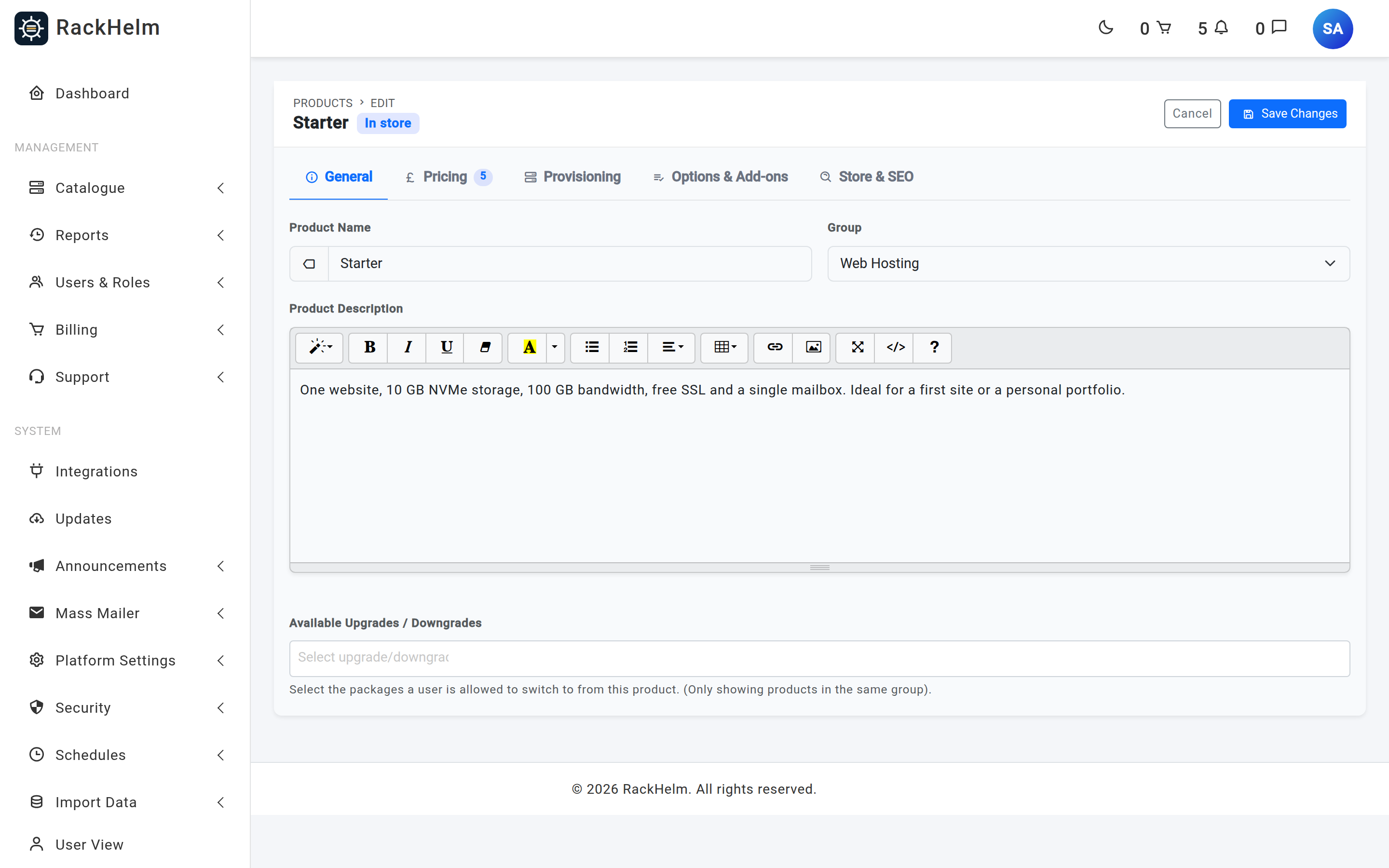
| Field | What it does |
|---|---|
| Product Name | Required, up to 255 characters. Shown on the store card, order page, invoices and admin list. |
| Group | Required on create — the “— Uncategorized —” entry exists but is rejected. When editing it may be cleared, moving the product to the Uncategorized panel. |
| Product Description | Rich text, with styles, colour, lists, tables, links and images. Shown as the store blurb. |
| Available Upgrades / Downgrades | Multi-select of products a customer may switch to; only products in the same group are offered. Empty on the create form — save first, then reopen. |
Tab 2 — Pricing #
Pricing has three blocks: a one-time base price, a baseline late fee, and the per-cycle pricing table — where nearly all real pricing lives.
One-Time Pricing #
One-Time Price (Base) is used only when the product has no priced billing cycle; if any cycle carries a price the cart ignores it. One-Time Setup Fee is a one-off charge on the product, and drives the Setup Fee column in the catalogue list.
Warning: A product must be priceable. Leave every cycle price blank and One-Time Price (Base) becomes required at
0.01or more, with the message “Set a One-Time Price, or give this product at least one priced billing cycle.”
Baseline Late Fee #
Baseline Late Fee (Flat Amount) is a flat £ charge applied when an invoice for this product goes overdue; blank uses the global default. Late Fee Grace Period (Days) is how long after the due date the fee waits. Individual cycles override both.
Billing Cycles table #
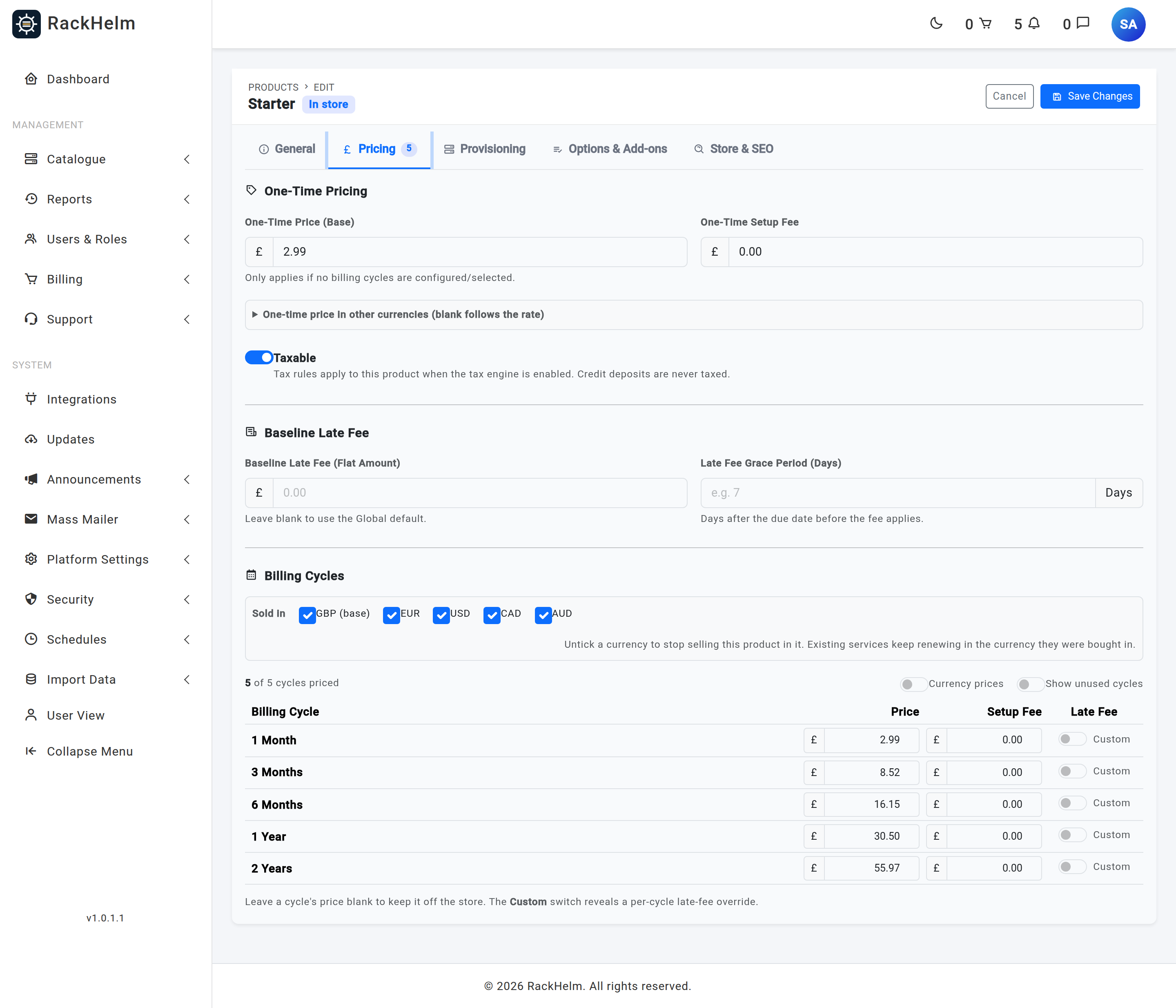
One row per billing cycle on the install. A row becomes real pricing only when its Price box is filled in; blank rows are discarded on save.
| Column | What it does |
|---|---|
| Billing Cycle | The cycle’s label, as defined under Billing Cycles. |
| Price | The recurring price for this term. Leave blank to keep the cycle off the store. |
| Setup Fee | A one-off fee on the first invoice for this cycle, then cleared so it never re-bills. Hidden while a registrar integration is selected — Renewal and Transfer replace this column. |
| Renewal | Registrar integrations only. The price used from the second invoice onwards. |
| Transfer | Registrar integrations only. Used when the customer chose “transfer” rather than “register”; blank falls back to the ordinary price. |
| Late Fee — Custom | Expands a per-cycle override: Fee Type (Percentage (%) or Flat Amount (£)), Fee Amount and Grace Period (Days). |
Note: On renewal the order line is re-priced to the cycle’s Renewal price where one exists, otherwise to its ordinary Price, and the setup fee is cleared. Since the Renewal column is hidden without a registrar integration, non-domain products renew at the ordinary price.
Warning: Never enter
0.00to make something free. A cycle with zero price and zero setup fee counts as unpriceable, and the customer is stopped at checkout rather than charged nothing.
Tab 3 — Provisioning #
This tab connects the product to whatever creates the service. Integration Type lists None / Manual Processing plus every panel, registrar or Custom API enabled on the install; picking one reveals its settings (package ID, resource limits, TLD, and so on). A type a product already uses stays listed even if its panel is later disabled, so an existing configuration is never reset behind your back.
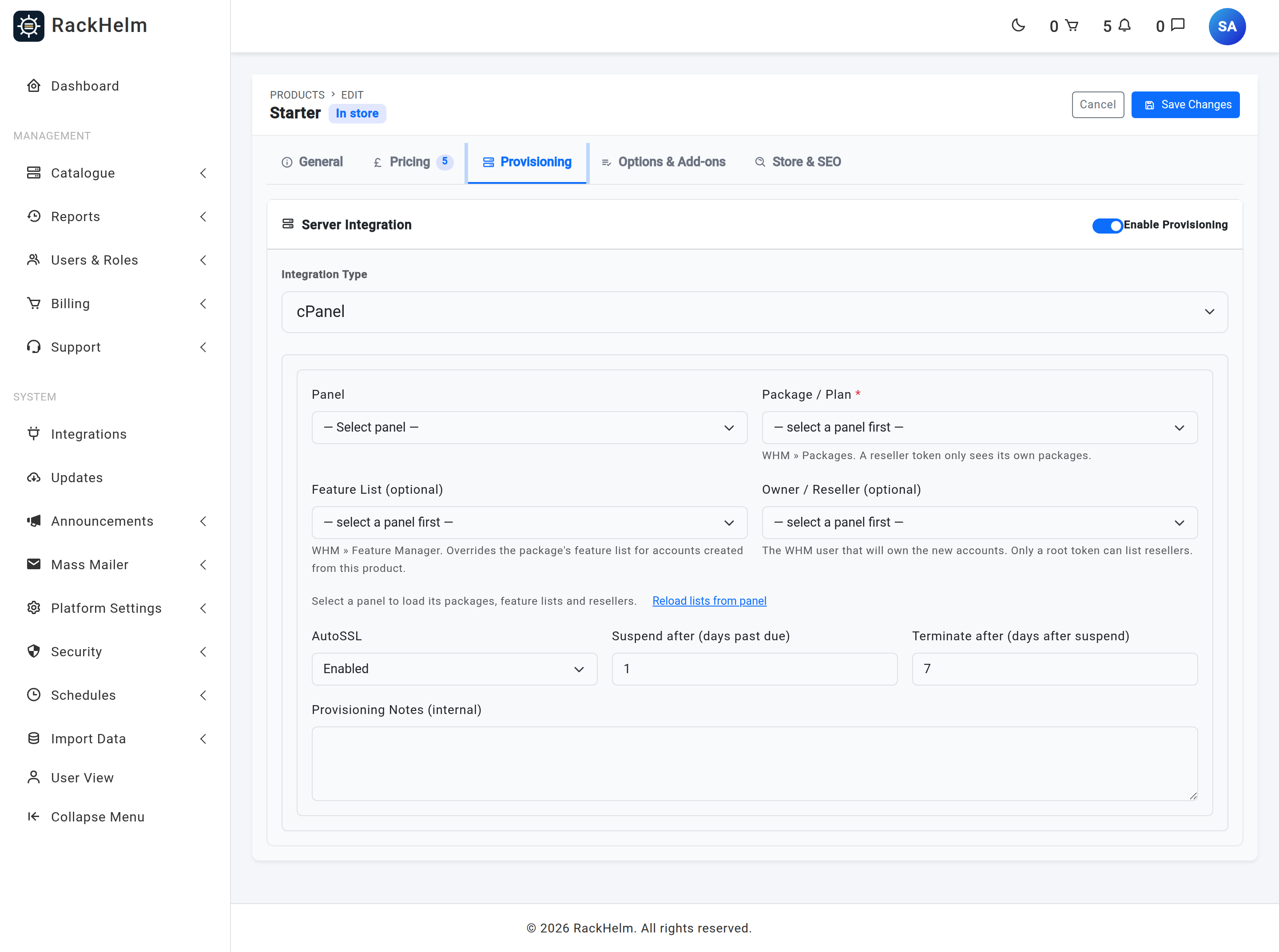
Note: The Enable Provisioning switch in this tab’s header is never written back on save — a saved integration is always active. To stop a product provisioning automatically, set Integration Type to None / Manual Processing.
Tab 4 — Options & Add-ons #
On the create form this tab is labelled just Options; the add-on column and the fuller label appear once the product exists.
The left column is the Configurable Options picker: every custom field, each with three per-assignment switches — Show on Order Page, Show in Admin and User Changeable. See Configurable Options.
The right column, Available Add-ons, is where you tick the extras sold alongside this product. Every add-on on the install is listed here — Include in store is a customer-facing filter applied on the order page, not a filter on this list — and the group’s add-ons reach the order page too without being ticked here. See Product Add-ons.
Note: The add-on column appears only when editing an existing product. Save first, then reopen the product to attach add-ons.
Tab 5 — Store & SEO #
/order/… URL with a copy button.| Field | What it does |
|---|---|
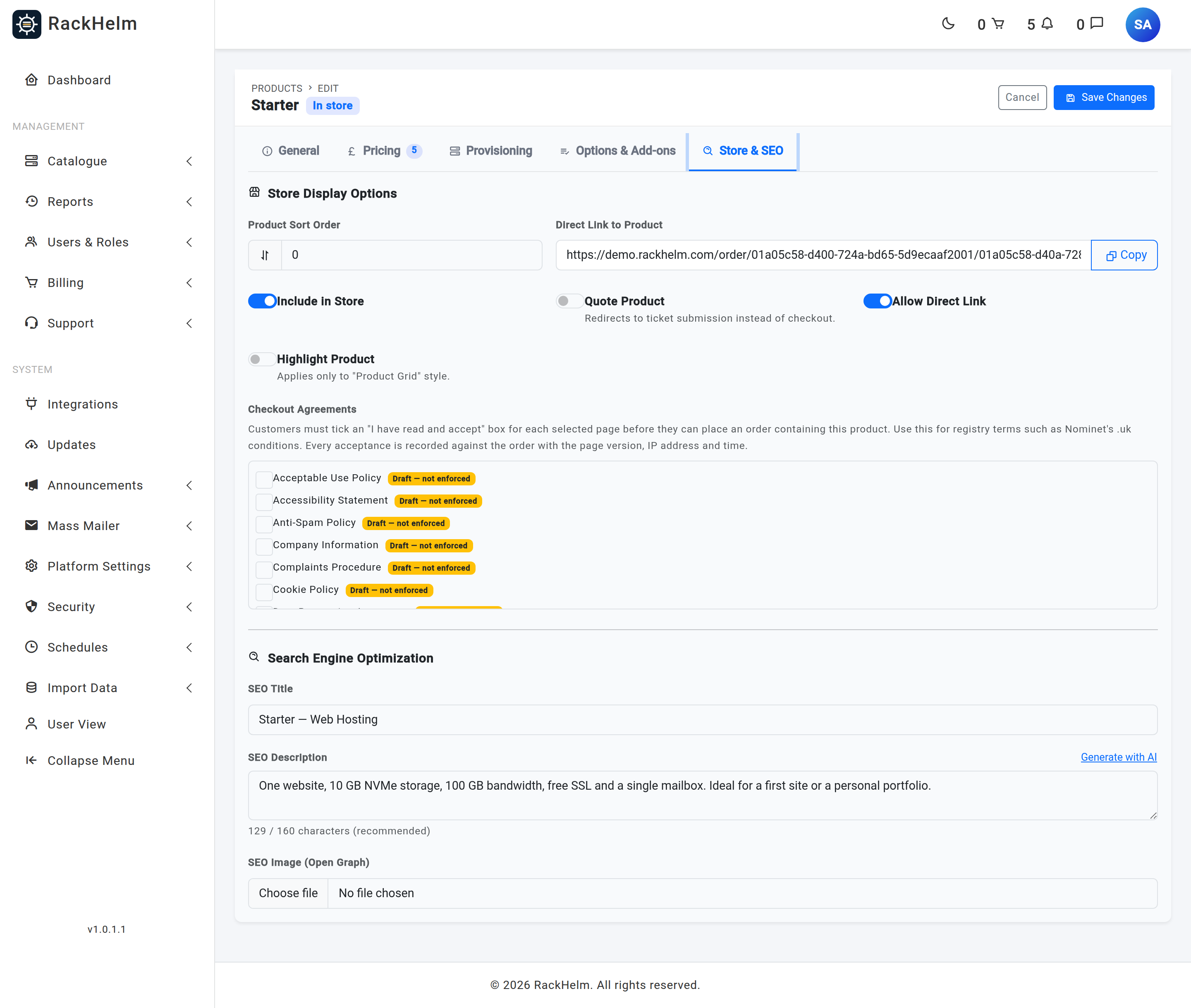
| Product Sort Order | Integer, default 0. Lower numbers appear first on the group’s store page. |
| Direct Link to Product | Read-only /order/{group}/{product} URL with a copy button. Edit form only. |
| Include in Store | Default on. Lists the product on its group’s store page. |
| Quote Product | Default off. Sends the customer to the ticket form, subject pre-filled “Quote Request: product name“, instead of to checkout. |
| Allow Direct Link | Default on. Lets the order page be opened by URL when the product is unlisted. With both switches off, the order page redirects back to the group. |
| Highlight Product | Default off. Adds a “Most Popular” badge. Applies only to the Product Grid layout. |
| Checkout Agreements | Legal pages the customer must accept before ordering — registry terms on a .uk product, say. Each acceptance records the page version, IP address and timestamp. Draft pages are badged “Draft — not enforced”. |
| SEO Title | Up to 255 characters. |
| SEO Description | Meta description, counter aiming at 160 characters. Generate with AI drafts one from the name and description. |
| SEO Image (Open Graph) | JPEG, PNG, JPG, GIF or WebP, maximum 2 MB. Leave blank to keep the current image. |
Note: The products table carries a
stockcolumn, but no editor field writes it and nothing enforces it. Treat stock control as unavailable.
Row actions on the catalogue list #
Each product row’s ⋯ menu offers Edit Product, View in Store, Duplicate, Activate/Deactivate and Delete Product.
Duplicate asks for a new name and copies pricing, cycles, add-ons, custom fields with their switches, upgrade paths, checkout agreements and the integration. The copy is created inactive and opens for review. An inactive product is never reachable publicly: the store skips it and its order page returns 404, whatever the visibility switches say.
Deletion is refused while the product sits on any order in paid, active or processing status. Otherwise it removes cycle pricing and the integration, detaches add-ons, custom fields and upgrade paths, and clears the product from every cart. Bulk deletion skips protected products and reports them by name.
Troubleshooting #
| Symptom | Cause and fix |
|---|---|
| “No group was selected. Please select a product group.” | Creating a product requires a group, despite the “— Uncategorized —” entry in the dropdown. Pick a real group. |
| Save is rejected asking for a One-Time Price. | No cycle carries a price. Price at least one cycle, or set the base price to 0.01 or more. |
| “No billing cycles defined yet”. | None exist. Follow the link in the message to create one. |
| A deactivated cycle still shows in the pricing table. | Expected — the product editor lists every cycle regardless of its active flag. Only the add-on pricing grid filters to active cycles. |
| Customer sees “could not be priced” at checkout. | The line resolved to zero or nothing: a cycle priced 0.00 with no setup fee, a cart row with no cycle chosen, or an add-on option unpriced for the order’s cycle. |
| Renewal / Transfer columns are missing. | They appear only when Integration Type is a domain registrar. Set the integration first, then price the cycles. |
| Upgrade/downgrade list is empty. | Only same-group products qualify, and the create form never populates it. Save into a group, then reopen. |
| Saving returns 403. | The form request requires the unseeded admin capability — only Super Admin satisfies it out of the box. |
| “Cannot delete … assigned to N active customer order(s).” | Deactivate the product instead: it leaves the store while existing services keep working. |
| The SSL product dropdown will not load. | The eNom certificate catalogue is fetched live and cached six hours. A failure reports “Could not load the eNom SSL product list.” — check the eNom panel credentials. |


