RackHelm sends a great deal of email — invoices, reminders, ticket replies, password resets, provisioning notices — so getting outbound mail right is one of the first things to do on a new install. This article covers the Mail Settings screen, how to test it, and the Email Logs screen that records what was sent.
Before you start #
Note: Mail Settings is gated by
edit_company_settings; Email Logs is gated byview_audit_logs. The two permissions are deliberately separate, so a support lead can read the mail log without being able to change the relay.
Have your relay details to hand: hostname, port, username, password and whether the relay expects TLS or SSL. Sending from your own domain via a proper relay (or a transactional provider) rather than the local sendmail binary is strongly recommended — mail from a fresh server IP is routinely rejected.
Configuring the relay #
Open Platform Settings → Mail Settings (/admin/settings/mail).
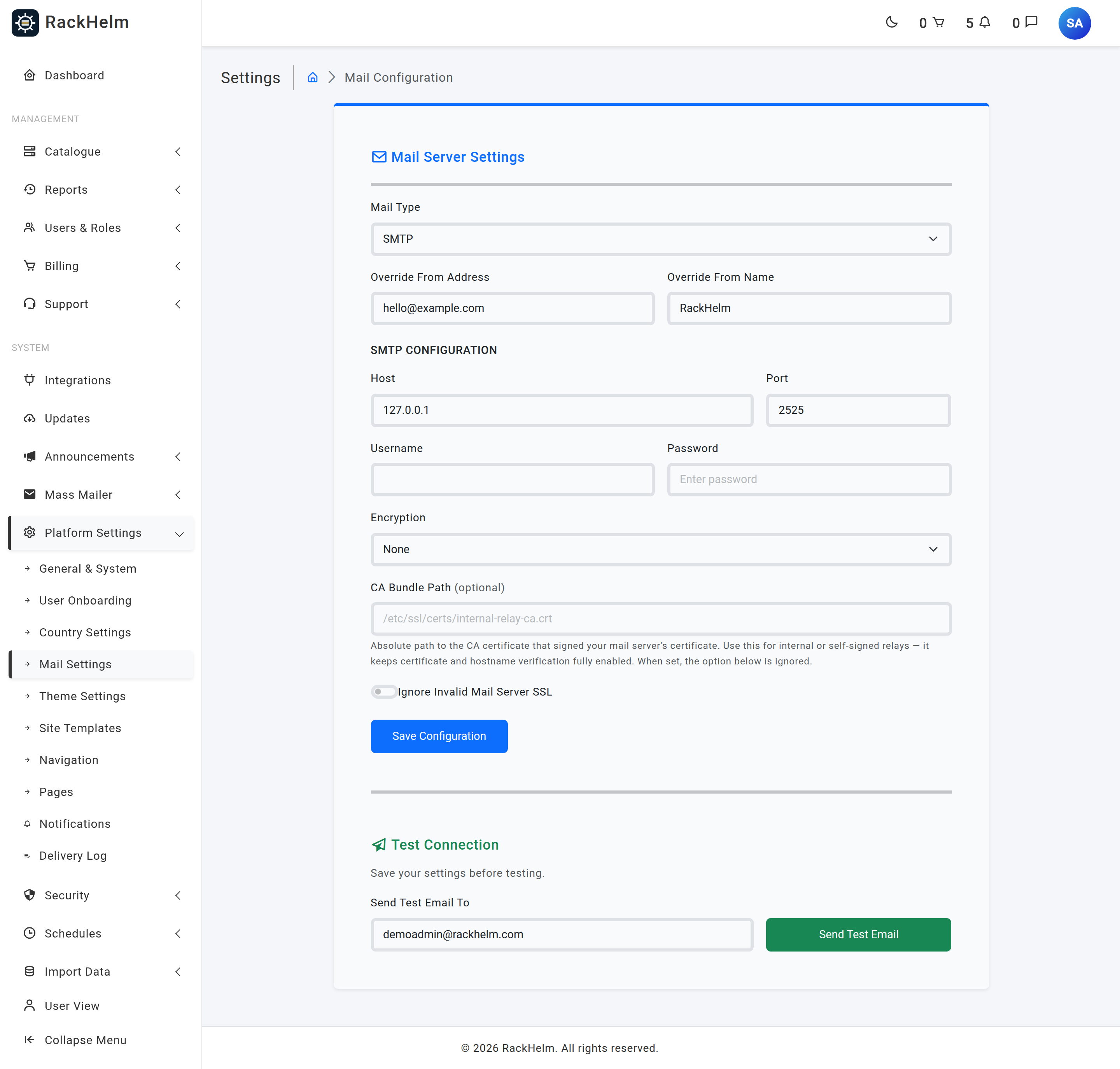
- Set Mail Type to SMTP (or PHP Mail Function (Sendmail) if you really do want to hand mail to the local MTA).
- Fill in Override From Address and Override From Name. The address is required and must be a valid email address.
- For SMTP, complete Host, Port, Username, Password and Encryption.
- Press Save Configuration, then send a test message (below).
| Field | What it does |
|---|---|
| Mail Type | smtp or sendmail. The SMTP fields are only saved when the type is SMTP. |
| Override From Address | Required. The envelope and header From address for all outgoing mail. |
| Override From Name | Required by the form, max 255 characters — but see the warning below. |
| Host | Required when the type is SMTP. Your relay’s hostname. |
| Port | Required when the type is SMTP, and must be a number. 587 for STARTTLS, 465 for implicit SSL. |
| Username / Password | Relay credentials. The password is encrypted at rest and never rendered back into the form. |
| Encryption | TLS, SSL or None. |
| CA Bundle Path | Optional path to a CA certificate file used to verify the relay. The path must exist and be readable by the web user, or the save is rejected. |
| Ignore Invalid Mail Server SSL | Disables certificate verification entirely. See the warning below. |
Note: Override From Name is stored but not applied. At runtime RackHelm sets the From name from the Company Name setting on General & System. If your emails show the wrong sender name, change it there.
Warning: Ignore Invalid Mail Server SSL is all or nothing — it switches off both chain and hostname verification, and outgoing mail carries password-reset links and signed verification URLs. If your relay presents an internal or self-signed certificate, put that certificate’s path in CA Bundle Path instead; verification stays on and the ignore switch is bypassed whenever a bundle is set.
Sending a test message #
At the bottom of the screen, Send Test Email To is pre-filled with your own address. Enter an address and submit. RackHelm sends a plain-text message through the configured relay and reports back:
- Test email sent successfully to … — the relay accepted the message. Check the inbox, and check spam.
- Failed to send email: … — the relay’s own error is shown verbatim. That message is usually enough to identify the problem: authentication failure, connection refused, or a TLS handshake error.
Tip: A test that succeeds proves the relay accepted the message. It does not prove deliverability. Publish SPF, DKIM and DMARC records for the domain in Override From Address before you go live.
The email log #
Security → Email Logs (/admin/email-logs) records every message RackHelm hands to the mailer, with its recipient, subject, full rendered body and a status. It is the fastest way to answer “did the customer actually get the invoice?”.
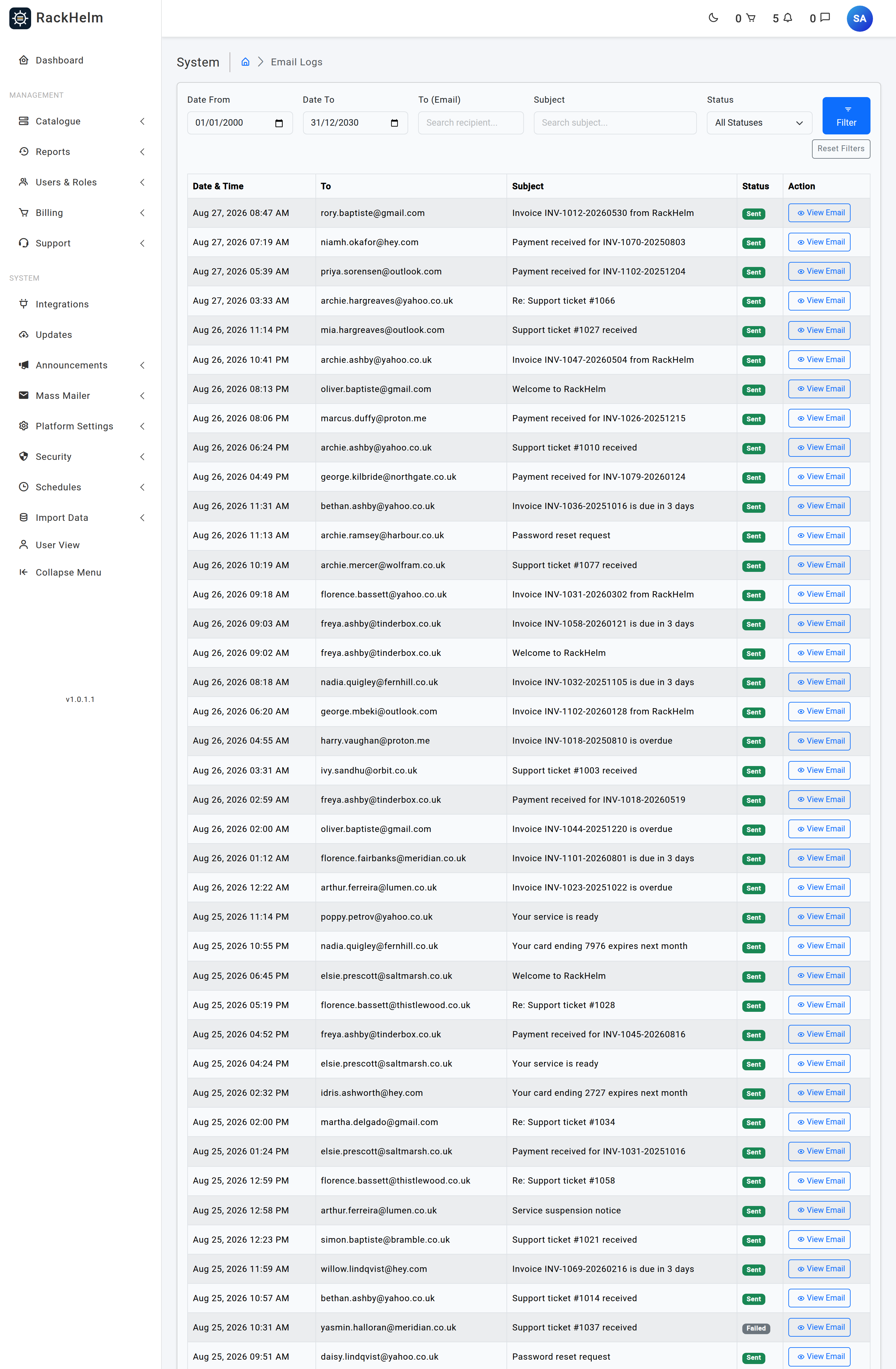
Filters across the top:
- Date From / Date To — defaults to the last two weeks.
- To (Email) — partial match on the recipient.
- Subject — partial match on the subject line.
- Status — Sent or Failed.
Results are paginated 50 at a time, newest first, and each row opens the stored HTML body so you can see exactly what the customer received.
Warning: The log is written when the mailer reports a message as sent, and every row is written with the status
sent. Nothing writes afailedrow, so the Failed filter is always empty and a message that was accepted by the relay and then bounced still appears here as sent. Treat this log as “what RackHelm produced and handed over”, not as proof of delivery. For alerting that does record failures, see Admin Notifications and its delivery log.
Troubleshooting #
| Symptom | Cause and fix |
|---|---|
| “That CA bundle path does not exist or is not readable by the web user.” | The path is wrong, or the file’s permissions exclude the PHP user. Check with ls -l and make the file world-readable, or clear the field. |
| Test mail fails with a certificate error | The relay’s certificate does not validate. Point CA Bundle Path at the issuing certificate. Only use Ignore Invalid Mail Server SSL as a temporary diagnostic. |
| Nothing arrives, no error shown | Most mail is queued rather than sent inline. Check that queue workers are running — see Maintenance, Logs and Health — and look for the message in the email log. |
| Password field looks empty after saving | Expected. The stored password is never rendered back into the form; leaving it blank keeps the existing one. Only type in it when you want to change it. |
| Emails arrive from the wrong name | The From name comes from Company Name on the General & System screen, not from Override From Name. |
| Links inside emails point at the wrong domain | Link roots are built from Company URL. Correct it on General & System. |
| Saving the SMTP fields appears to do nothing | The host, port, username, password, encryption and CA bundle are only written when Mail Type is SMTP. Switch the type first, then save. |


