The audit log answers “who changed this, and what did it look like before?”. RackHelm records every create, update and delete on the records that matter — products, prices, orders, invoices, users, roles, settings, integrations and more — together with the staff member responsible and the exact fields that changed.
Before you start #
Note: Requires the
view_audit_logspermission. It is deliberately separate fromview_settings, so you can give a compliance or support lead read access to the history without giving them the ability to change configuration.
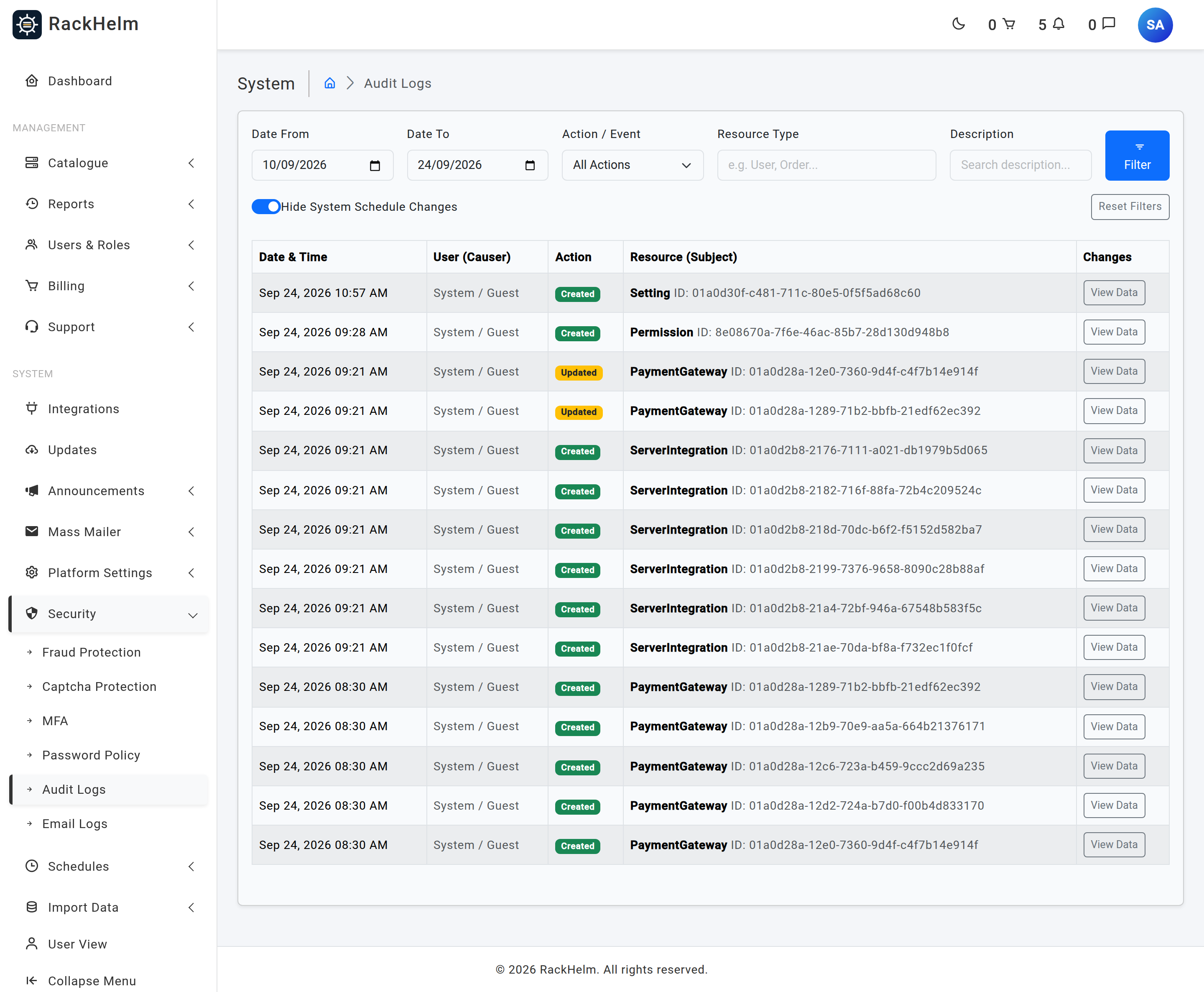
Open Security → Audit Logs (/admin/audit-logs).
Reading the log #
Each row has five columns:
| Column | What it shows |
|---|---|
| Date & Time | When the change was recorded. |
| User (Causer) | The account that made the change. Blank where the change came from a background job or a console command rather than a person. |
| Action | created, updated or deleted. |
| Resource (Subject) | The record that changed, identified by its type. |
| Changes | Opens a panel showing the changed fields with their new and previous values. |
Only fields that actually changed are stored, and a change that alters nothing is not recorded at all — so the Changes panel is a precise diff rather than a dump of the whole record.
Filtering #
- Date From / Date To — defaults to the last two weeks. Widen it to search further back.
- Action / Event — a dropdown built from the actions actually present in your log.
- Resource Type — a partial match on the record type, so typing
InvoiceorUsernarrows to those. - Description — a partial match on the recorded description.
- Hide System Schedule Changes — ticked by default. Schedule rows are updated by the scheduler itself and would otherwise crowd out everything else. Untick it when you are specifically investigating a schedule change.
Results are paginated 50 at a time and the filters are preserved as you page through.
What is recorded #
Around forty record types are audited. The ones you are most likely to look up:
| Area | Audited records |
|---|---|
| Catalogue | Products, product groups, addons and their options and prices, billing cycles and their prices, custom fields, product variables and assignments, coupons, site templates |
| Commerce | Orders, order items, invoices, invoice entries, payment methods, payment gateways, credit transactions, addresses, SSL certificates |
| People | Users, roles, permissions |
| Support | Departments, canned replies, email routes, email templates, support settings |
| Platform | Settings, system schedules, countries, sites, notification channels, subscriptions and audiences, server integrations, integration panels and accounts, custom API integrations, campaign templates |
Changes to a schedule’s last run timestamp are excluded deliberately, so an enabled schedule does not write an audit row every minute.
Secrets are redacted #
Settings are stored as key/value pairs and their values are audited like anything else — which would mean an SMTP password or an API key sitting in the history in clear text, readable by anyone holding view_audit_logs. RackHelm therefore masks the value whenever the key names a credential, replacing it with [redacted].
This happens twice over: once when the row is written, and again when the log is rendered, so rows written before the masking shipped are also covered. The same treatment is applied to control-panel integration credentials, remote panel account configuration, and notification webhook URLs.
Note: Redaction is deliberately over-broad and fails closed — a value it cannot classify is masked anyway. If you see
[redacted]against a setting that holds nothing sensitive, that is why. The fact of the change, who made it and when, is never hidden.
Warning: The render-time masking can only classify a setting whose row still exists, and it does not apply to anyone reading the database table directly. If a credential was written to the log before masking shipped, rotating that credential is the only complete fix.
Retention #
Audit rows are kept indefinitely by default — RackHelm does not schedule a cleanup of them, on the basis that an audit trail you have silently pruned is not much of an audit trail. On a busy install the table grows steadily; if you need to cap it, do so as a deliberate, documented decision rather than by accident.
Troubleshooting #
| Symptom | Cause and fix |
|---|---|
| A change you know happened is not listed | Check the date range first — it defaults to two weeks. Then check whether the record type is one of the audited ones above; not every table is. |
| The log is full of System Schedule rows | The Hide System Schedule Changes checkbox has been unticked. Tick it again. |
| The causer column is empty | The change was made by a queued job, the scheduler or a console command, not by a signed-in person. |
A value shows as [redacted] |
The setting key matched the credential patterns, or the original record has since been deleted so the value could not be classified and was masked to be safe. |
| An update was recorded with no visible changes | Only changed fields are stored. If a panel appears empty, the change was to a field that is excluded from logging. |
| You cannot see the menu entry | The Security section of the sidebar is additionally wrapped in a permission key no role holds, so only a Super Admin sees it. The page itself honours view_audit_logs, so a direct link to /admin/audit-logs works for anyone who holds it. |


