Almost nothing important in RackHelm happens during the web request that triggers it. Provisioning a new service, charging a card, generating an invoice, sweeping every registrar, sending an e-mail and delivering a webhook are all queued and executed by a background worker. This article explains the workers the installer sets up, the two queue lanes they run, the cron entry that drives the scheduler, and how to restart everything safely.
Why queues matter here #
When a customer pays, the order is marked paid immediately and the actual work — calling the control panel or registrar API, creating the account, e-mailing the credentials — is pushed onto a queue. If no worker is running, the order sits at pending provisioning for ever, invoices are never generated, and no mail leaves the building. There is no fallback path that runs this work in the web request.
RackHelm uses Redis for its queues and Laravel Horizon to run them. The installer sets QUEUE_CONNECTION=redis. There are two Redis connections, because the work does not all fit one shape:
| Connection | Queues | retry_after |
|---|---|---|
redis |
The six everyday queues below | 300 seconds (REDIS_QUEUE_RETRY_AFTER) |
redis-long |
long-running only |
960 seconds, and cannot be set lower |
retry_after is how long the queue waits before deciding a reserved job died and handing it to another worker. It must always exceed the longest job that can land on that connection, or a slow job is run twice concurrently.
| Queue | Carries |
|---|---|
default |
Anything not explicitly routed elsewhere — including control-panel, registrar, game-panel and Custom API provisioning, and the suspend / unsuspend / terminate jobs |
payments |
Automatic payment attempts against stored payment methods |
provisioning |
Worked, but empty unless you set PROVISIONING_QUEUE=provisioning in .env |
invoices |
Invoice generation |
bulk-email |
Mass mailer campaign sends |
notifications |
Admin alert delivery (NOTIFICATIONS_QUEUE) |
long-running |
Jobs too long for the 300-second lane. Today: the on-demand per-registrar domain fetch behind the domain importer, which can run for 15 minutes |
Note: The
provisioningqueue name is a historical one. Provisioning jobs resolve their queue fromPROVISIONING_QUEUE, whose fallback isdefault— and that variable is normally unset, so in a stock install provisioning rides thedefaultqueue. Horizon works both, so nothing is lost either way; it matters only when you are reading queue depths and wondering whyprovisioningis always zero.
The two supervisors #
supervisor-1 |
supervisor-long |
|
|---|---|---|
| Connection | redis |
redis-long |
| Queues | default, payments, provisioning, invoices, bulk-email, notifications | long-running |
| Processes | Auto-balanced, up to 10 in production (3 in local) |
Fixed at exactly 1 |
| Worker timeout | 280 seconds | 930 seconds |
| Attempts | 1 | 1 |
| Memory ceiling | 128 MB per worker | 128 MB |
The Horizon master process is capped at 64 MB. Completed and pending job records are kept for 60 minutes, failed ones for 7 days. Horizon raises its long-wait alert after 60 seconds of waiting on redis:default, and after 900 seconds on redis-long:long-running — one full run of the longest job there is normal; more than that is a backlog.
Note: Provisioning jobs are attempted once. A failure does not silently retry — it is surfaced on the order and re-driven by the Provision Orders sweep or by the retry buttons in the admin area. That is deliberate: a blind retry of a half-finished provisioning run can create duplicate accounts.
Why the timeouts are what they are #
Three numbers have to stay in order on each lane: the job’s own timeout, the supervisor’s timeout, and the connection’s retry_after. Two failure modes come from getting that wrong, and both were seen in practice.
The first is the obvious one: if retry_after is shorter than a job’s real runtime, the queue hands the job to a second worker while the first is still running. Two workers then charge the same card or provision the same account.
The second is not obvious at all. When Horizon’s auto-balancer scales a pool down it sends SIGTERM to the oldest worker and then SIGKILLs it once the supervisor’s timeout (plus ten seconds) has passed — whatever the job’s own timeout says. With the supervisor at 60 seconds, the hourly registrar sweep was being killed about 70 seconds in, every hour, and then failed by the re-claim with MaxAttemptsExceededException. That is why supervisor-1 now sits at 280: above every job that can land on it (the panel lifecycle jobs at 270, the registrar sweep at 240) and below retry_after at 300.
supervisor-long avoids the problem differently: its minimum and maximum process counts are both 1 with simple balancing, so the balancer never has a busy worker to scale down in the first place.
Warning: Never add
long-runningtosupervisor-1‘s queue list. Its workers would claim those jobs on the 300-second connection, and both failures above come straight back.
Warning: check this before upgrading. If your
.envpinsREDIS_QUEUE_RETRY_AFTERto 270 or lower, raise it — the default is now 300, and the panel lifecycle jobs run up to 270 seconds. An explicit env value overrides the default silently, so an install that set 90 in the past will keep re-claiming long provisioning jobs mid-run and can suspend, terminate or charge twice.
The Supervisor program #
The installer creates a Supervisor program that keeps Horizon running and restarts it if it dies. On Debian and Ubuntu it is written to /etc/supervisor/conf.d/rackhelm-horizon.conf; on RHEL to /etc/supervisord.d/rackhelm-horizon.ini. The file extension is not cosmetic — Debian’s Supervisor includes only *.conf and RHEL’s only *.ini, and a file with the wrong extension is silently ignored.
[program:rackhelm-horizon]
process_name=%(program_name)s
command=php /var/www/rackhelm/artisan horizon
autostart=false
autorestart=true
user=www-data
redirect_stderr=true
stdout_logfile=/var/www/rackhelm/storage/logs/horizon.log
stopwaitsecs=3600
One Horizon process runs both supervisors, so there is only ever one program to manage. stopwaitsecs=3600 gives in-flight jobs up to an hour to finish before Supervisor kills the process, so a restart never truncates a provisioning run. On RHEL the installer also enables and starts supervisord itself.
Warning: The installer writes
autostart=falseon purpose — that block runs in parallel with Composer, and a Horizon started beforevendor/exists would crash-loop into FATAL — and then starts Horizon by hand once migrations have finished. It never rewrites the file.autorestart=trueonly restarts a process that was running and exited, so after a server reboot Horizon does not come back on its own: every queued payment, provisioning job and e-mail waits until someone runssupervisorctl start rackhelm-horizon. If you want it to survive reboots, setautostart=truein that file and runsupervisorctl reread && supervisorctl update.
To confirm the worker is alive:
supervisorctl status rackhelm-horizonIf you run queue:work instead of Horizon #
Horizon is what the installer sets up and what the admin queue screens read. If you run plain workers instead, you need one for each lane — a worker on the everyday queues, and a second one for the long lane, which nothing else will pick up:
php artisan queue:work redis-long --queue=long-running --timeout=930Note: The long lane is only used when the application is actually queuing on Redis. On a
databaseorsyncqueue connection the long job stays on the ordinary connection, because there is no long-lane worker to give it to.
The scheduler cron entry #
Recurring work is driven by the framework scheduler, which has to be invoked once a minute. The installer writes that entry for you, to /etc/cron.d/rackhelm, running as the web-server user:
* * * * * www-data cd /var/www/rackhelm && php artisan schedule:run >> /dev/null 2>&1Check it survived with cat /etc/cron.d/rackhelm. On a manual install, or if the file is missing, add the equivalent to the crontab of the user that owns the application files:
sudo crontab -u www-data -e* * * * * cd /var/www/rackhelm && php artisan schedule:run >> /dev/null 2>&1Use nginx instead of www-data on RHEL. Running the scheduler as the web-server user keeps any files it writes owned consistently with the rest of storage/.
Without it, none of the recurring tasks run: no invoices are generated, overdue services are never suspended, e-mail-to-ticket never fetches, registrars are never swept, exchange rates never move, and log and notification retention never prunes.
Tip: Verify it works by running
sudo -u www-data php artisan schedule:runby hand from/var/www/rackhelm. It should list the tasks it considered, or exit quietly if none are due this minute.
What the scheduler runs #
Four retention tasks are fixed in the code and cannot be edited from the admin area:
tickets:prune-pending— hourly; discards unconfirmed guest ticket submissions and their parked uploads.- Notification payload pruning — daily at 03:20; clears the contents of delivery records while keeping the audit row.
- Notification delivery pruning — daily at 03:30.
- Custom API delivery pruning — daily at 03:40, honouring the retention window set in the admin area (90 days by default).
Everything else is a row in the System Schedules table, listed individually in the admin sidebar under Schedules. Fourteen tasks are seeded: Provision Orders, Generate Invoices, Process Due Invoices, Email to Tickets, Process Cancellations, Notify Expiring Cards, Domain Updater, Invoice Reminders, Terminate Overdue Services, Suspend Overdue Services, Apply Late Fees, Auto Close Tickets, Mass Mailer and Refresh Exchange Rates.
Warning: Every seeded schedule except Refresh Exchange Rates ships disabled. After installation, go through the list and enable the ones your business needs. An install with a working cron entry and every schedule left off still bills nobody.
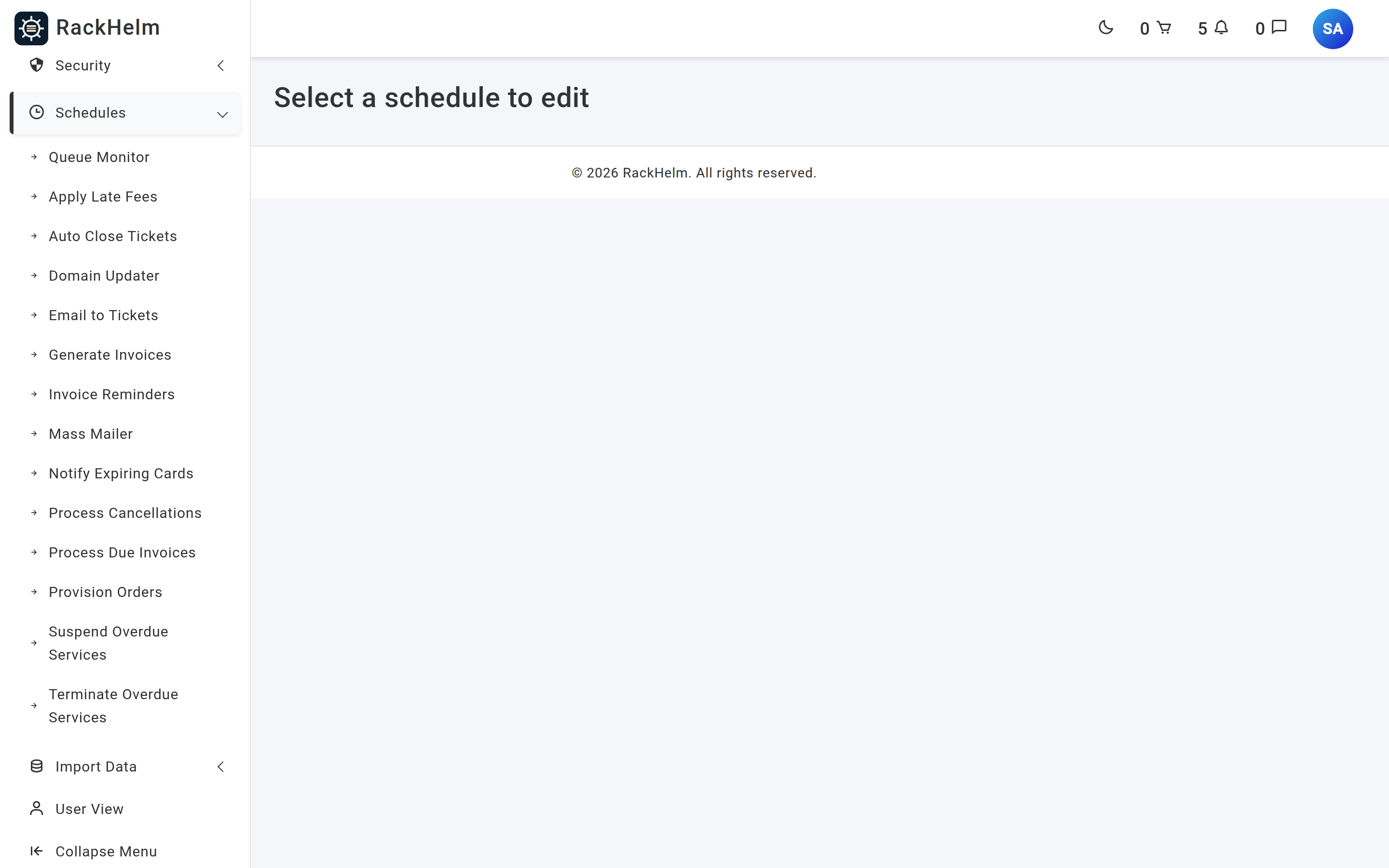
/admin/system-schedules page itself only says “Select a schedule to edit” — the list lives in the sidebar menu beside it, and on the dashboard’s schedule table. Each row carries its own cron fields; the last run time tells you whether cron is firing at all.Note: The System Schedules screens require the
manage_schedulespermission, which the built-in Administrator role does not hold. The sidebar menu itself is wrapped in a check formanage_settings— a key that does not exist in the permission list and therefore passes only for a Super Admin — so a staff member grantedmanage_schedulesreaches a schedule through the dashboard’s System schedule status table rather than the sidebar. See System Schedules and the Scheduler.
Three safety behaviours are worth knowing. A schedule row whose cron expression is invalid is skipped and logged rather than allowed to abort the whole scheduler run. A row whose job class is not on the scheduler’s allowlist is refused outright, with a critical log line. And Process Due Invoices is registered so it never overlaps itself and only ever runs on one server, because two concurrent runs would queue duplicate charge jobs against the same card.
Monitoring the queue #
There are two views:
- Horizon, at
/horizon— throughput, per-queue wait times, both supervisors, failed jobs and retry controls. - Queue Monitor, in the admin area at
/admin/queue-monitor, linked from the sidebar under Schedules → Queue Monitor — a lighter view of supervisors, queue workload, recent and failed jobs, and a retry action.
Note:
/horizonrequires theview_horizonpermission and a staff account. The staff check is there alongside the permission because permissions are inherited down the role hierarchy, and Horizon exposes queued job payloads — billing data and customer personal information — plus retry and delete.
Warning:
/admin/queue-monitoris stricter than it looks. The route asks forview_horizon, but the controller additionally requiresmanage_roles— andmanage_rolesis not one of the portal’s permissions, so it can never be granted to a role and passes only for a Super Admin. Granting an Administratorview_horizongets them into/horizon, not into the Queue Monitor. The same boundary hides the dashboard’s background-job health strip.
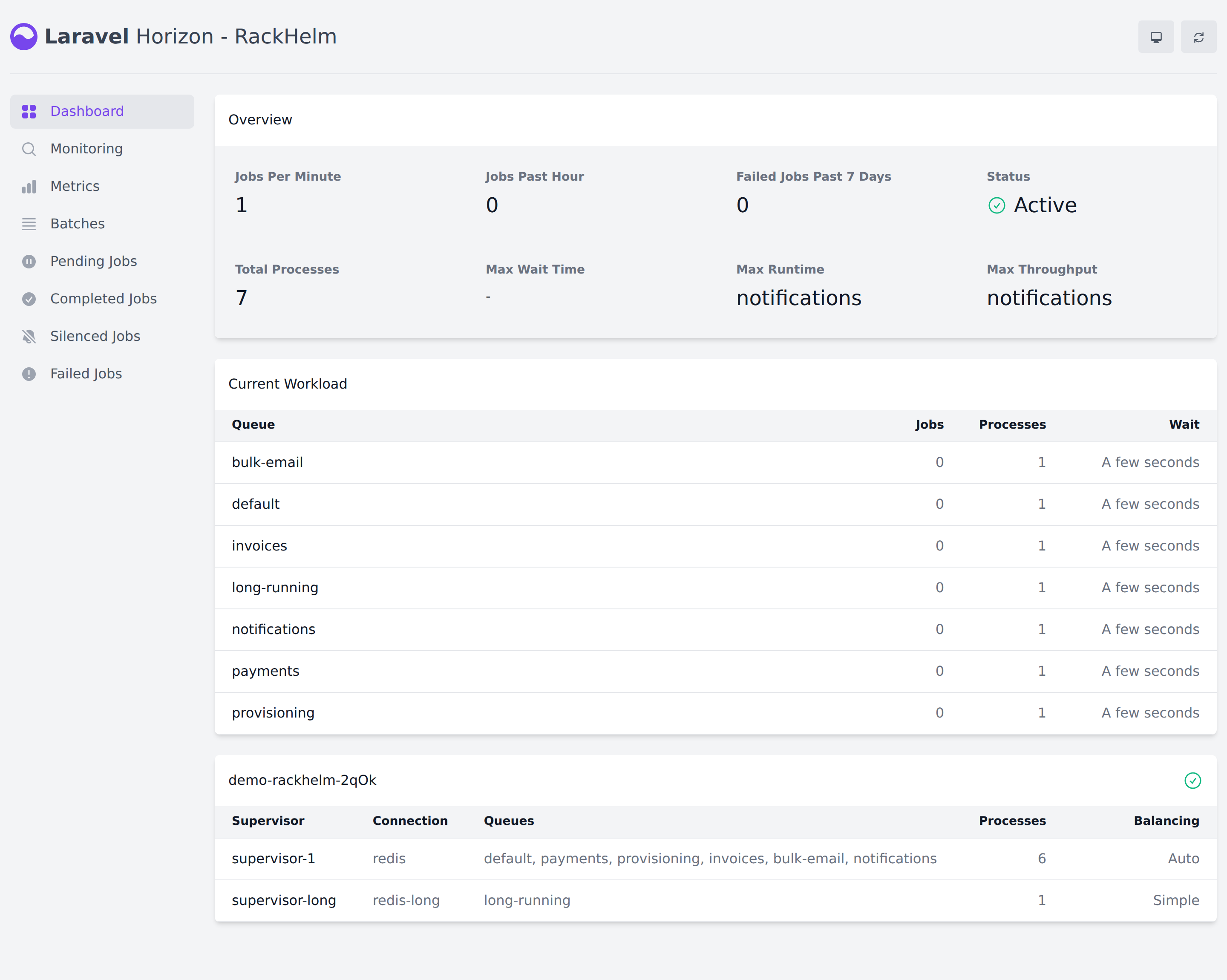
supervisor-long is missing, nothing is working the long-running queue and registrar fetches will sit there for ever.Restarting workers after a change #
Horizon loads your code and environment once at start-up and keeps them, so any deployment or .env edit needs a worker restart or the workers keep running the old version. The graceful way:
cd /var/www/rackhelm
sudo -u www-data php artisan horizon:terminate
That lets in-flight jobs finish, then exits; Supervisor immediately starts a fresh Horizon with the new code. If Horizon is not responding at all, restart the Supervisor program directly:
sudo supervisorctl restart rackhelm-horizonNote:
rackhelm-updatedoes this for you: it terminates Horizon and stops the Supervisor program before it touches the release, then starts it again afterwards. If it cannot find a program calledrackhelm-horizonit warns you and carries on, so a hand-rolled worker setup has to be stopped and started yourself.
Troubleshooting #
| Symptom | Cause and fix |
|---|---|
| Orders stay at pending provisioning; nothing appears in Horizon | The worker is not running. Check supervisorctl status rackhelm-horizon and storage/logs/horizon.log. |
| Everything stopped after a reboot | The installed Supervisor program has autostart=false. Run supervisorctl start rackhelm-horizon, then set autostart=true so it does not happen again. |
| Nothing recurring ever happens, but the queue works | No cron entry for schedule:run, or every System Schedule is still disabled. Check /etc/cron.d/rackhelm and the last run column. |
supervisorctl reread reports no changes after you add a program file |
Wrong file extension. Debian and Ubuntu include only *.conf; RHEL only *.ini. |
| Jobs run twice, or a customer is charged twice | REDIS_QUEUE_RETRY_AFTER is shorter than the job’s real runtime, so the queue re-dispatched it. The default is 300; raise any value of 270 or lower. |
A long job fails with MaxAttemptsExceededException and never completes |
It was SIGKILLed when the worker pool scaled down, then failed by the re-claim. The supervisor timeout must be at least the job’s own timeout; anything over 300 seconds belongs on the long-running lane instead. |
| Registrar fetches started from the domain importer never finish | Nothing is working long-running. Check that supervisor-long appears in Horizon, and that you are on the redis queue connection. |
The provisioning queue is always empty |
Expected. Provisioning runs on default unless PROVISIONING_QUEUE says otherwise. |
| Queue appears empty but jobs were definitely dispatched | REDIS_PREFIX or HORIZON_PREFIX changed — commonly a side effect of editing APP_NAME without pinning them. See The .env file explained. |
| Deployed a fix but the old behaviour persists in background jobs | Workers still hold the previous build. Run php artisan horizon:terminate. |
| A schedule row never fires while the others do | Its cron expression failed validation and was skipped. Look for a Scheduler: skipping schedule warning in storage/logs/laravel.log. |
/horizon returns 403 |
The account is not staff, or lacks view_horizon. |
/admin/queue-monitor returns 403 for a staff account that can open /horizon |
Expected: that screen is Super-Admin-only, as explained above. |


