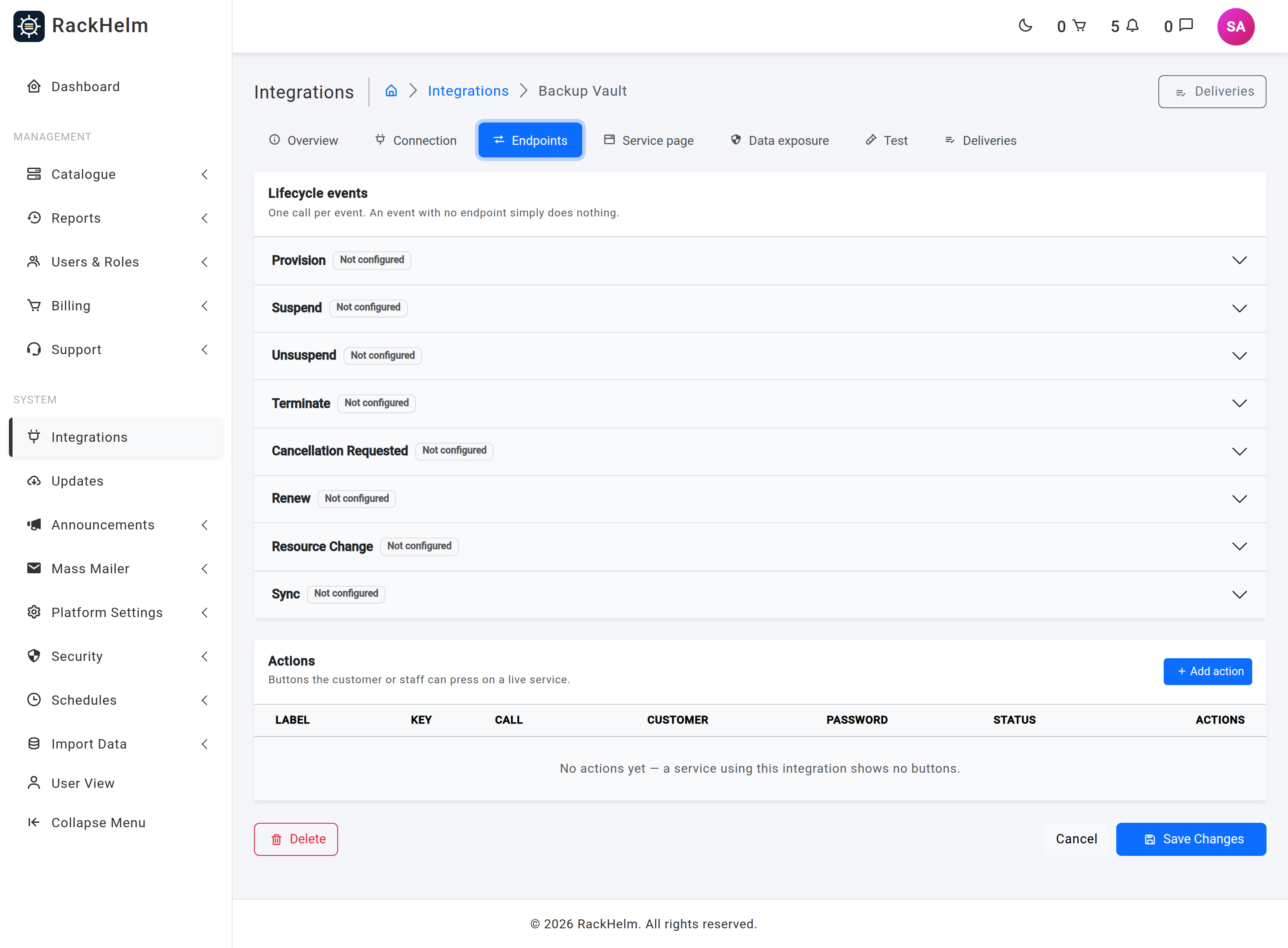
An endpoint is one HTTP call bound to one lifecycle event. Between them, an integration’s endpoints are the whole map of “when this happens to a service, send that request”. This article covers the Endpoints tab of the integration editor and every field in the endpoint modal.
Before you start #
Save the integration first — endpoints hang off it, so the tab is empty until the row exists. If you intend to send order variables (a chosen domain, a plan code, a seat count), add them to the allowlist on the Data exposure tab first: a template naming a variable that is not allowed is rejected when you save the endpoint. See Template variables and data exposure.
The tab #
The tab has two halves.
- Lifecycle events — an accordion with one row per event:
provision,suspend,unsuspend,terminate,cancellation_requested,renew,resource_change,sync. Each takes at most one endpoint. A row reading Not configured means nothing is called when that event fires, which is a perfectly valid configuration. - Actions — a table of named buttons. There can be as many as you like, told apart by their Action key.
Note: Action endpoints are stored and can be fired from the Test tab or by replaying a delivery, but nothing raises them automatically and the customer’s service page does not render action buttons yet — the customer-facing action route answers “not available yet”. See What the Custom API integration is.
Add a call #
- Open the accordion row for the event and select Add call, or use Add action for a button.
- Choose the Method and type the Path. The base URL is shown as a prefix so you can see the whole address.
- Write the Payload template, inserting values with the token buttons above it.
- Fill in the Response map if you need anything back from the reply.
- Select Add endpoint.
Field reference #
| Field | What it does |
|---|---|
| Event | Which lifecycle event this call answers, or Action (customer button). Required. |
| Action key | Actions only, and required for them. Lower-case letters, numbers and single dashes, up to 40 characters — for example reboot. It is what a button posts back, so it must be stable. |
| Button label | Actions only. Up to 80 characters. Left blank, the action key is title-cased instead. |
| Method | GET, POST, PUT, PATCH or DELETE. |
| Path | Required, up to 2,048 characters, appended to the integration’s base URL. A full https://… URL is accepted and gets exactly the same safety checks as the base. Tokens in the path are URL-encoded so a value can never walk out of its own path segment. |
| Payload template | A JSON object sent as the request body. Must be an object of key/value pairs, not a bare value or a list. |
| Query template | A JSON object appended to the URL as a query string. A parameter that resolves to nothing is dropped rather than sent empty. |
| Extra headers | A JSON object merged over the integration’s default headers. Credential-bearing names are refused here for the same reason as on the Connection tab. |
| Response map | A JSON object of "attribute name": "dot.path.into.the.reply". See below. |
| Expected status | A JSON list of HTTP codes, for example [200, 201, 202]. Blank means any 2xx counts. Anything outside 100–599 is discarded. |
| Success path | Optional dot path, up to 255 characters, that must resolve to something truthy in the reply — for the APIs that answer 200 OK with {"ok": false}. |
| Sort order | 0–65535. Orders the actions within the integration; low numbers first. |
| Active | Off means the event finds no endpoint and does nothing. |
| Show the button to the customer | Actions only. Stored, and read by the model, but no screen renders customer action buttons yet — see the note below. |
| Require the password again | Actions only. Stored for the same future control as the switch above. |
Note: The two switches above are forced off on any non-action event, because a lifecycle call has no button for a customer to press. RackHelm resolves that on save rather than trusting the form.
GET and HEAD carry no body #
GET and HEAD carry no request body. If you pick one of those methods, the payload box is greyed with a warning and the driver will not send it — put the reference in the URL instead, as a path segment such as accounts/{{ item.external_id }} or in the query template. This also matters for signing: the signature covers the body, so a receiver that drops an unexpected GET body would compute a different HMAC than the one sent.
Capturing values from the reply #
The Response map is how a call brings something back. Each entry is an attribute name on the left and a dot path into the decoded JSON reply on the right:
{
  "external_id": "data.id",
  "licence_key": "data.key",
  "status": "data.state",
  "expires_at": "data.expires"
}
Everything mapped is stored against that service and becomes readable by later calls as {{ attr.name }} — that is the mechanism by which a terminate call hands the remote system back the identifier its provision call issued. Two names are reserved and do extra work:
| Reserved name | Extra effect |
|---|---|
external_id |
Also written to the service itself, readable as {{ item.external_id }} as well as {{ attr.external_id }}. This is the identifier every later suspend, renew, terminate and action should address the service by. |
expires_at |
Parsed and copied onto the service’s expiry date. An unparseable value is logged and ignored rather than failing the call. |
Two behaviours are worth knowing. A path the reply did not contain leaves the stored attribute exactly as it was, so a thin sync response never erases a licence key captured at provision time. And attribute names are capped at 190 characters — longer ones are skipped.
Warning: Capturing a value does not publish it. Nothing appears on the customer’s service page until you add a display field for it — see The customer’s service page. That separation is deliberate: an API that returns a root password beside a hostname would otherwise put the password on a customer’s page the moment someone mapped the hostname.
Using captured values in later calls #
The token palette in the modal has a Captured from this service row listing every attribute your endpoints capture, plus item.external_id when something fills it.
A typical terminate call is a DELETE against licences/{{ item.external_id }}.
If you use one of those tokens on the provision endpoint, the modal warns you: provision is the call that captures the identifier, so it does not exist yet at that point and the token renders empty. It resolves normally on every later event.
What counts as success #
A call succeeds when the status code is acceptable and, if you set one, the success path is truthy. Order of decision:
- If Expected status lists codes, the response status must be one of them; otherwise any 2xx passes.
- If Success path is set, that dot path in the decoded body must be truthy.
- A reply that breached the integration’s response ceiling is never treated as a success — it is not decoded at all.
A failed provision throws, which marks the order item as failed with the message; every other event records the failure on its delivery row and leaves the service’s provisioning status alone.
Editing and deleting #
The same modal edits an existing endpoint — it repopulates from the row you opened it with. Deleting an endpoint stops that event calling anything. Deliveries already recorded are kept: the log deliberately holds no foreign key to the endpoint so the audit trail survives.
Troubleshooting #
| Symptom | Cause and fix |
|---|---|
| “This integration already has a provision endpoint. Edit that one instead.” | Lifecycle events take at most one endpoint each. Edit the existing one rather than adding a second. |
| “This integration already has an action called ‘reboot’.” | Action keys are unique per integration. |
| “Give the action a key — it is what the customer button posts back.” | You chose Action (customer button) without an action key. |
| “The payload template is not valid JSON.” / “…must be a JSON object of key/value pairs.” | Check for a trailing comma, a missing quote, or a top-level list where an object is required. |
{{ client.compnay }} — Unknown key "compnay" for "client"… |
A typo, caught at save time on purpose. The message lists the valid keys for that namespace. |
Variable "PlanCode" is not in this integration's variable allowlist. |
Add the key on the Data exposure tab, then save the endpoint again. |
| A header is refused | Its name contains authorization, x-api-key, token, secret or cookie. The auth type on the Connection tab adds those for you. |
| The payload is never sent | The method is GET. Move the values into the path or the query template. |
| Every call is recorded as failed although the provider is happy | Your Expected status list is too narrow (a 204 or 202 answer), or the Success path points at a key the provider does not return. Clear both and retest, then tighten. |
| Nothing is captured despite a filled response map | The dot paths do not match the real reply. Use Read last response on the Service page tab to see the actual shape. |


