RackHelm is a white-label billing, provisioning and client-portal platform for hosting providers and online service businesses. It sells your services, takes the money, creates the accounts on your control panels and registrars, and gives your customers one place to manage everything they have bought — all under your own brand.
This article is the orientation piece. It explains the two audiences the application serves, the subsystems it is made of, and where to look next.
One application, two audiences #
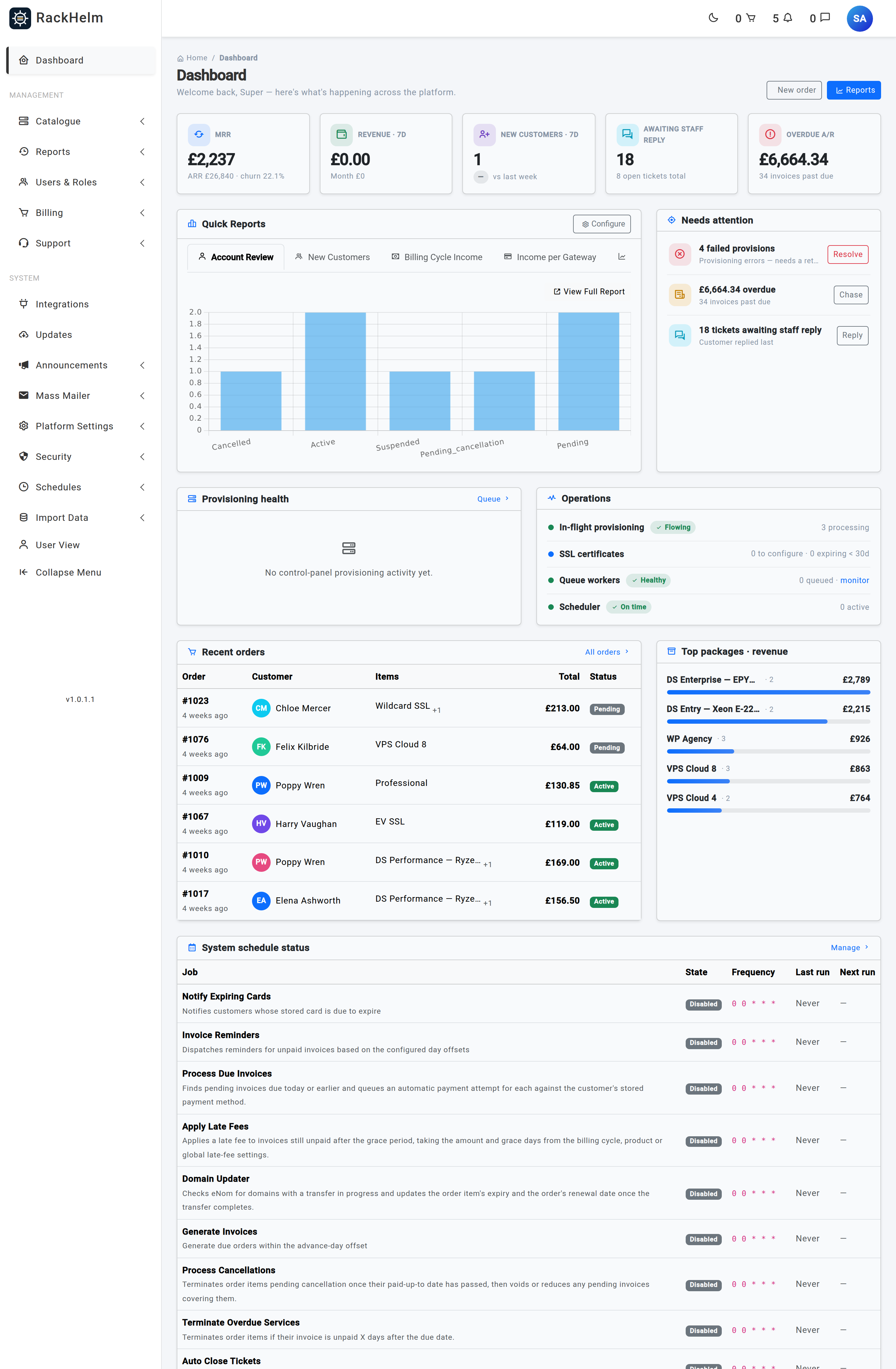
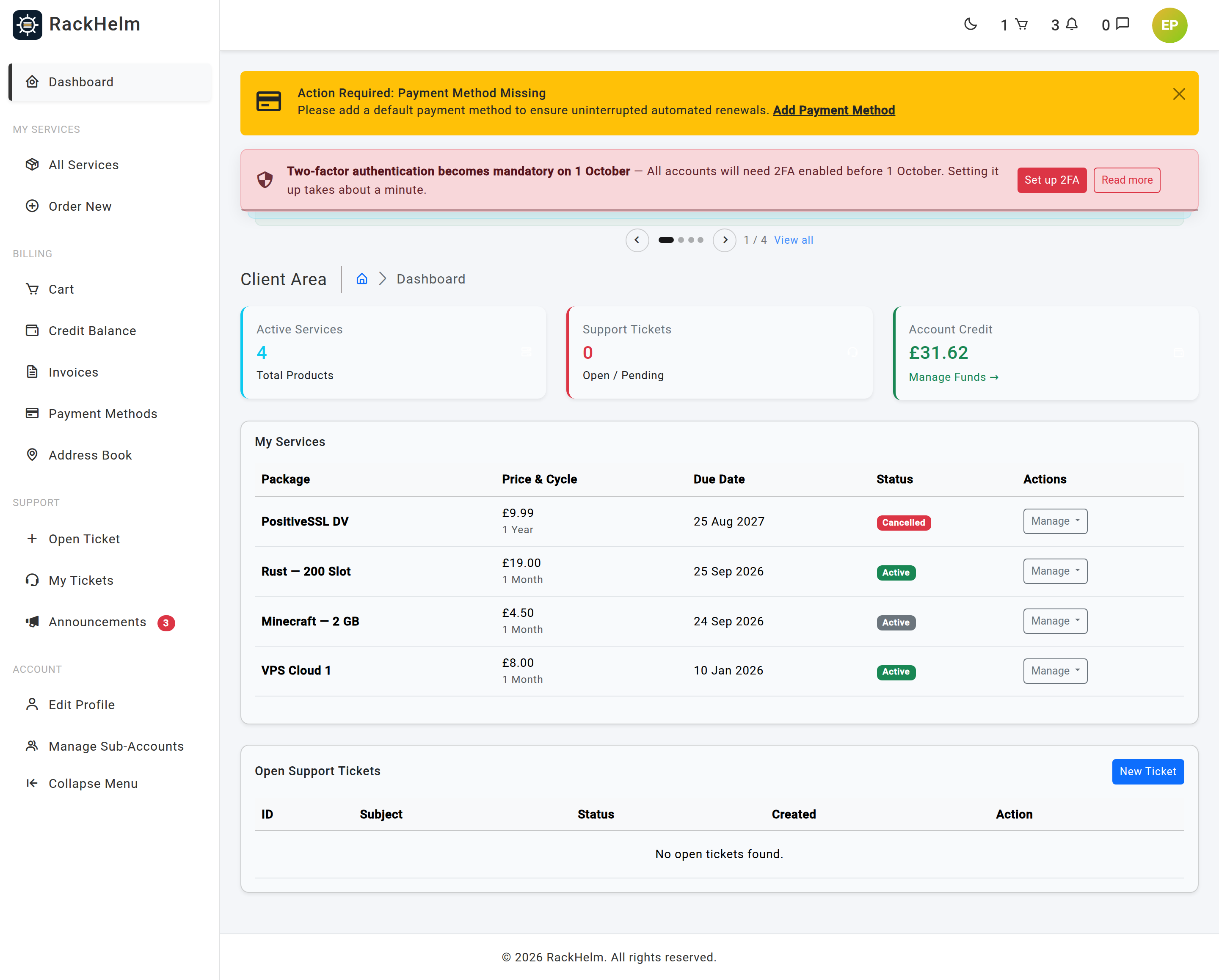
Almost every confusion a new operator has comes from not knowing which of the two front doors a screen belongs to. RackHelm is a single Laravel application that presents two completely separate interfaces.
| Audience | Where it lives | Who gets in |
|---|---|---|
| Operator / staff — you and your team | Everything under /admin |
A signed-in user who holds at least one role flagged as a staff role. The whole admin route file sits behind the auth, is_staff, force.2fa and password.confirm middleware. |
| Customer — the people who buy from you | /dashboard, /services, /invoices, /tickets, /domains and the rest of the client portal |
Any signed-in user with a verified e-mail address. No staff role and no permission required — the whole portal sits behind auth, verified and force.2fa only. |
| Public visitor | The landing page at /, the store at /store, the contact form at /contact and your content pages |
Nobody needs to sign in. Ordering requires an account, which the checkout flow collects. |
Staff can cross the boundary in both directions. The bottom of the staff sidebar has a User View link that drops you into the customer portal, and staff holding the login_as_client permission can impersonate a customer to see exactly what they see.
The subsystems #
RackHelm is best understood as eight cooperating parts. Some of them map directly onto a section of the staff sidebar; others — the store, orders and provisioning — are threaded through several screens.
| Subsystem | What it is for |
|---|---|
| Catalogue | What you sell. Product groups, products, billing cycles, product addons and custom fields. This is the source of every price the store quotes. |
| Store, cart and checkout | The customer-facing buying path: /store → cart → checkout. Handles coupons, account credit, fraud screening and the payment charge. |
| Orders | What a customer bought. An order holds one or more order items; an order item is the individual service the customer owns and renews. |
| Provisioning | Turning a paid order item into a real account on a real system — a hosting account, a game server, a registered domain, an SSL certificate, or a call to an API you defined yourself. |
| Billing | Invoices, invoice entries, PDF generation, payment gateways, account credit, coupons, late fees, reminders, suspensions and terminations. |
| Support | A helpdesk with departments, canned replies, internal staff notes, spam filtering, and inbound email routing that turns mail into tickets. |
| Integrations | The credentials and drivers for the outside systems RackHelm talks to: control panels, domain registrars, SSL issuers, analytics, and operator-defined Custom APIs. |
| Content and navigation | Editable pages with a visual builder, page groups that own the URL prefix, redirects, menus for five separate navigation locations, announcements, and email campaigns. |
Cutting across all eight are users and roles (granular permissions, staff roles, client sub-accounts), reporting, and automation — a scheduler of background jobs that does the recurring work while nobody is watching.
What it runs on #
You do not need to be a Laravel developer to run RackHelm, but knowing the shape of the stack helps when you are reading server logs.
- PHP 8.2 or newer, on the Laravel 12 framework.
- MySQL or MariaDB for the database — the installer writes
DB_CONNECTION=mysqland provisions one of those two. - Redis plus Laravel Horizon for the background job queues. Provisioning, payments, invoice generation and outbound email all run as queued jobs, so if the queue worker is not running, none of them happen.
- Vite, Tailwind CSS and Bootstrap for the front end.
- The ionCube Loader, because production builds are encoded.
Warning: RackHelm is licensed software. The licence key lives in
.envasRACKHELM_LICENSE_KEYand is checked on every request by a middleware that cannot be bypassed. If the key is missing or invalid, the application stops serving.
Finding your version #
The running version is printed at the very bottom of the staff sidebar, below the menu — for example v1.0.0. Hover it and the tooltip gives you the product name, the full version and the release date.
The version is deliberately shown only to signed-in staff, never on customer-facing pages. It follows semantic versioning:
- Major — a breaking change to the installer or to an integration contract, or a migration that cannot be rolled back cleanly.
- Minor — a new customer- or staff-facing capability, backwards compatible.
- Patch — fixes and internal changes only.
Pre-release builds append a channel, so 1.2.0-beta sorts below the matching stable release. There is no setting that changes the reported version: it ships inside the build, so what it says is what you are actually running. Quote it whenever you raise a support request.
Where to go next #
- How RackHelm fits together — follow a single order from the store all the way to a renewal invoice.
- Key concepts and glossary — the vocabulary, including the words that mean two different things depending on which side of the application you are on.
- Your first hour: a setup checklist — the ordered list of what to configure before you take a real order.
Troubleshooting #
| Symptom | Cause and fix |
|---|---|
A staff member signs in but lands on the customer dashboard with no way into /admin. |
Staff access comes from the role, not from a permission: the user must hold a role whose Staff role switch is on. Check it under Users & Roles → Roles & Permissions — only a Super Admin can change that switch. The Admin Panel shortcut in the customer sidebar is a separate matter; see A tour of the client portal. |
| Orders are placed and paid, but nothing is ever created on the control panel. | Provisioning is queued work. Either the queue worker is not running, or the Provision Orders schedule is disabled. Both are covered in Your first hour. |
| No emails arrive — not invoices, not password resets, not ticket replies. | Mail is configured in the database, not only in .env. Open Platform Settings → Mail Settings, fill in the SMTP details and use Send Test Email before you go further. |
| The whole site returns an error immediately after installation. | Usually a missing or expired licence key, or a config cache written before the key was set. Confirm RACKHELM_LICENSE_KEY in .env. |


