GameCP is RackHelm’s second game-panel integration. It works the same way as Pterodactyl from the billing side — same custom variables, same add-on upgrades, same lifecycle — but GameCP’s own model is simpler: games instead of nests and eggs, and no browser console, so customers get metrics, logs, power controls and a single-sign-on link into the panel itself. This article covers the connection, the per-product configuration and the places GameCP behaves differently from Pterodactyl. It is written for whoever sets the integration up.
Before you start #
- The
edit_integrationspermission. See Roles & Permissions. - Your GameCP origin — the hosted tenant (
https://your-tenant.gamecp.com) or a self-hosted install’s origin. Both are supported; only the base URL differs. - A permanent GameCP API key, which begins
gcp_. GameCP has a single key for everything, so this one credential covers provisioning, power control, metrics and single sign-on. It needs administrative rights, because RackHelm creates panel users with it.
Add the connection #
- Open System → Integrations and press Configure on the GameCP card. The button reads Manage once the panel has been saved.
- Set Base URL to the panel origin. Do not include the
/apipath — RackHelm adds it. The hint under the field spells out both forms. - Paste the key into API Token. Pasting it with a leading
Beareris safe; RackHelm strips it. - Tick Active.
- Press Save, then Test API.
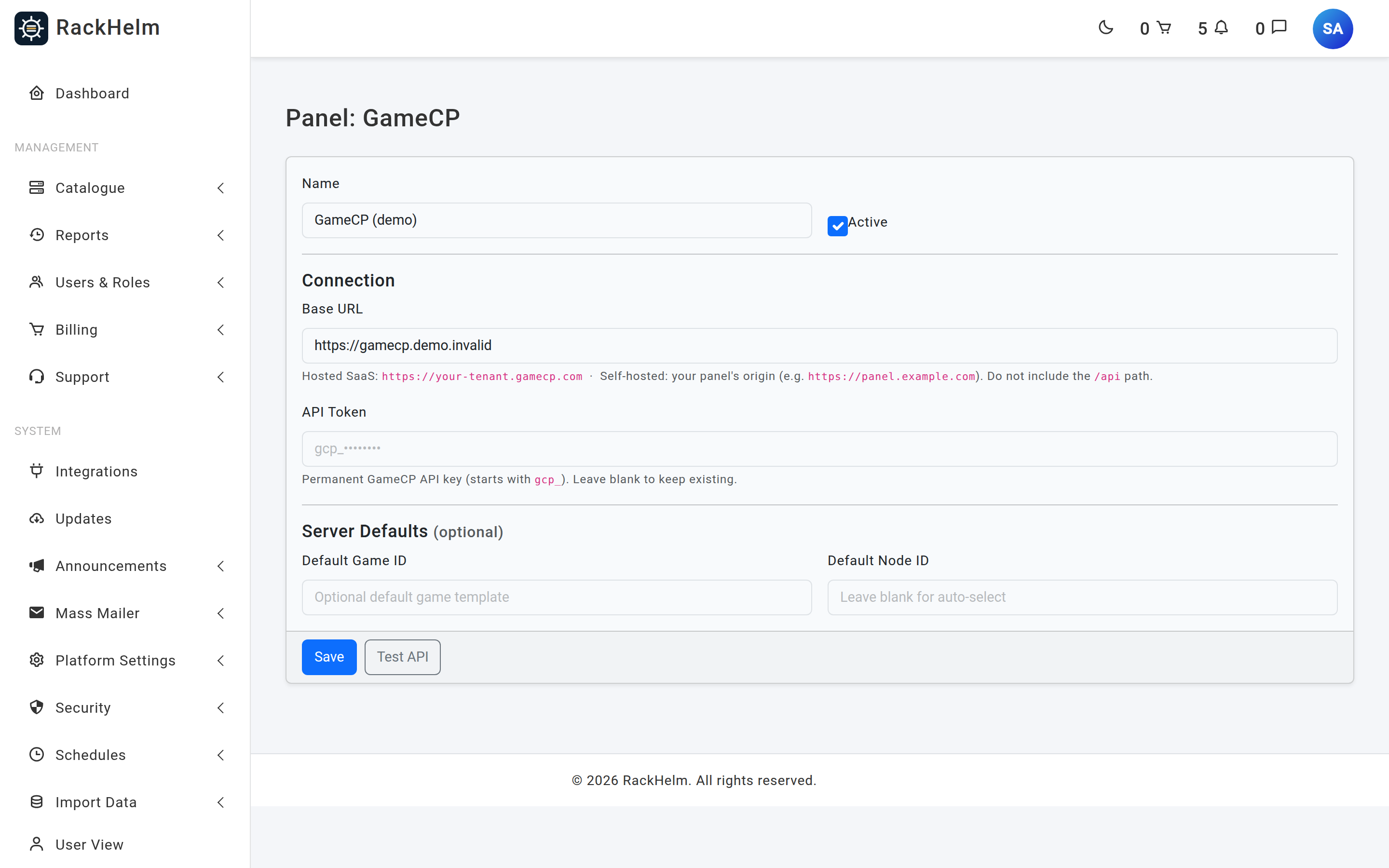
Fields #
| Field | Rule | Notes |
|---|---|---|
| Name | Optional, max 120 characters | Defaults to “GameCP”. |
| Active | Checkbox | Required for GameCP to appear as an Integration Type, and for the game/node lookups on a product to work — they return 404 for an inactive panel. |
| Base URL | Required, http/https, publicly resolvable | Panel origin only, no /api suffix. Re-validated on every outbound call; the connection is pinned to the address that passed validation and redirects are refused, so the bearer token cannot be replayed elsewhere. |
| API Token | Optional on edit | Blank keeps the stored token. Stored encrypted and sent as a bearer token. |
| Default Game ID | Optional, max 190 characters | Stored on the panel record but not read when a server is created. Set the game on the product. |
| Default Node ID | Optional, max 190 characters | Stored only; the product’s own Node field is what the driver uses. |
Test API asks the panel for one game. GameCP is the only control panel whose tester substitutes the stored token when you leave the box blank, so you can re-test a saved connection without re-typing the key.
Note: That substitution refuses to send the stored token to a different destination. Change the Base URL and leave the token box empty, and the test answers “Re-enter the API token when changing the Base URL.” — otherwise anyone who could edit the integration could have the saved key delivered as a bearer header to a host of their choosing without ever seeing it. If nothing is stored yet you get “No saved API token; please enter it.”
Bind a product to GameCP #
Edit the product under Catalogue → Catalogue & Groups, open the Provisioning tab and choose GameCP. Select the Panel first — the game and node lists are fetched live from it (up to 500 entries each).
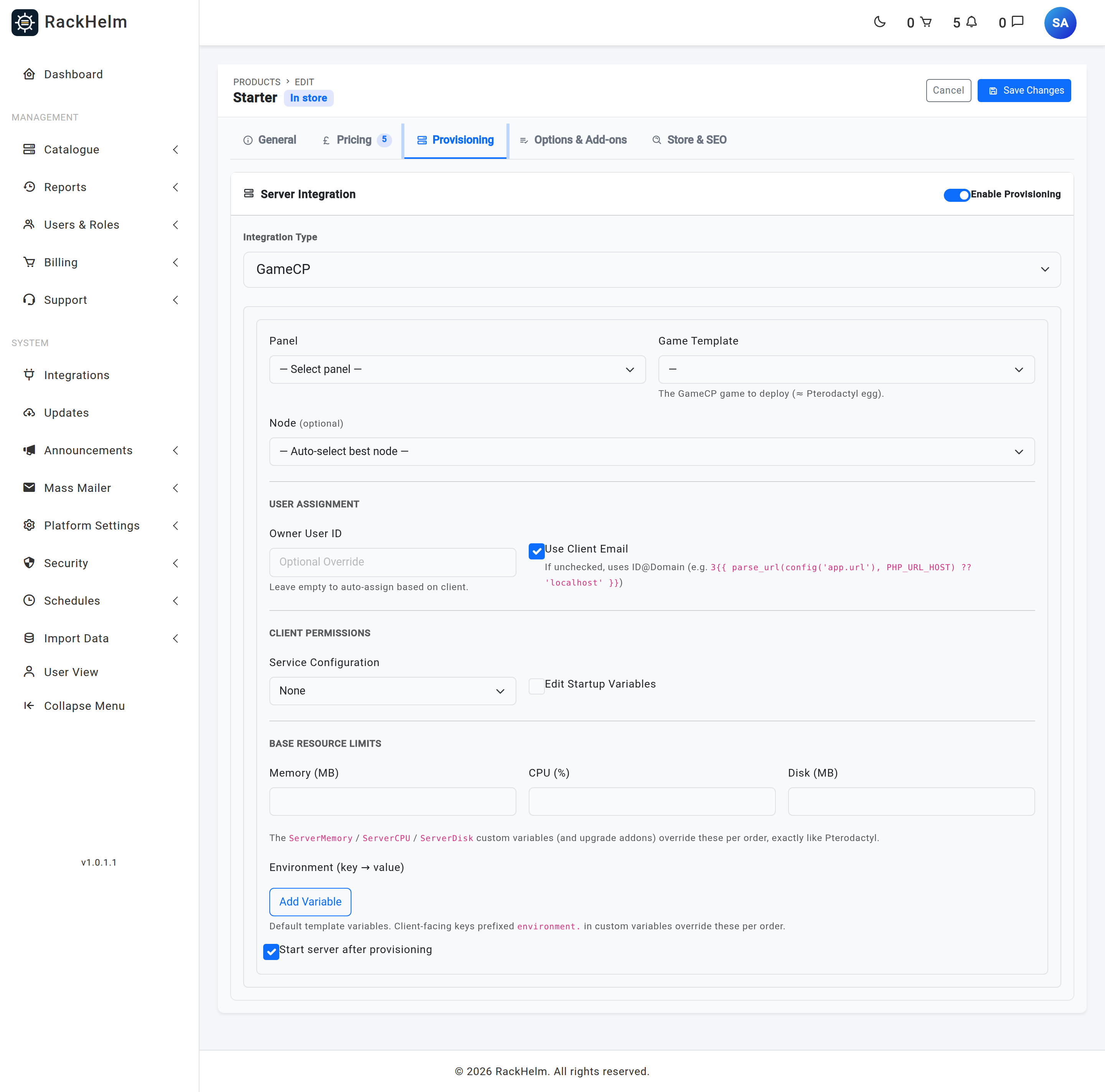
| Field | What it does |
|---|---|
| Game Template | Required. The GameCP game to deploy. Without it the order fails with “GameCP config missing ‘game_id’ (the game template to deploy).” |
| Node | Optional. Leave on Auto-select best node to let GameCP place the server. |
| Owner User ID | Optional. A GameCP user that owns every server sold from this product. Leave empty to give each customer their own. |
| Use Client Email | On by default. When off, the GameCP user is created as {customer id}@{your portal hostname}. |
| Service Configuration | What the customer may change: None or Change Game. |
| Edit Startup Variables | Off by default. |
| Memory (MB) / CPU (%) / Disk (MB) | Base limits, sent to GameCP as the string fields memoryLimit, cpuLimit and diskLimit. Leave blank to inherit the game template’s own limits — a blank field is filtered out of the override rather than sent as zero. A value of 0 is filtered out the same way, so it cannot be used to mean “unlimited”. |
| Environment (key → value) | Default template variables. Order-level variables prefixed environment. override these per order. |
| Start server after provisioning | On by default, and honoured — RackHelm sends a start command once the server exists. Unlike Pterodactyl, where the setting is stored but the create call always starts the server. |
What happens on provision #
- RackHelm checks the panel answers, then resolves the game template from the product.
- It resolves the owner: the product’s Owner User ID, else a GameCP user already linked to this customer, else one looked up by email, else a new one created from their name and email. New users get a random throwaway password because customers reach the panel through single sign-on, not a password.
- It creates the server with a generated name, the game, and — where set — the node, location and owner.
- It applies resource limits and environment overrides in one follow-up call. If that call fails the server is kept on the template’s defaults and a warning is logged; the order is not failed.
- It starts the server if Start server after provisioning is on, then records the GameCP server ID on the order item and stamps any participating add-on children with it.
Server names #
A new server is named <product slug>-<12 hex characters of the order item id>, for example ark_survival-9f3c41a0b2d7. Before 1.0.1.1 the name was built by printing the order item id as a decimal number; because that id is a UUID, every server on the panel came out as minecraft-1 or minecraft-19 and they were impossible to tell apart. Servers created before the upgrade keep the names the panel already holds — nothing looks a server up by name, so they are only cosmetic and are deliberately not rewritten.
The deploy location #
Location, when you use it, comes from the panel-agnostic LocationID variable — the same one Pterodactyl uses — resolved in this order:
LocationIDin the service’s own order item variables, matched on that exact spelling: what the customer picked at checkout when the field is offered as a Configurable Option.- A product add-on assigned to the product and linked to a custom field keyed
LocationID— its first option by sort order. - The same, assigned to the product’s group.
locationin the integration config, which no admin screen writes.
The full set-up — the custom field, the linked add-on and the two places on the product’s Options & Add-ons tab — is written out in Pterodactyl and works identically here.
Note: Unlike Pterodactyl, GameCP does not need a location. If nothing sets
LocationIDthe field is simply omitted from the create call and GameCP places the server itself, or uses the product’s Node. There is no “Missing LocationID” failure on this driver, and there is no location dropdown on the Provisioning tab — the value is only ever theLocationIDvariable.
Resource add-ons and upgrades #
An add-on changes a server’s limits by carrying a variable whose key names the limit. GameCP reads three:
| Variable key | GameCP limit |
|---|---|
ServerMemory |
memoryLimit (MB) |
ServerCPU |
cpuLimit (%) |
ServerDisk |
diskLimit (MB) |
Add-on values replace the base package figure rather than adding to it, because an upgrade is expected to exceed the base. They are applied when the server is created, and again by a recalculation job that recomputes the three limits from the base package plus every active add-on child and pushes them to the panel. That job runs when an add-on’s invoice is paid, when an add-on is removed or terminated, and when a package change completes.
Note: The other Pterodactyl variables —
ServerSwap,ServerIO,ServerThreads,ServerBackups,ServerDatabases,ServerAllocations— are accepted on an order without complaint and then ignored, because GameCP exposes no equivalent limits. An add-on built around one of them takes the customer’s money and changes nothing on the panel.
Warning: A limit that resolves to
0is stripped out of the payload rather than sent, so the panel keeps whatever it already had. An add-on option whose value is0therefore looks as though it did nothing — because it did. Give every option a real number.
Note: At create time only add-ons with Needs provisioning ticked contribute their variables. The recalculation job reads every active add-on child regardless, so an add-on without that flag does nothing until the next recalculation and then takes effect.
Lifecycle actions #
| Action | What GameCP is asked to do |
|---|---|
| Suspend | GameCP has no suspended state, so RackHelm stops the server and sets it inactive. The data survives and the change is reversible. |
| Unsuspend | Sets the server active again. |
| Terminate | Deletes the server. |
| Renew | Billing-only. Nothing is sent to GameCP. |
Suspension runs automatically once an invoice passes the overdue threshold; unsuspension runs when that invoice is paid. Each action reports success only if GameCP confirmed it, so a service left showing failed after a suspension really was not suspended — check the log before assuming otherwise.
Warning: Do not use Retry Provisioning on Pending Provisioning to clear a failed lifecycle action. Retry queues a fresh provisioning run, and that run checks only the item’s status — not whether a server already exists — so it creates a second server on the panel and overwrites the stored server ID, orphaning the first. Use Mark Provisioned instead once you have confirmed the panel’s real state.
What the customer sees #
A provisioned GameCP service appears under Servers in the client portal with power controls, polled metrics and server logs. There is no in-browser console: GameCP does not issue a browser websocket token, so the console pane polls instead and the page offers a single-sign-on link that logs the customer into the GameCP panel by email. Asking the console endpoint for a websocket answers “Live console is available in the GameCP panel.”
Asking for a kill sends a stop, because GameCP exposes no separate kill signal. Reinstalling is not offered either — the portal answers “Reinstall is managed inside the GameCP panel for this server.” and the customer does it through the single-sign-on link.
Troubleshooting #
| Symptom | Cause and fix |
|---|---|
| “GameCP config missing ‘game_id’ (the game template to deploy).” | No Game Template selected on the product’s Provisioning tab. |
| “Missing GameCP panel credentials (base_url/api_token).” | The panel row has no base URL or API token. Re-enter both and save. |
| Game or Node dropdown shows “(failed to load)” | The lookup calls the panel with the stored token. Check the token and that the connection is marked Active — the lookups return 404 for an inactive panel. |
| “Unable to reach GameCP API at …” | The reachability check failed before anything was created. Usually a wrong base URL, an expired key, or the /api path left on the end of the URL. |
| “GameCP server create failed: …” | The panel’s own error is passed through. A node with no capacity, or an unknown game ID, are the usual causes. |
| “GameCP server created but no ID returned.” | The panel accepted the request but answered in a shape RackHelm did not recognise. Check the server actually exists before retrying, or you will create a duplicate. |
| Server created but resources are wrong | The override call failed, or GameCP expects different units. The server keeps the template defaults; check the log for “Override apply failed (server kept on template defaults)” and verify the units against your panel. |
| An upgrade add-on was paid for but the server did not change | Either the variable key is one GameCP does not map (only ServerMemory, ServerCPU and ServerDisk are used), or the option’s value is 0, which is stripped from the payload. |
| “Failed to create GameCP user for …” | The API key cannot create users. Use a key with administrative rights. |
| Single sign-on link does nothing | GameCP did not return an SSO login link for that email. Confirm the customer’s GameCP user exists and the key may issue SSO tokens. If no email was ever recorded against the server you get “No GameCP account email is associated with this server.” instead. |
| “Re-enter the API token when changing the Base URL.” | You changed the Base URL and left the API Token box blank. Type the key in so it is never sent to a destination it was not issued for. |
| Base URL rejected on save | The host resolves to a private, reserved or unresolvable address. Private panels have to be listed in SAFEURL_PRIVATE_ALLOWLIST. See Adding a control panel connection. |


