A Content Security Policy (CSP) is a response header that tells the browser which origins a page may load scripts, styles, images, frames and network connections from. RackHelm builds its policy in PHP, per request, so pages that legitimately need to reach a host nobody could know in advance can widen it for that one response. This article is for whoever administers the server.
Where the policy comes from #
The base policy lives in config/security.php, under the csp key. On every web response, RackHelm’s security-headers middleware builds the header from that config and sets it unconditionally.
| Directive | Allowed sources out of the box |
|---|---|
default-src |
'self' |
script-src |
'self', 'unsafe-inline', 'unsafe-eval', Stripe.js, Google Tag Manager, Cloudflare Turnstile |
style-src |
'self', 'unsafe-inline' |
img-src |
'self', data:, https: |
frame-src |
'self', Stripe.js, Stripe hooks, Cloudflare Turnstile |
connect-src |
'self', the Stripe API, Google Tag Manager and the Google Analytics endpoints |
Note:
script-srcstill permits'unsafe-inline'and'unsafe-eval'. RackHelm’s admin views carry a great deal of inline script; tightening that is a separate piece of work and not something you can do from a setting.
Third-party front-end libraries are self-hosted rather than pulled from a CDN precisely so the policy can stay this narrow. Stripe is the deliberate exception.
Why it is built per request #
Some pages talk to hosts that cannot be listed in a config file. The clearest example is the game-panel console: the browser opens a websocket straight to the daemon on whichever node the customer’s server happens to live on, at an address like wss://node3.example.com:8080. No static allowlist can know those hosts, and they change as you add nodes.
Those pages therefore widen connect-src while they render, and the middleware emits the widened policy for that response only. Every other response keeps the base policy. That mechanism is the reason the next section matters so much.
Never add a second CSP header #
Warning: Do not add a
Content-Security-Policyheader inpublic/.htaccess, in your nginx server block, or anywhere else in front of the application. When a browser receives two CSP headers it applies the intersection of them — a source must be permitted by both policies to be allowed. A static copy in the web server would therefore silently strip every runtime addition, and the only symptom is a feature that quietly stops working: the console never connects, a payment frame never appears, and the browser console shows a CSP violation for a host you can see in the header RackHelm sent.
RackHelm’s shipped public/.htaccess declares the other security headers but deliberately declares no CSP. If you inherit a modified .htaccess, or a server block written for a different application, check it before debugging anything else:
grep -ri "content-security-policy" /etc/nginx/ /var/www/rackhelm/public/.htaccessThe expected result is a comment only, and nothing that sets the header.
The other security headers behave differently #
The middleware sets Strict-Transport-Security, X-Frame-Options, X-Content-Type-Options, Referrer-Policy and Permissions-Policy only if they are absent. That makes it a no-op on Apache, where .htaccess already sets them, and a safety net everywhere else — nginx with PHP-FPM, for instance, never executes .htaccess at all, so without the middleware the site would ship with no security headers.
Widening the policy for your own install #
If your install fronts a host RackHelm cannot discover on its own — a self-hosted analytics endpoint, a chat widget, a panel node you want allowlisted permanently — use the environment escape hatch rather than editing the config file. Each directive has a matching variable that is merged into the base policy:
| Variable | Widens |
|---|---|
CSP_DEFAULT_SRC |
default-src |
CSP_SCRIPT_SRC |
script-src |
CSP_STYLE_SRC |
style-src |
CSP_IMG_SRC |
img-src |
CSP_FRAME_SRC |
frame-src |
CSP_CONNECT_SRC |
connect-src |
Values are space- or comma-separated. To allowlist a panel node’s websocket permanently, add both schemes:
CSP_CONNECT_SRC="wss://node1.example.com:8080 https://node1.example.com:8080"Sources containing whitespace, a semicolon or a comma are discarded when the policy is assembled, so a malformed entry cannot append directives of its own.
Note: RackHelm’s installer deliberately does not cache configuration, so an edit to
.envtakes effect on the next request. If you have runphp artisan config:cacheyourself, re-run it after editing.
Checking what is actually being sent #
- Open the affected page in your browser and press F12 to open developer tools.
- On the Network tab, click the document request and read the response headers. There must be exactly one
Content-Security-Policyentry. - On the Console tab, read the violation message. It names the directive that blocked the request and the URL that was blocked — which tells you which variable above to widen.
From the command line:
curl -sI https://portal.example.com/ | grep -i content-security-policy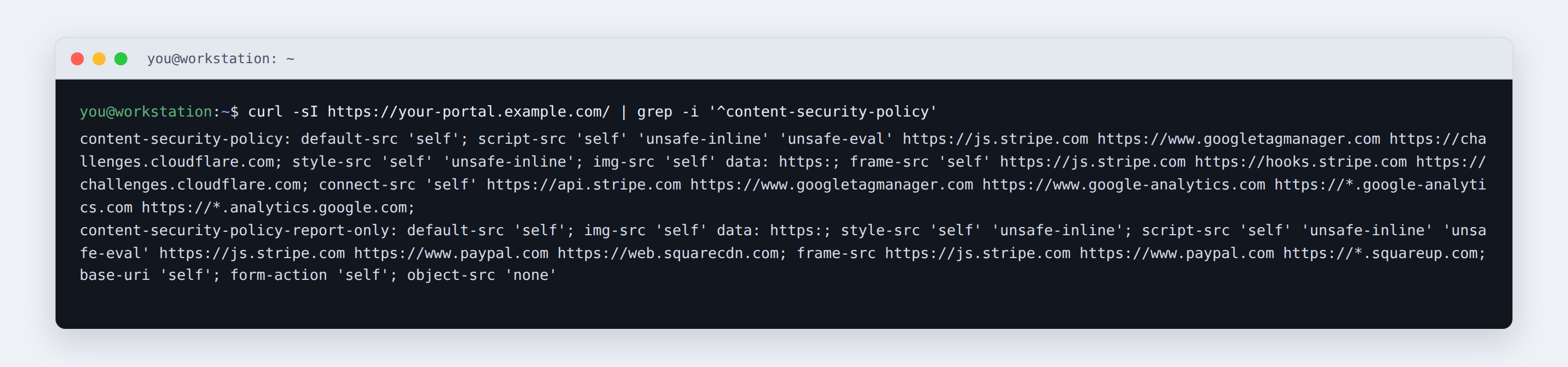
Troubleshooting #
| Symptom | Cause and fix |
|---|---|
The game-panel console never connects; the console logs a connect-src violation for a wss:// URL |
Almost always a second CSP header from the web server intersecting away the runtime addition. Remove it. Failing that, add the node explicitly with CSP_CONNECT_SRC. |
Two Content-Security-Policy headers in the response |
Something in front of the application is setting one. Check .htaccess, your nginx or Apache configuration, and any CDN or proxy in front of the portal. |
| A third-party widget’s script is blocked | Add its origin to CSP_SCRIPT_SRC, and its API host to CSP_CONNECT_SRC if it also makes requests. |
An entry you added to .env is missing from the header |
Either it contains a space, comma or semicolon inside the source and was discarded, or your configuration is cached. Quote the whole value, separate sources with spaces, and re-run config:cache if you use it. |
| Images from an external host are blocked | Unlikely — img-src already allows all of https:. Check the URL is not plain http:. |
| Card fields fail to load at checkout | Stripe’s script and frame origins must remain in the policy. If you have overridden config/security.php, restore the Stripe entries. |


