Realtime Register is the most modern of the six integrations: a REST/JSON API with a bearer-style key, no IP allowlisting requirement, and a fully separate OTE sandbox. It supports registration, transfer, renewal, nameservers, registrar lock, privacy protection, auth-code retrieval and bulk availability. This article is for operators; for how domain orders flow through the platform in general, read How domain registration works in RackHelm first.
Warning: The Realtime Register driver has not been verified against a live account. It was written to the published v2 API. Exercise it in OTE and place one real order before selling through it.
Before you start #
- A Realtime Register account and its customer handle.
- An API key, generated on your profile page in the Realtime Register Domain Manager. It is displayed once — record it when you create it.
- The
edit_integrationspermission.
IP allowlisting is not required, but keys can be restricted to IP ranges in the Domain Manager. If you have applied a restriction, this server’s address must be inside it.
Configure the panel #
- Open Integrations → Realtime Register (
/admin/panels/realtimeregister). - Enter the API key and the customer handle, and leave the OTE switch on while testing.
- Press Test API. RackHelm reads the customer’s credit and reports the balance and currency.
- Press Save.
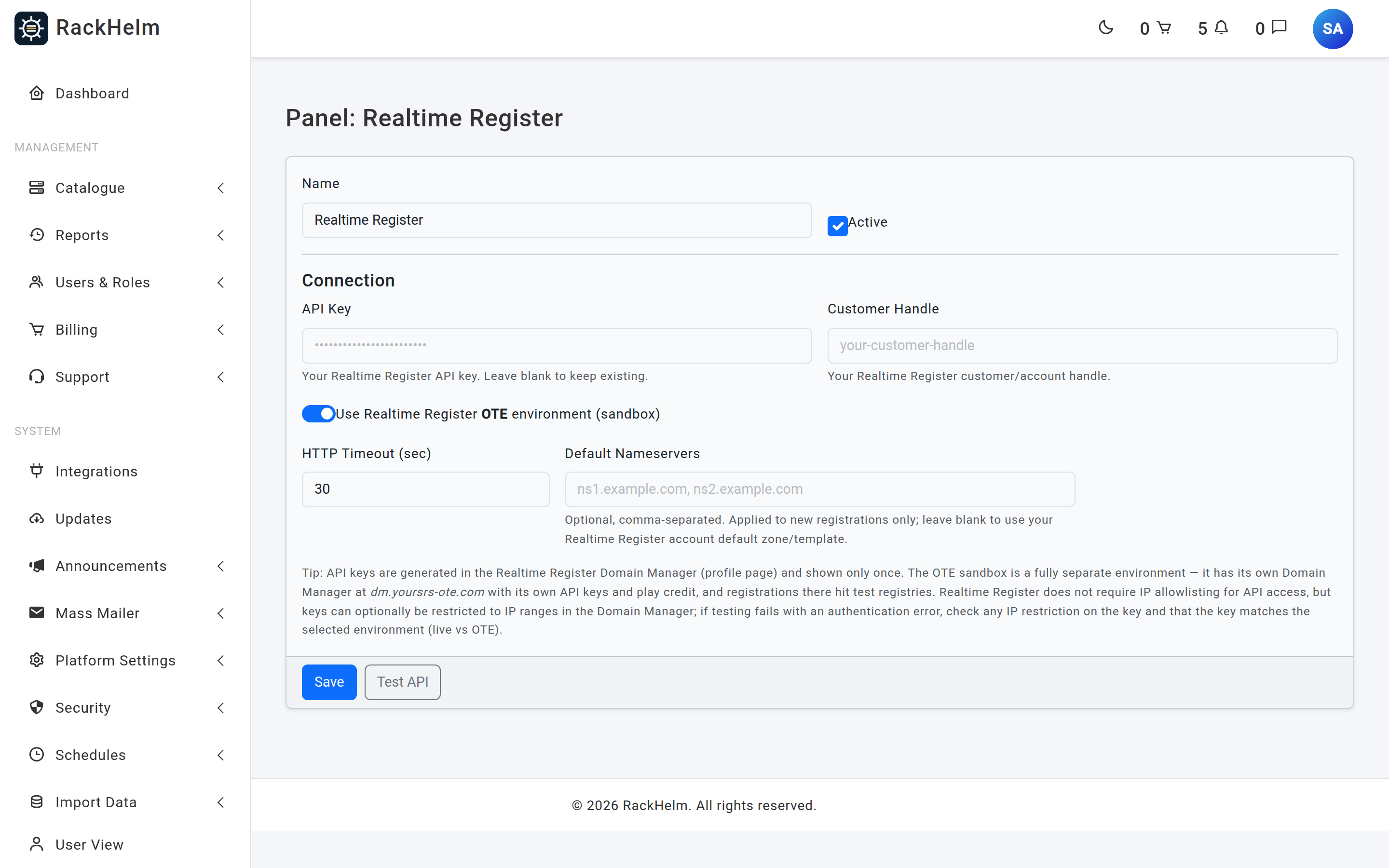
Field reference #
| Field | What it does |
|---|---|
| Name | Display label. Defaults to Realtime Register. Up to 120 characters. |
| Active | Master switch for the panel. |
| API Key | Sent in an Authorization: ApiKey … header, so it never travels in a URL. Never rendered back — leave blank to keep the stored value. |
| Customer Handle | Required. Your Realtime Register customer/account handle; every domain is created against it. |
| Use Realtime Register OTE environment (sandbox) | Switches between api.yoursrs-ote.com/v2 and api.yoursrs.com/v2, and stores a mode of test or live. |
| HTTP Timeout (sec) | Seconds to wait. Field default 30, minimum 5; a cleared value falls back to the driver’s 60. |
| Default Nameservers | Optional, comma-separated, up to 10, applied to new registrations only. Leave blank to use your account’s default zone/template — an empty list is never sent. |
Note: OTE is a fully separate environment with its own Domain Manager at
dm.yoursrs-ote.com, its own API keys and its own play credit. Registrations there hit test registries.
What Realtime Register supports #
| Capability | Behaviour |
|---|---|
| Registration | Creates or reuses a registrant contact handle, then registers the domain against your customer handle with that handle in the registrant, admin, tech and billing roles. |
| Asynchronous acceptance | A 202 response means the registry took the command asynchronously and the platform will finish it. RackHelm treats that as success and records the process id. |
| Transfer | Requires an EPP code. Transfers complete asynchronously — for most gTLDs in five to seven days — and the expiry only appears in the response once the transfer has completed. |
| Renewal | Extends by the billing cycle’s whole years. |
| Nameservers | Supported from the customer’s domain page. |
| Registrar lock | Read and toggle. |
| WHOIS privacy | privacyProtect. Only sent when requested, because some TLDs reject the field outright. It can also be enabled after registration. |
| EPP code | Read from the domain record. Where a TLD issues time-limited codes and none is present, RackHelm asks the platform to generate a fresh one and re-reads it. |
| Availability | Bulk, up to 30 names per batch, with a 12-second wall-clock budget for a whole customer search and an 8-second per-call timeout. |
| Domain listing | 250 per page, capped at 40 pages — about 10,000 names — for the domain importer. |
| Suspend / unsuspend | Not implemented; domains have no suspend concept. |
Note: Domains are created with
autoRenewoff. Renewal is driven by RackHelm billing, so leave auto-renew off at Realtime Register too or you will pay twice.
Balances are in cents #
Every money value in the Realtime Register API is an integer number of cents. RackHelm divides by 100 when it displays your balance on the connection test — a balance shown as £12.34 is 1234 in the API.
Put TLDs on sale #
There is no bulk price importer for Realtime Register. Create each TLD product under Catalogue → Catalogue & Groups, named after the extension with its leading dot, and set Integration Type to Realtime Register on the product’s Provisioning tab.
Troubleshooting #
| Symptom | Cause and fix |
|---|---|
| “Authentication failed (401): the API key was rejected.” | Wrong or revoked key, or a key belonging to the other environment. OTE and live keys are separate. |
| “Authorisation failed (403): the API key is valid but is not permitted to access this customer handle.” | The handle is wrong, or the key does not have rights over it. Check the handle in the Domain Manager. |
| Test fails with a network or timeout error despite correct credentials | Check any IP restriction applied to the key in the Domain Manager, and outbound HTTPS from the server. |
| “Customer handle is required.” | The field is empty. It is mandatory and is validated before any call is attempted. |
| “Connected, but no balance data returned.” | The credit endpoint answered without an account block. Check the handle. |
| Transfer fails with “EPP Code is required for transfer.” | No code on the order. Make the EppCode variable required on transfer products. |
| Transfer order has no expiry date | Expected while the transfer is in flight. The Domain Updater schedule fills it in once the registry completes. |
| Privacy could not be enabled | The TLD prohibits it. The failure is logged and treated as best-effort rather than failing the order. |
| EPP code returns “Auth code regeneration requested; check again shortly.” | The TLD issues time-limited codes. Wait a moment and reload the domain page. |
| Registered domain uses unexpected nameservers | With Default Nameservers blank, your account’s default zone or template applies. Set the field, or change nameservers on the domain afterwards. |


