Stripe is the most fully supported gateway in RackHelm: it is the only one that handles checkout, paying an invoice from the client portal, saving a card, background renewal charges and a verified webhook. This article walks through the whole setup, including the webhook secret — which has no field on the admin form and needs a one-off command. It is written for operators.
Before you start #
- A Stripe account with API keys, and access to Developers → Webhooks in the Stripe dashboard.
- Access to Billing → Payment Gateways in RackHelm, which in a default install means a Super Admin account.
- Shell access to the RackHelm server for the webhook-secret step.
- The portal must be reachable over HTTPS from the public internet for Stripe to deliver webhooks.
Step 1 — Enter your API keys #
- Open Billing → Payment Gateways.
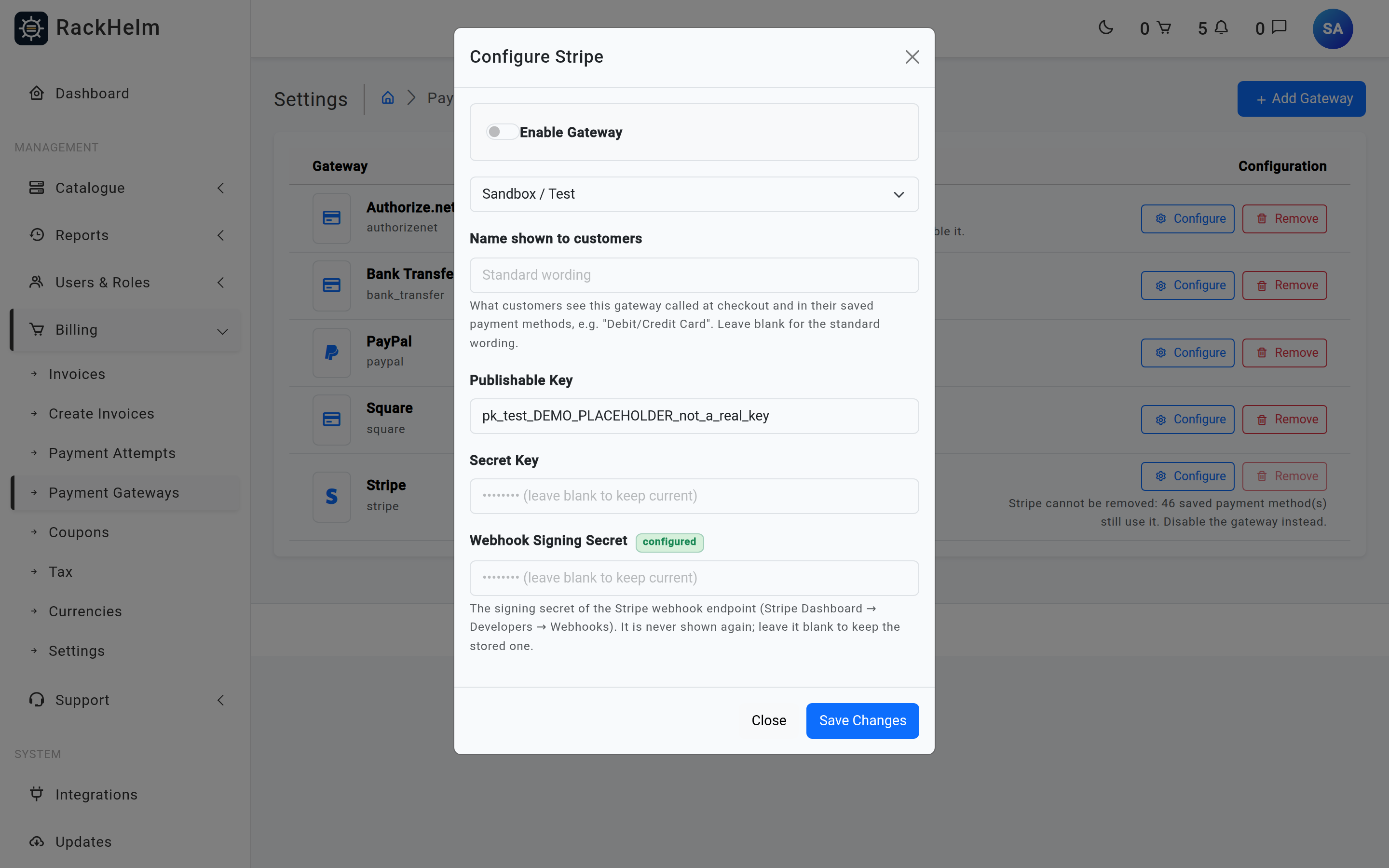
- Select Add Gateway and choose Stripe, or Configure on the Stripe row if you have already added it.
- Paste your Publishable Key (
pk_test_…orpk_live_…). - Paste your Secret Key (
sk_test_…orsk_live_…). - Tick Enable Gateway and select Save Changes.
Warning: The Mode dropdown does not change Stripe’s behaviour. Stripe uses a single API host and the key decides the environment, so a live secret key takes real money even while the list shows “Sandbox”. Treat the key prefix as the source of truth.
Note: The Secret Key field is always rendered blank. Leaving it blank on a later save keeps the stored key; only type in it when you are genuinely rotating the key.
Step 2 — Create the webhook endpoint in Stripe #
The webhook is the backstop that settles an invoice when the customer closes the browser mid-payment. Without it, a payment that Stripe accepted but whose return trip never completed leaves the invoice open.
- In the Stripe dashboard, open Developers → Webhooks → Add endpoint.
- Set the endpoint URL to your portal’s payment webhook:
https://your-portal.example.com/webhooks/payment - Subscribe to the events RackHelm acts on. The handler processes exactly one:
payment_intent.succeeded
Subscribing to anything else is harmless — unrecognised events are acknowledged and ignored — but adds noise.
- Save the endpoint and copy its Signing secret (
whsec_…).
Note: Create a separate endpoint in each Stripe environment you use. Test-mode and live-mode endpoints have different signing secrets, and RackHelm stores only one.
Step 3 — Store the signing secret #
RackHelm reads the signing secret from the Stripe gateway’s stored configuration under the key webhook_secret, but the admin form has no field for it. Set it once from the server, from the directory RackHelm is installed in:
php artisan tinker --execute="$g = AppModelsPaymentGateway::where('slug','stripe')->first(); $c = $g->config; $c['webhook_secret'] = 'whsec_REPLACE_ME'; $g->config = $c; $g->save(); echo 'saved';"Warning: Saving the Stripe dialog in the admin area replaces the gateway’s whole stored configuration with what the form submitted, and the form has no webhook-secret field — so the secret is wiped every time you save that dialog. Re-run the command above after any change to the Stripe keys, and re-test delivery from the Stripe dashboard.
Step 4 — Verify #
- In Stripe, use Send test webhook on the endpoint and pick
payment_intent.succeeded. A correctly configured portal returns200with{"status":"ok"}. 400withWebhook secret not configuredmeans step 3 has not taken effect.400withInvalid webhookmeans the stored secret does not match the endpoint’s signing secret — usually a test secret against a live endpoint or vice versa.- Place a small real order using a Stripe test card in test mode and confirm the invoice reaches
paid, the service provisions, and the customer receives the “Payment Successful” email.
What Stripe is used for, and how #
| Flow | What RackHelm does |
|---|---|
| Checkout | Creates a SetupIntent so the browser can collect card details, then a PaymentIntent for the cart total in the store currency. The capture is serialised per order with a 120-second lock and carries an idempotency key derived from the order and the card, so a double-submit cannot charge twice. |
| Paying an invoice in the client portal | Creates a PaymentIntent for the invoice’s stored amount, tagged with the invoice id in its metadata. An existing intent is reused only if its amount still matches and it is still payable; if a late fee has changed the total, the stale intent is discarded and a new one minted. |
| Saving a card | Creates or reuses a Stripe customer for the account, attaches the payment method, and confirms a SetupIntent with off_session usage. If the bank demands 3D Secure, the portal returns the customer to a challenge and completes the save afterwards. |
| Renewals | Creates an off-session, auto-confirming PaymentIntent against the saved method, attaching it to the Stripe customer first if it is not already. |
| Webhook | Resolves the invoice from the intent’s metadata.invoice_id, checks that the amount actually received covers the invoice total, then settles it. Retried deliveries are harmless: an already-paid invoice is detected and no second receipt is sent. |
Currency #
Checkout charges in the store currency (the currency setting, defaulting to GBP). Invoice payments from the client portal and background renewal charges are created in GBP regardless of that setting. If you operate in another currency, test both paths before going live.
Minimum amount #
An invoice total below £0.50 cannot be paid by card — the portal shows “Amount (£x) is too small to process via Stripe” instead of a payment form. The same floor applies when account credit covers most of an invoice: the split is adjusted so the card is charged at least 50p, with credit covering the rest.
Troubleshooting #
| Symptom | Cause and fix |
|---|---|
| Webhook returns 400 “Webhook secret not configured” | No webhook_secret stored, or it was wiped by saving the admin dialog. Re-run the command in step 3. |
| Webhook returns 400 “Invalid webhook” | The signing secret does not match, or a proxy is altering the request body — signature verification is computed over the raw payload. |
| Webhook returns 404 or 500 from the edge | Either the endpoint is behind authentication or a firewall, or there is no active Stripe gateway row — the handler looks one up and aborts with 404 when it cannot find it. /webhooks/payment is deliberately public and unauthenticated; its security comes from the Stripe signature. |
| Customer paid but the invoice is still open | Look for “Short payment on Invoice” in the application log — the intent collected less than the invoice total, most often because a late fee raised the total after the intent was minted. Reconcile by hand and mark the invoice paid. |
| “Could not initialize payment system” on the invoice page | The Stripe API call failed. Check the secret key is valid for the environment and look at the application log for the Stripe error message. |
| Card form never appears | The Publishable Key is blank, or the gateway is not active. The key is only published to the page when the gateway row is active. |
| Renewal charges fail with “User has no Stripe customer id” | The account never went through a Stripe flow. Ask the customer to add a card in the client portal, which creates the Stripe customer. |
| Renewal charges fail with “No saved payment method” | The customer has no default method, or their only method belongs to another gateway. The automatic charge run emails the customer in this case rather than failing silently. |
| “This payment method belongs to a different customer” | The card token was already attached to another Stripe customer. The customer must re-enter the card details. |
| Stripe elements are blocked in the browser console | A second Content Security Policy header is being sent by the web server, intersecting with RackHelm’s. Remove it — RackHelm’s own policy already allows js.stripe.com, hooks.stripe.com and api.stripe.com. |


