Some products cannot legally be sold until the customer has accepted a specific document — the clearest example being Nominet’s registrant terms on a .uk domain. RackHelm can force an “I have read and accept” tick per product at checkout, and record a versioned, timestamped proof of that consent against the order. This article covers how to switch it on, how it behaves and how to read the audit trail. It is written for operators.
Before you start — this feature is gated behind a migration #
Warning: Checkout agreements depend on a database table (
product_terms_pages) that is created by a migration which may not have been run on your install. Every part of the feature checks for that table first and quietly does nothing when it is missing — no error, and no agreements. Confirm the state of your install before relying on it.
How to tell whether it is active #
Open any product for editing and go to the Store & SEO tab. If you see a Checkout Agreements box listing your content pages, the feature is live. The box is hidden when there is nothing to list — either because the migration has not been run, or because the install has no content pages at all — so create a page first, then look again.
Running the migration #
From the RackHelm installation directory, run only this migration by path:
php artisan migrate --path=database/migrations/2026_08_19_000001_add_checkout_terms_acceptance.php --forceWarning: Do not run a bare
php artisan migrateon a live install. Other migrations may be sitting pending for reasons you did not choose, and a blanket run applies all of them. Always target the one file with--path=.
Note: The migration also adds an
order_idcolumn to thepage_acceptancestable, which belongs to the Legal Pages feature. If your install has no content pages at all, create and publish the pages you need first.
Attaching an agreement to a product #
- Create and publish the legal page the customer must accept.
- Open Catalogue → Catalogue & Groups and edit the product — for example your
.ukdomain product. - Go to the Store & SEO tab and find Checkout Agreements under Store Display Options.
- Tick every page the customer must accept before buying this product.
- Save the product.
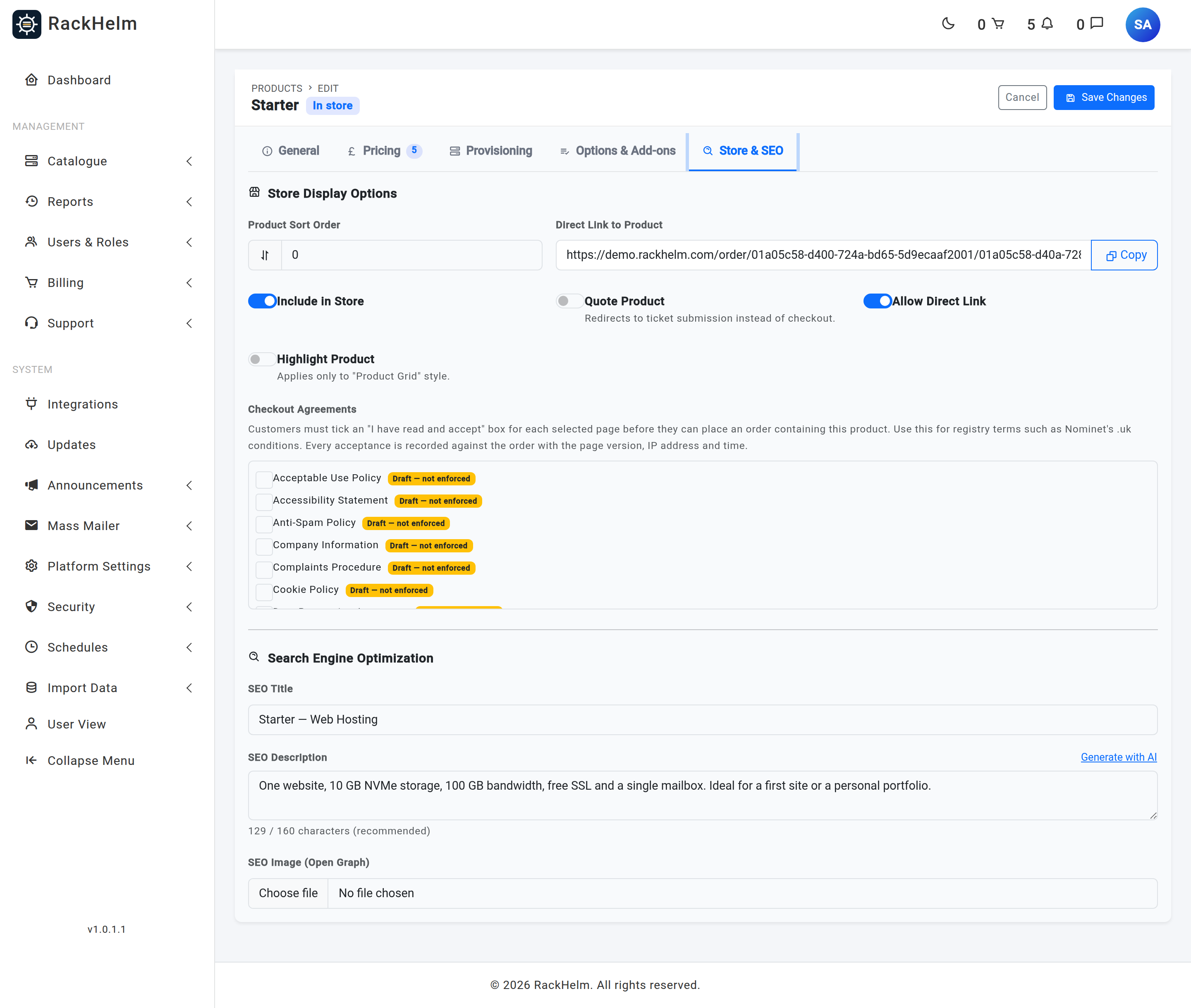
Note: Only published pages are enforced. This is deliberate: a customer cannot read a draft page, so forcing acceptance of one would dead-end every checkout containing that product. Attaching a draft is harmless — it lies dormant until you publish.
What the customer sees #
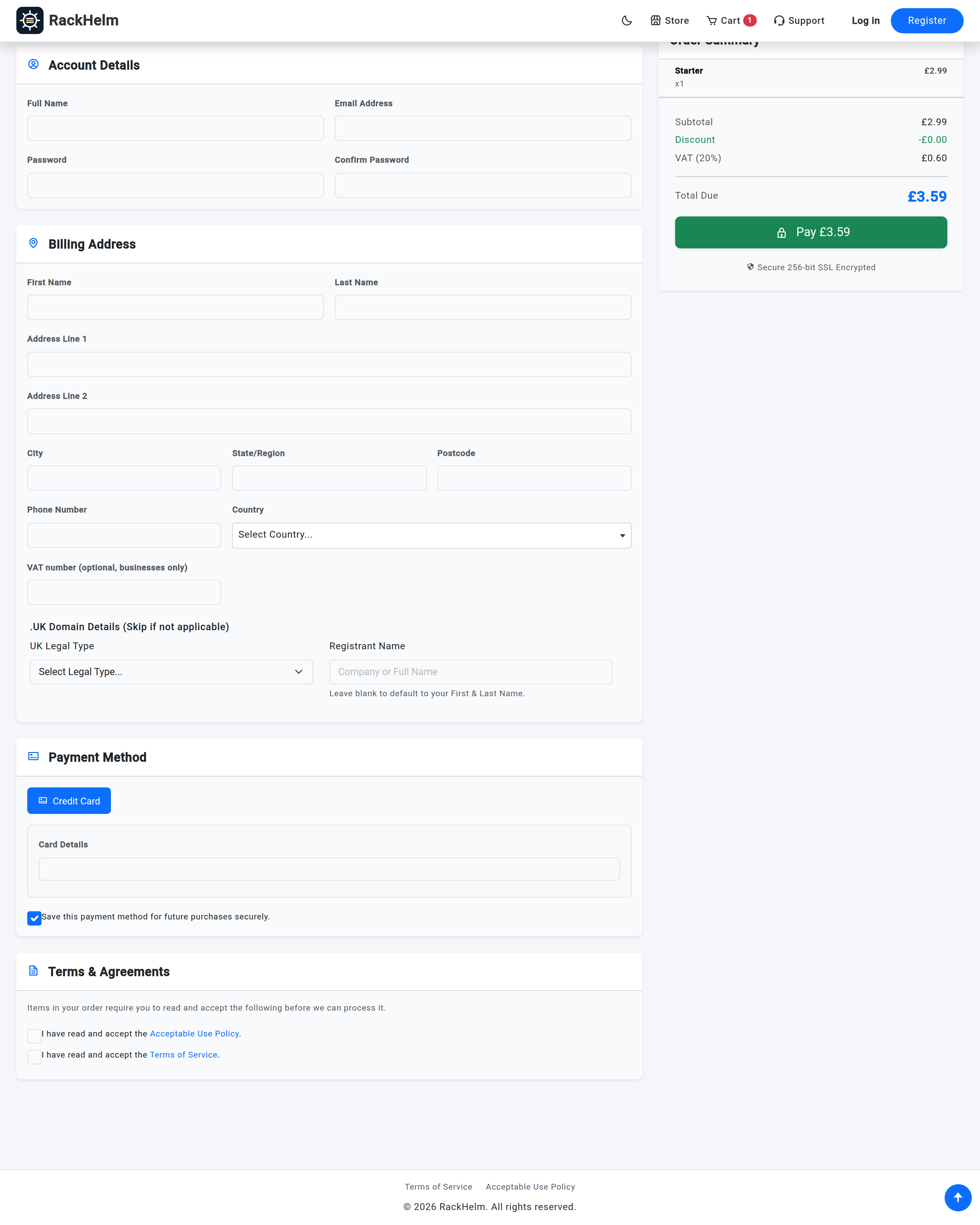
When a cart contains a product with attached agreements, the checkout page shows a panel reading “Items in your order require you to read and accept the following before we can process it.” Beneath it is one tick box per required page: I have read and accept the [page title]. The page title links to the live page, opening in a new tab.
Pages are listed once each and ordered by title, so a cart containing three .uk domains shows the Nominet terms once, not three times.
How the requirement is enforced #
There are two layers, and the second is the one that matters:
- The browser blocks submission and shows “Please accept all required agreements above to continue.”
- The server independently recomputes the required pages from the caller’s own cart and refuses the order unless every one of them was ticked, with the message You must read and accept “[page title]” before placing this order.
Note: The server check is not belt-and-braces, it is the real gate. The Stripe, Square and PayPal checkout paths submit the form directly from JavaScript, which fires no browser validation at all — without the server check those three gateways would have no enforcement whatsoever. The required pages are always derived from the cart on the server, never from anything the browser sends.
The check runs before the order is created, so a guest checkout that fails it does not even create the account.
The audit trail #
Once payment succeeds and the orders exist, RackHelm writes one acceptance record per required page per order that actually contains the requiring product. Each record holds:
| Field | What it proves |
|---|---|
| User | Who ticked the box. This is the acting user, so a sub-account checking out on behalf of the owner is recorded honestly as the sub-account. |
| Page | Which document was accepted. |
| Order | The order the consent was given for. Null only if no created order matched, which keeps the consent itself on record either way. |
| Version | The page’s version number at the moment of acceptance — the answer to “which wording did they agree to?” |
| Accepted at | Timestamp. |
| IP address | The customer’s IP. |
| User agent | The browser string, truncated to 1,000 characters. |
Records are also only written for boxes the customer actually ticked — the list is intersected with the posted ticks before anything is stored, so an audit row can never claim a consent that was not given.
Note: Writing the audit rows can never fail an order. It runs after the payment and the order both succeeded, and any problem is logged (look for
[CheckoutTerms]in the application log) rather than raised. A lost audit row is an operations problem, not a reason to unwind a paid order.
Not the same as re-consent #
RackHelm has a second, separate consent mechanism: a middleware that can re-prompt existing customers to accept an updated Terms or Privacy page when its version increases, at /terms/review. That feature is off by default and applies to the whole account rather than to a product. Checkout agreements are per product and fire at purchase; re-consent is per account and fires on the next login. They write to the same audit table, distinguishable by whether an order is attached.
Troubleshooting #
| Symptom | Cause and fix |
|---|---|
| No Checkout Agreements box on the product editor | The migration has not been run. See the command above. |
| The box is absent even though the migration has run | The install has no content pages, so there is nothing to list and the box is hidden. Create and publish a page first. |
| The agreement is attached but never appears at checkout | The page is still a draft — the list marks it “Draft — not enforced”. Publish it. |
| The panel appears but the order goes through without a tick | Should not be possible; the server refuses it. If you can reproduce it, check the log for [CheckoutTerms] failed to resolve required pages — on an internal error the service deliberately degrades to “nothing required” so checkout never breaks, which would also disable enforcement. |
| The same document is demanded several times | It is not — pages are de-duplicated and shown once. If two different pages have similar titles, rename one. |
| An acceptance record has no order attached | Either it came from the re-consent flow rather than checkout, or no created order contained the requiring product. The consent itself is still valid and recorded. |
| You need to prove what a customer agreed to | Read the acceptance record’s version number, then compare it with the page’s version history. The version, not the current page text, is the record of what they saw. |


