Guest tickets let someone who has no account with you raise a support request from a public contact form. RackHelm holds every submission behind an email-confirmation step: nothing is stored as a ticket, and no account is created, until the sender clicks a link sent to the address they typed. This article is for whoever publishes and staffs that form.
Before you start #
Note: Turn the feature on with Allow guest tickets in Ticket settings. It is off on a fresh install, and while it is off
/contactreturns a 404 and any submission is rejected outright.
You also need at least one department, since the form makes the visitor choose one.
Tip: Turn on a captcha for the ticket forms at the same time. Under Security → Captcha Protection, pick a provider — Cloudflare Turnstile, hCaptcha or Google reCAPTCHA v2 — and enable it for the ticket form. A public form that emails whatever address is typed into it is worth protecting.
The contact form #
The form lives at /contact and needs no login. Link to it from your marketing site and your portal footer.
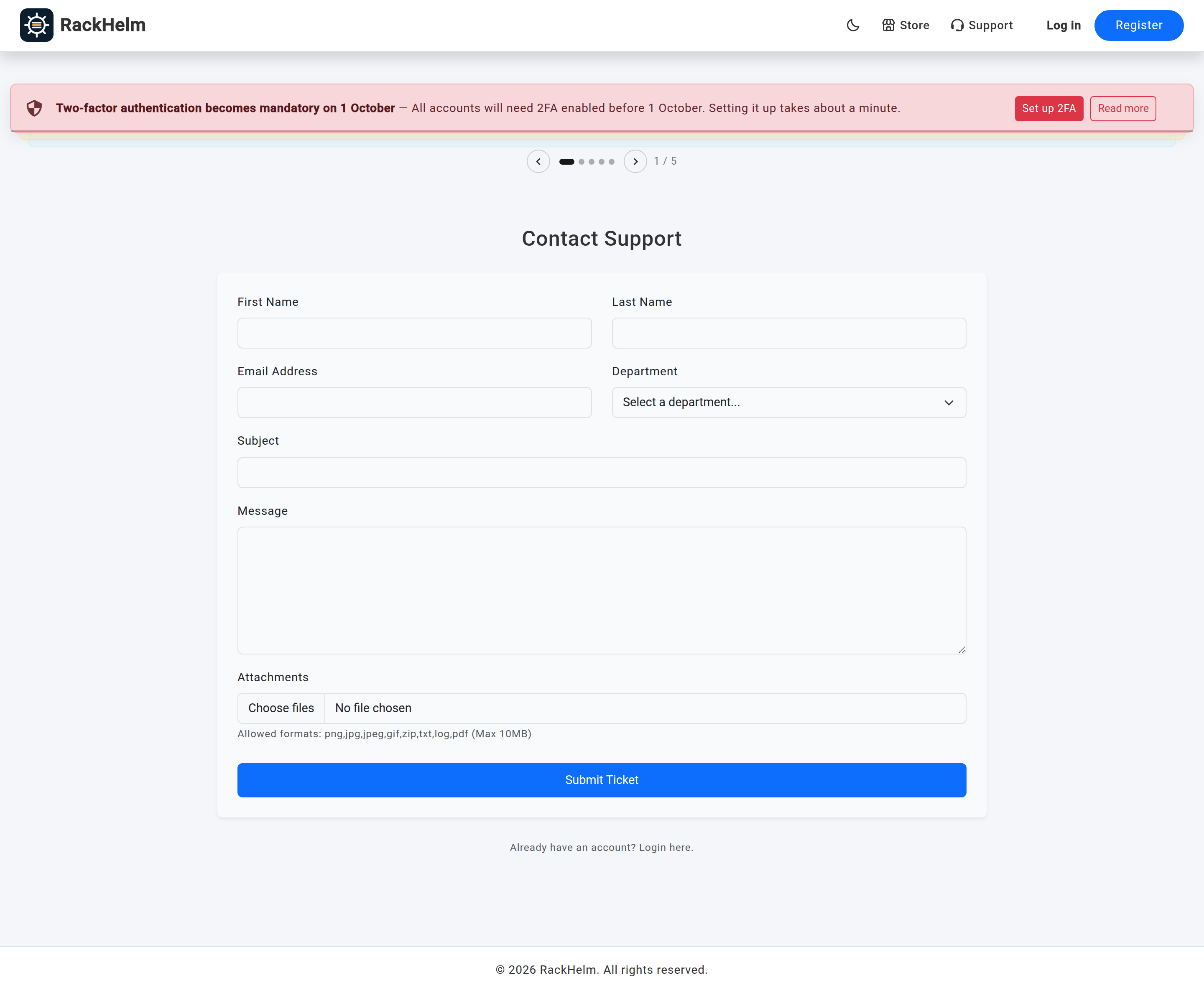
| Field | Rules |
|---|---|
| First Name / Last Name | Both required, up to 191 characters each. |
| Email Address | Required, must be a valid address, up to 191 characters. The confirmation link goes here. |
| Department | Required. Lists every department you have. |
| Subject | Required, up to 191 characters. |
| Message | Required. Sanitised before it is stored. |
| Attachments | Optional, and only shown when attachments are enabled. Same type and size limits as everywhere else — see Ticket attachments. |
A “Already have an account? Login here.” link sits under the form for customers who have wandered onto the wrong page.
Note: The contact form never shows the Related package picker, whatever Ask which package the ticket is about is set to in Ticket settings. A logged-out visitor has no account to draw packages from, so the field would have nothing to offer. Guest tickets therefore always arrive with no package attached; an agent can add one afterwards from the ticket’s properties panel once the account exists.
The verification step #
Submitting the form does not create a ticket. Instead:
- The submission — names, address, department, subject and sanitised message — is parked, with a 48-hour expiry. Any uploads are parked privately alongside it.
- An email titled “Verify your support ticket” is sent to the address on the form, carrying a signed link that expires with the submission.
- The page returns “Almost there — we have emailed you a link to confirm your address. Your ticket reaches our support team as soon as you click it.”
- Clicking the link creates the ticket, opens it in the chosen department at Medium priority, moves the parked files onto the first message, and shows the visitor their ticket reference.
- The submitter gets the standard “Support Ticket Created” email, and your staff get the usual new-ticket alert.
Note: The confirmation message is identical whatever address is used — unknown, existing customer, or an address that has submitted before. That is deliberate: a form that answered differently would let anyone test whether a given address has an account with you.
Why the extra step exists #
Without it, an anonymous visitor could make your platform send email to any address they liked, from your domain, and could write files onto your server before proving anything. Parking the submission means an unconfirmed request costs you a database row and nothing else.
What happens to unconfirmed submissions #
They expire after 48 hours. The hourly tickets:prune-pending clean-up removes expired submissions and their parked uploads, so abandoned or malicious submissions leave nothing behind. If a visitor follows a link after it has expired they are told “That verification link has expired. Please submit your ticket again.”; an altered or malformed link returns a 401.
Warning: If your outbound mail is not working, the contact form is a silent dead end — visitors see the “check your email” message and no ticket ever reaches you. Send a test submission to an address you control before publishing a link to
/contact.
Guest accounts #
When a confirmation link is followed and the address has no account, RackHelm creates one and flags it as a guest. It carries a random password, so it cannot be signed into as it stands, and it exists purely to own the ticket. If the address does already have an account by then — the visitor signed up between submitting and confirming — that account is used instead and the ticket appears in their portal like any other.
Guest accounts are also created by inbound email on routes that accept unregistered senders. Either way they are held apart from your real customers: Users & Roles → All Users keeps them behind their own Guests segment rather than in the default list, and the dashboard and reports leave them out of new-customer counts.
How a guest from email is named #
A guest created from the contact form is named from the First Name and Last Name the visitor typed. A guest created by an inbound email has no such form, so RackHelm now takes the name from the sender’s From display name — the part before the angle brackets in Jane Smith <jane@example.com> — splitting it on the first space into first and last name, exactly as checkout does. With no display name at all, it falls back to the local part of the address, so jane@example.com becomes a guest named “jane”.
The display name is whatever the sending client wrote, so it is sanitised before it is stored: invalid UTF-8 is scrubbed, bidi overrides and zero-width characters that could disguise a name are removed, control characters and line separators collapse to spaces, and the result is capped at 255 characters. Without that, a strict MySQL install rejects the row and the ticket is lost along with it.
Warning: A guest’s name is still text an unauthenticated stranger chose. Treat it as untrusted wherever you paste or export it — it is escaped on RackHelm’s own screens, but it is not a verified identity, and on a route where sender authentication is not enforced it is not even a verified mailbox.
The quarantine placeholder #
One account in the Guests segment is not a person: unverified-sender@unverified.invalid, named “Unverified Sender”. It is created on demand, flagged as a guest and disabled, and it owns every [UNVERIFIED SENDER] ticket that the inbound-mail pipeline quarantines. Leave it alone — it is deliberately not routable, and RackHelm refuses to file quarantined mail against that address if it ever finds a real, enabled account holding it, logging “The unverified-sender placeholder address is held by a real account; refusing to file quarantined mail against it.” See Email routing and IMAP piping.
Working a guest ticket #
A guest ticket behaves exactly like any other from that point on. It sits in the queue, carries a department and priority, accepts replies, and emails the guest at the address they verified. Replies from that address are threaded back onto the thread by email, subject to the checks in Email routing and IMAP piping.
Tip: If a guest turns into a customer, they keep the same account and the same ticket history — no merge is needed, because the account was keyed on their email address from the start. Once they own packages, the ticket’s Related package field can be filled in retrospectively from the properties panel.
Troubleshooting #
| Symptom | Cause and fix |
|---|---|
/contact returns 404 |
Allow guest tickets is off in Ticket settings. |
| Visitors say they submitted but no ticket exists | They did not click the confirmation link, or the email did not reach them. Check your outbound mail and spam folders. |
| “Invalid or expired verification link.” (401) | The link was altered — a mail client rewriting or truncating the URL is the usual culprit. |
| “That verification link has expired.” | More than 48 hours passed. The visitor must submit again. |
| “Captcha verification failed. Please try again.” | The captcha keys are wrong, or the widget did not load. Check Security → Captcha Protection. |
| The form has no department dropdown entries | No departments exist. Create one. |
| No package field on the contact form | Expected. The picker is only ever shown to signed-in customers. |
| Guests from email are all named after their address | Their mail clients send no From display name, so the local part of the address is used. |
| Spam through the contact form | Enable a captcha for the ticket form. The public routes are already rate-limited to 60 requests a minute. |
| The client list is filling with unfamiliar names | Guest accounts from the contact form and inbound email. Expected — they sit in the Guests segment, not the default list. |


