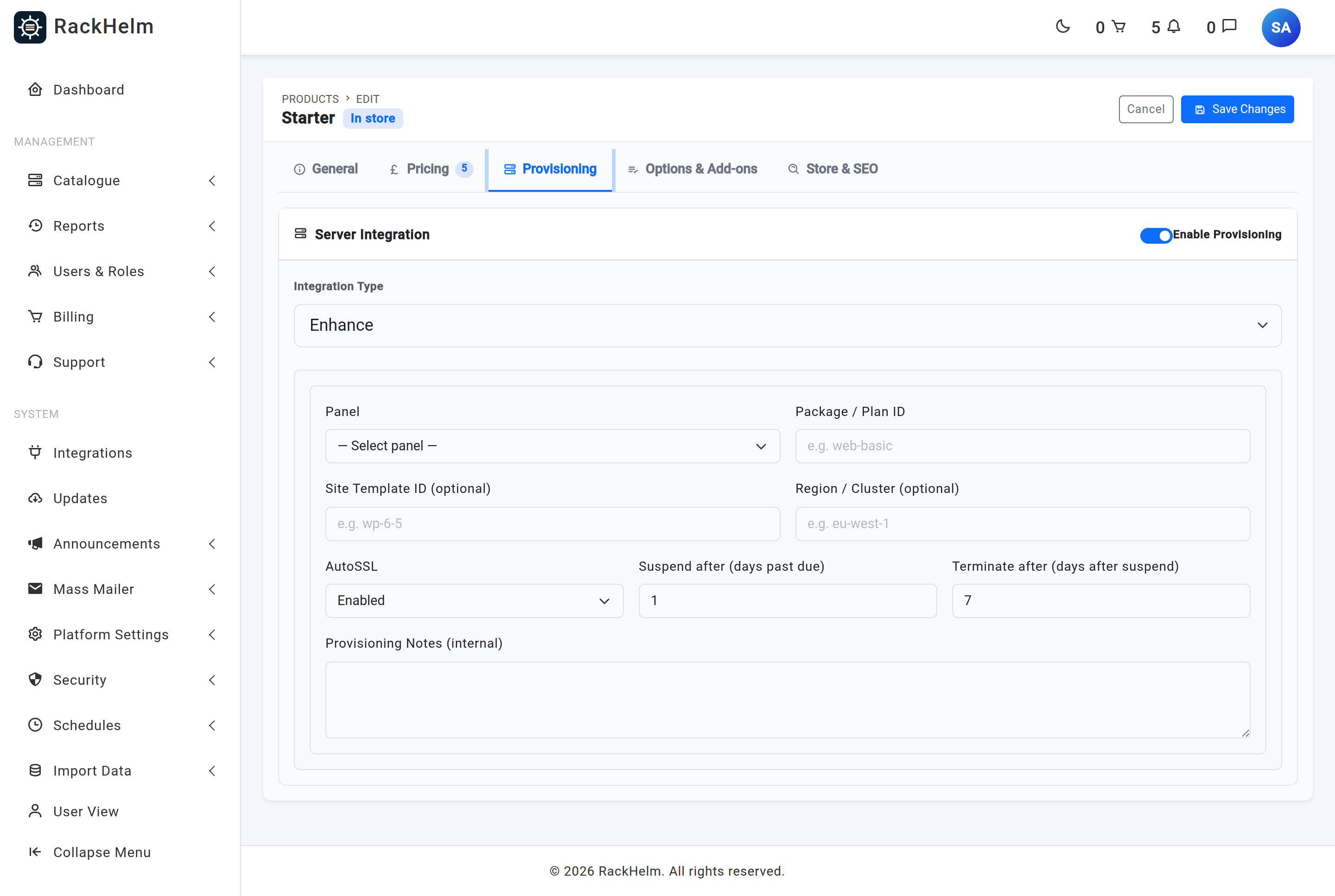
A product’s Provisioning tab sets the resources a service starts with. Custom fields let a customer choose some of them at checkout, and add-ons let them buy more later. This article explains how those three sources combine, which variable names RackHelm recognises, and what happens to a live server when an upgrade is bought. It is written for operators building a catalogue.
The three sources, in priority order #
When a service is provisioned, each resource value is resolved from the first source that supplies it:
- A variable on the order — a custom field the customer filled in, or a value carried by an add-on they bought at the same time. Highest priority.
- The product’s stored limits — what the Provisioning tab saved.
- The driver’s built-in default.
Warning: The product’s limits are a starting specification, not a ceiling. A customer-supplied value always wins and is not clamped down to the product’s figure — that is deliberate, because a paid upgrade is meant to exceed the base package. A custom field of type number is validated only as numeric and not negative, so a free-text number field lets a customer ask for any size they like. Offer resource choices as a dropdown with fixed options: dropdown values are validated against the options you configured.
Variable names RackHelm recognises #
These names are panel-agnostic — the same variable drives Pterodactyl and GameCP. Create them under Catalogue → Custom Fields and assign them to the product, or set a fixed value on the product or its group.
| Variable | Applies to | What it sets |
|---|---|---|
ServerMemory |
Pterodactyl, GameCP | Memory in MB. |
ServerCPU |
Pterodactyl, GameCP | CPU as a percentage. |
ServerDisk |
Pterodactyl, GameCP | Disk in MB. |
ServerSwap |
Pterodactyl | Swap in MB. |
ServerIO |
Pterodactyl | I/O weight (10–1000). |
ServerThreads |
Pterodactyl | Pinned CPU threads. |
ServerBackups |
Pterodactyl | Backup slots. |
ServerDatabases |
Pterodactyl | Database slots. |
ServerAllocations |
Pterodactyl | Extra port allocations. |
LocationID |
Pterodactyl, GameCP | Where to deploy. Pterodactyl requires it; GameCP auto-places without it. |
DomainName |
Enhance (and the hosting panels) | The site’s primary domain. Enhance orders fail without it. |
environment.KEY |
Pterodactyl, GameCP | Anything after the prefix is passed straight through as a panel environment variable, overriding the egg or game template’s default for KEY. |
Tip:
environment.variables are how you let a customer set something game-specific — a world seed, a server name, a Steam account token — without giving them permission to edit startup variables in the panel.
Mapping a panel plan to a product #
Hosting panels sell plans rather than individual limits, so those products carry a plan identifier instead of a resource list:
| Provider | Field on the product | What to put in it |
|---|---|---|
| Enhance | Package / Plan ID (required) | The numeric Enhance plan ID. RackHelm assigns it to the customer, which creates the subscription. |
| cPanel | Package / Plan ID (required) | The WHM package name. |
| Plesk | Service Plan Name / ID | The Plesk service plan. |
| CyberPanel, ISPmanager, DirectAdmin | Package / Plan ID | The panel’s own package name. |
| Pterodactyl | Nest + Egg and the resource boxes | No plan concept — resources are set individually. |
| GameCP | Game Template and the base limit boxes | Blank limits inherit the game template’s own limits. |
Upgrades: what happens to a live server #
Buying an add-on does not re-provision anything. The add-on becomes a child order item, and a recalculation is dispatched for the parent service. That happens when the add-on is first invoiced, when an upgrade’s delta invoice is paid, and when an add-on is cancelled. You can also run it by hand: open Users & Roles → Active Packages → the package and press Recalculate Resources.
Only child items whose status is Active are counted. A cancelled add-on drops out of the calculation on the next run.
| Provider | What the recalculation does |
|---|---|
| Pterodactyl | Recomputes the limits from the product’s base values plus every active add-on, reads the server’s current allocation, and pushes a build update to the panel. Add-on items still sitting at pending, queued or failed are marked provisioned once it succeeds. |
| GameCP | Recomputes memory, CPU and disk and patches the server’s resource limits. A value of zero is left out, so the game template’s own limit stands. |
| Enhance | Switches the subscription to a different plan. The add-on must carry a plan_id (or package_id) variable holding the new plan. |
| Custom API | Sends a resource_change event to your own endpoint carrying the recomputed variable bag; what happens next is up to that endpoint. |
| Everything else | Nothing — the recalculation logs that no job is mapped for that integration type and exits. |
Add-on values replace the base value rather than adding to it. An add-on that sets ServerMemory to 4096 gives a 4 GB server, not “base plus 4 GB”. Where several active add-ons set the same variable, the last one processed wins.
Warning: In this build the Pterodactyl recalculation misroutes two variables: an add-on’s
ServerSwapis applied to disk, and itsServerDiskis applied to backups. The other names —ServerMemory,ServerCPU,ServerIO,ServerThreads,ServerBackups,ServerDatabasesandServerAllocations— are applied to the resource they name. GameCP’s equivalent job maps memory, CPU and disk correctly. Test any Pterodactyl upgrade add-on against a real server before selling it, and avoidServerSwapandServerDiskon upgrade add-ons until this is corrected.
Cancelling an add-on #
Cancelling an add-on that has no integration of its own marks it cancelled locally, syncs the parent order’s status and triggers the same recalculation, so the server is resized back down from the remaining active add-ons. Add-ons that do have their own integration are provisioned and terminated as separate services.
Troubleshooting #
| Symptom | Cause and fix |
|---|---|
| Customer’s server has the base resources despite an upgrade | The add-on item is not Active, so it is not counted, or its variable name does not match the list above. Check the add-on’s custom field key exactly — the names are case-sensitive. Press Recalculate Resources on the package to retry. |
| Upgrade changed the wrong resource on Pterodactyl | The known ServerSwap and ServerDisk misrouting described above. |
| “Missing LocationID” on a Pterodactyl order | No LocationID on the order, product or group. Assign one, or offer it as a dropdown on the order page. |
| “Missing DomainName” on an Enhance order | Add a DomainName custom field to the product and show it on the order page. |
| Customer ordered an implausible amount of RAM | A free-text number custom field. Change it to a dropdown with fixed options — dropdowns are validated against their configured values. |
| Enhance upgrade did nothing | The add-on carries no plan_id or package_id, so there was no plan to switch to. |
| Nothing happened at all after an upgrade | The parent product’s integration type has no recalculation job (only Pterodactyl, GameCP, Enhance, eNom and Custom API are handled). Adjust the service by hand. |


