eNom is the most complete registrar integration in RackHelm: registration, transfer, renewal, nameservers, in-portal DNS records, registrar lock, EPP code retrieval, ID Protect privacy, bulk availability search, name suggestions, a TLD price importer and SSL certificate resale all run through it. This article is for operators; for how domain orders flow through the platform in general, read How domain registration works in RackHelm first.
Before you start #
- An eNom reseller account, and the API username and password for it.
- This server’s outbound public IP added to your eNom account’s API allowlist. eNom refuses API calls from unlisted addresses with User not permitted from this IP address.
- The
edit_integrationspermission.
Get your credentials #
The API username is your eNom reseller login. The password is either the account password or an API token issued in the eNom reseller portal. Add this server’s IP to the API allowlist in the same portal — RackHelm can tell you which address it will present: set Platform Settings → General & System → External IP and eNom calls will carry that value.
Configure the panel #
- Open Integrations → eNom (
/admin/panels/enom). - Fill the fields below.
- Press Test API. RackHelm runs a
checkcommand againstexample.com; a green OK means credentials and IP allowlisting are both right. - Press Save.
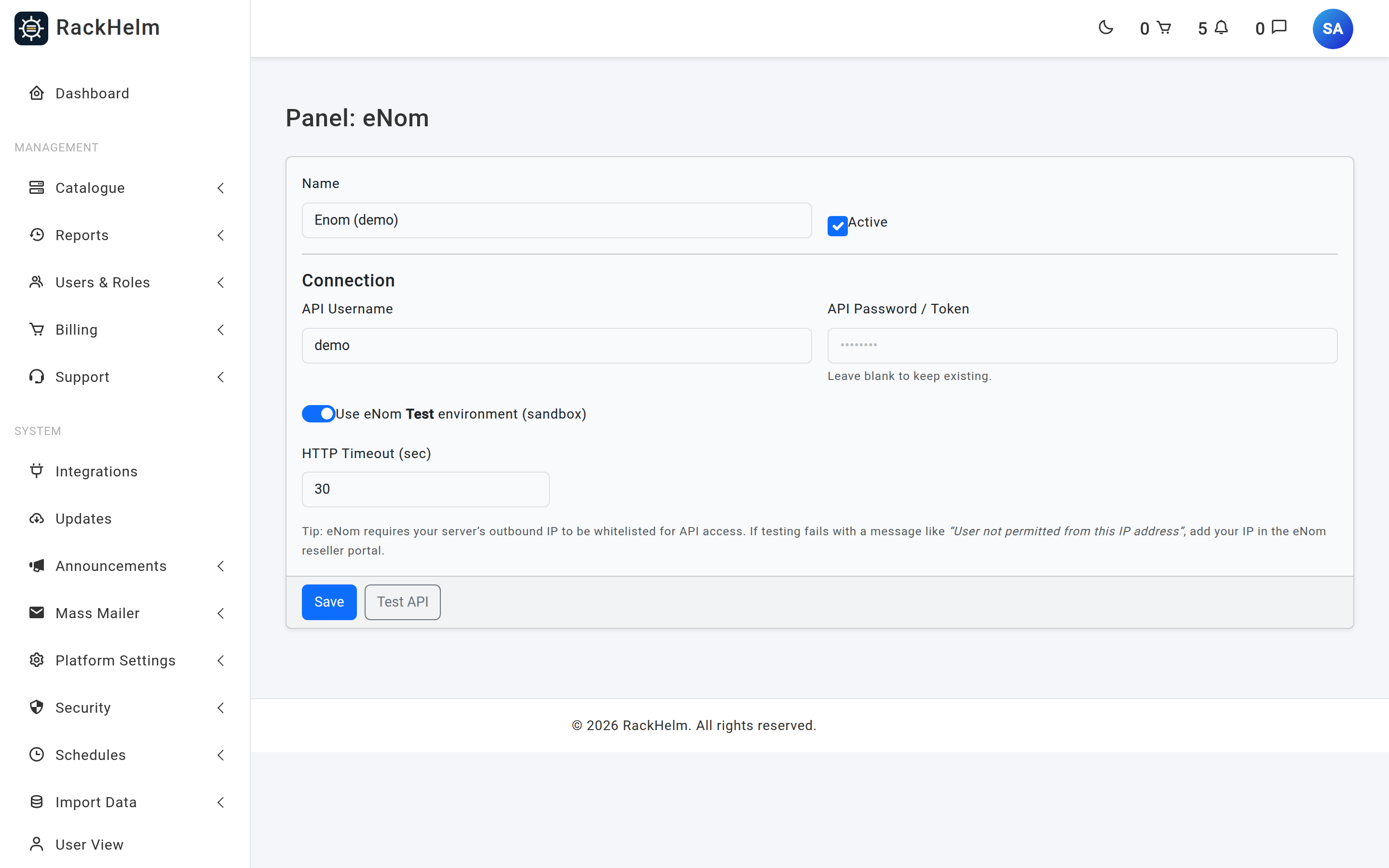
Field reference #
| Field | What it does |
|---|---|
| Name | Display label on the Integrations page. Defaults to eNom. Up to 120 characters. |
| Active | Master switch. An inactive panel is not offered as an integration type on products. |
| API Username | Required. Your eNom reseller login, sent as uid. |
| API Password / Token | Sent as pw. Never rendered back into the page — leave blank to keep the stored value. |
| Use eNom Test environment (sandbox) | Switches the endpoint between resellertest.enom.com and reseller.enom.com. A friendly mode of test or live is stored alongside it. |
| HTTP Timeout (sec) | Seconds to wait for eNom. Defaults to 30; minimum 5. |
Note: The sandbox at
resellertest.enom.comis a separate account with its own credentials and its own IP allowlist. Test-account credentials will not authenticate against the live endpoint, or the reverse.
Put TLDs on sale #
Fastest route is the bulk importer — see Importing TLD pricing from eNom. To do it by hand: create a product named after the TLD (.com, including the leading dot), open its Provisioning tab, set Integration Type to Enom, and enable provisioning. The product name is how the driver derives the TLD, so it must match exactly.
What eNom supports #
| Capability | Behaviour |
|---|---|
| Registration | Purchase, with registrant contact taken from the order’s address (falling back to the user profile) and the term derived from the billing cycle. |
| Transfer | Requires an EPP/auth code on the order. Completion is reconciled later by the transfer sync job. |
| Renewal | Extend for the billing cycle’s whole years. |
| Nameservers | Up to 5 — the domain page refuses to add a sixth row. |
| DNS records | Read and write, but only while the domain uses eNom’s own name-services.com nameservers. |
| Registrar lock | Read and toggle from the customer’s domain page. |
| EPP code | Unlocks the domain, then requests the auth code. eNom returns it directly or emails it to the registrant. |
| WHOIS privacy | eNom ID Protect, added at registration when the order carries a truthy DomainPrivacy variable. |
| Availability | Bulk checks, up to 30 names per call, plus name suggestions. |
| SSL certificates | Sold through the same panel credentials — see Selling SSL certificates. |
| Suspend / unsuspend | Not implemented; domains have no suspend concept. |
.uk domains through eNom #
When the TLD ends in uk, the driver also sends the registrant’s legal type and the name the domain is registered for. Those come from the customer’s address record: UK Legal Type (IND, FIND, LTD, PLC, PTNR, LLP, STRA, RCHAR, FCORP, OTHER — defaulting to IND) and Registrant Name, which falls back to the customer’s first and last name. If you sell .uk seriously, consider going direct to the registry instead — see Selling .uk domains through Nominet.
The End User IP #
eNom wants an end-user IP on each call. RackHelm resolves it in this order: Platform Settings → General & System → External IP, then the current request’s IP, then the resolved server hostname, then 127.0.0.1. Setting the company setting explicitly is worth doing — it is deterministic, and background jobs have no request IP to fall back on.
Troubleshooting #
| Symptom | Cause and fix |
|---|---|
| Test API shows “User not permitted from this IP address” | The server’s outbound IP is not on eNom’s API allowlist. Add it in the eNom reseller portal — to the sandbox account too if you are testing there. |
| Test API shows “No saved password; please enter it.” | You left the password blank and nothing is stored yet. Type it once and test again. |
| “Enom Critical Error: Server ignored parameters.” | eNom returned its URL-interface banner instead of XML, which almost always means the IP allowlist again. |
| “Enom returned invalid XML” | Something other than eNom answered — a proxy, a captive portal or an outage. Check outbound HTTPS from the server. |
| “Enom HTTP Error: the registrar could not be reached.” | Transport failure. Raise the timeout if the network is slow; the message is deliberately generic because eNom credentials travel in the query string and must never reach the log. |
| Registration fails with “Missing SLD or TLD.” | The order item has no DomainName variable, or the product is not named after its TLD. |
| Bulk search returns nothing | Check errors are logged but not thrown, so an allowlist problem shows as “everything unavailable”. Look for [Enom] 'Check' command reported errors in storage/logs/laravel.log. |
| DNS tab missing on a customer’s domain | The domain is not on eNom’s name-services.com nameservers. Records are managed wherever the domain is delegated. |
| Cannot add a sixth nameserver | eNom’s limit is five. |
| Live details on the domain page look stale | They are cached for 15 minutes. The customer’s Refresh Data button clears both the details and DNS caches. |


