NameSilo is the simplest registrar integration to set up — one API key and nothing else. It is also the narrowest: it registers, transfers, renews, reads domain details, sets nameservers and toggles the registrar lock, but has no EPP-code retrieval, no bulk availability search and no in-portal DNS editing. This article is for operators; for how domain orders flow through the platform in general, read How domain registration works in RackHelm first.
Before you start #
- A NameSilo account with API access and an API key.
- This server’s outbound IP added to your NameSilo API configuration. Calls from unlisted addresses are rejected.
- The
edit_integrationspermission.
Configure the panel #
- Open Integrations → NameSilo (
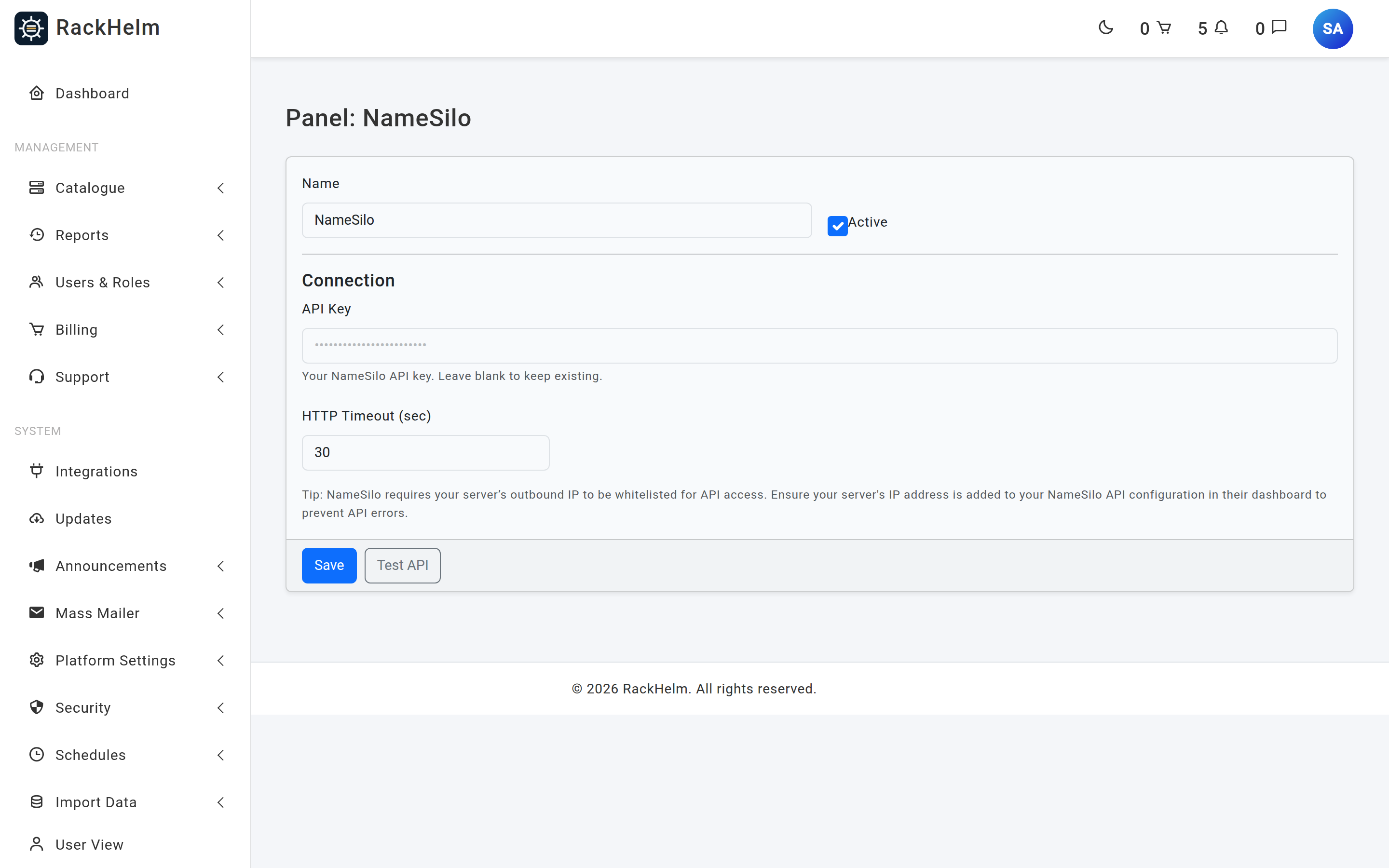
/admin/panels/namesilo). - Paste the API key and set the timeout.
- Press Test API. RackHelm calls
getAccountBalance; success reports your account balance, which is a stronger signal than a bare 200 — it proves the key can actually spend. - Press Save.
Field reference #
| Field | What it does |
|---|---|
| Name | Display label. Defaults to NameSilo. Up to 120 characters. |
| Active | Master switch. An inactive panel is not offered as an integration type on products. |
| API Key | Sent as key on every call. Never rendered back into the page — leave blank to keep the stored value. |
| HTTP Timeout (sec) | Seconds to wait for NameSilo. The field defaults to 30 and enforces a minimum of 5; when no timeout has been stored at all the driver falls back to 60. |
Warning: The NameSilo panel has no sandbox switch. Everything you do through it hits the live NameSilo account and spends real credit. NameSilo does operate an OTE environment, but there is no field to select it — treat every test order as a real purchase.
Put TLDs on sale #
There is no bulk price importer for NameSilo. Create each TLD product manually under Catalogue → Catalogue & Groups, named after the extension with its leading dot (.com), then set Integration Type to NameSilo on the product’s Provisioning tab. The product name is how the driver builds the domain, so it has to be exact.
What NameSilo supports #
| Capability | Behaviour |
|---|---|
| Registration | registerDomain. The contact block (name, address, city, state, postcode, country, email, phone) is POSTed rather than put in the URL. |
| Transfer | transferDomain. An EPP/auth code is required — without one the driver fails with “EPP Code is required for transfer.” |
| Renewal | renewDomain for the billing cycle’s whole years. |
| Nameservers | Supported from the customer’s domain page. |
| Registrar lock | Read and toggle. |
| WHOIS privacy | Set at registration only: a truthy DomainPrivacy order variable sends private=1. There is no method to enable privacy afterwards. |
| Availability | One name per call — there is no bulk check, so a group search across many NameSilo TLDs is one call per TLD. |
| EPP code | Not implemented. Customers wanting to transfer away must be given the code from the NameSilo panel by hand. |
| DNS records | Not implemented in RackHelm. |
| SSL certificates | Not offered. NameSilo’s public API has no SSL operations, so it cannot be automated. |
| Suspend / unsuspend | Not implemented; domains have no suspend concept. |
Note: Registrations are sent with
auto_renew=0. Renewal is driven by RackHelm’s own billing — the domain is renewed when the customer’s invoice is paid, not automatically at NameSilo. Do not also enable auto-renew in the NameSilo panel or you will pay twice.
Importing your existing NameSilo domains #
NameSilo is one of the registrars the domain importer covers. Run php artisan domains:sync-providers first, then work through Importing existing domains from a registrar. The NameSilo sync lists your domains and fetches expiry and lock status per domain for anything not seen in 24 hours, so the first run on a large portfolio takes a while.
Troubleshooting #
| Symptom | Cause and fix |
|---|---|
| Test API shows “No saved API key; please enter it.” | The field was left blank and nothing is stored. Paste the key once and test again. |
| Test API shows “Connected, but no balance data returned.” | NameSilo answered without a balance — usually an API-level rejection. Check the key is active and the IP is allowlisted in the NameSilo dashboard. |
| Every call fails with an API error | NameSilo returns a numeric reply code; anything other than 300 is a failure. The message is passed through to the admin with credentials scrubbed. |
| Transfer order fails immediately | No EPP code on the order. Unlike Nominet, NameSilo transfers cannot start without one — make the EppCode variable required on your transfer products. |
| Domain page shows no EPP Code | Expected: the driver has no getEppCode(). Retrieve it from the NameSilo panel and give it to the customer. |
| Group availability search is slow | No bulk check exists, so each TLD is one round trip. Keep the number of NameSilo TLDs in a searchable group modest, or put high-traffic TLDs on a registrar that supports bulk checks. |
| Sync job logs “NameSilo Sync Failed” | Look in storage/logs/laravel.log. The key is scrubbed from the message, so check the key and IP allowlist directly. |


