Nominet is the .uk registry, and RackHelm talks to it directly as a registrar member. It is the odd one out among the six integrations: there is no REST or HTTP API, no API key and no sandbox URL. RackHelm opens an EPP session over TLS on TCP port 700 and speaks XML. This article is for operators; for how domain orders flow through the platform in general, read How domain registration works in RackHelm first.
Warning: The Nominet driver has not been verified against a live Nominet tag. It implements Nominet’s EPP profile as published, but no real registration has been made through it. Nominet requires testing in OT&E or the testbed before going live — do that, then place one real .uk order before selling.
EPP, not REST — what that changes #
- Transport. A raw TLS socket on port 700, not HTTPS. If your host blocks unusual outbound ports, this integration will not connect at all.
- Credentials. Your IPS TAG and an EPP password, not a key. The password is set in Nominet Online Services and Nominet requires a minimum of 14 characters.
- Sessions. Each operation opens a session, logs in, runs its commands, logs out and closes — always in a
finallyblock, so an EPP error can never leave a session hanging. - IP allowlisting is mandatory. Nominet only accepts connections from addresses registered under Tag Settings → EPP in Nominet Online Services, per environment. Live changes can take up to a day.
- Separate test credentials. The test environments are not the live account — Nominet issues separate test credentials for OT&E and the testbed.
Before you start #
- A Nominet registrar (channel partner) account and your IPS TAG.
- An EPP password set in Nominet Online Services, at least 14 characters.
- This server’s outbound IP registered under Tag Settings → EPP for the environment you are configuring.
- The
edit_integrationspermission.
Configure the panel #
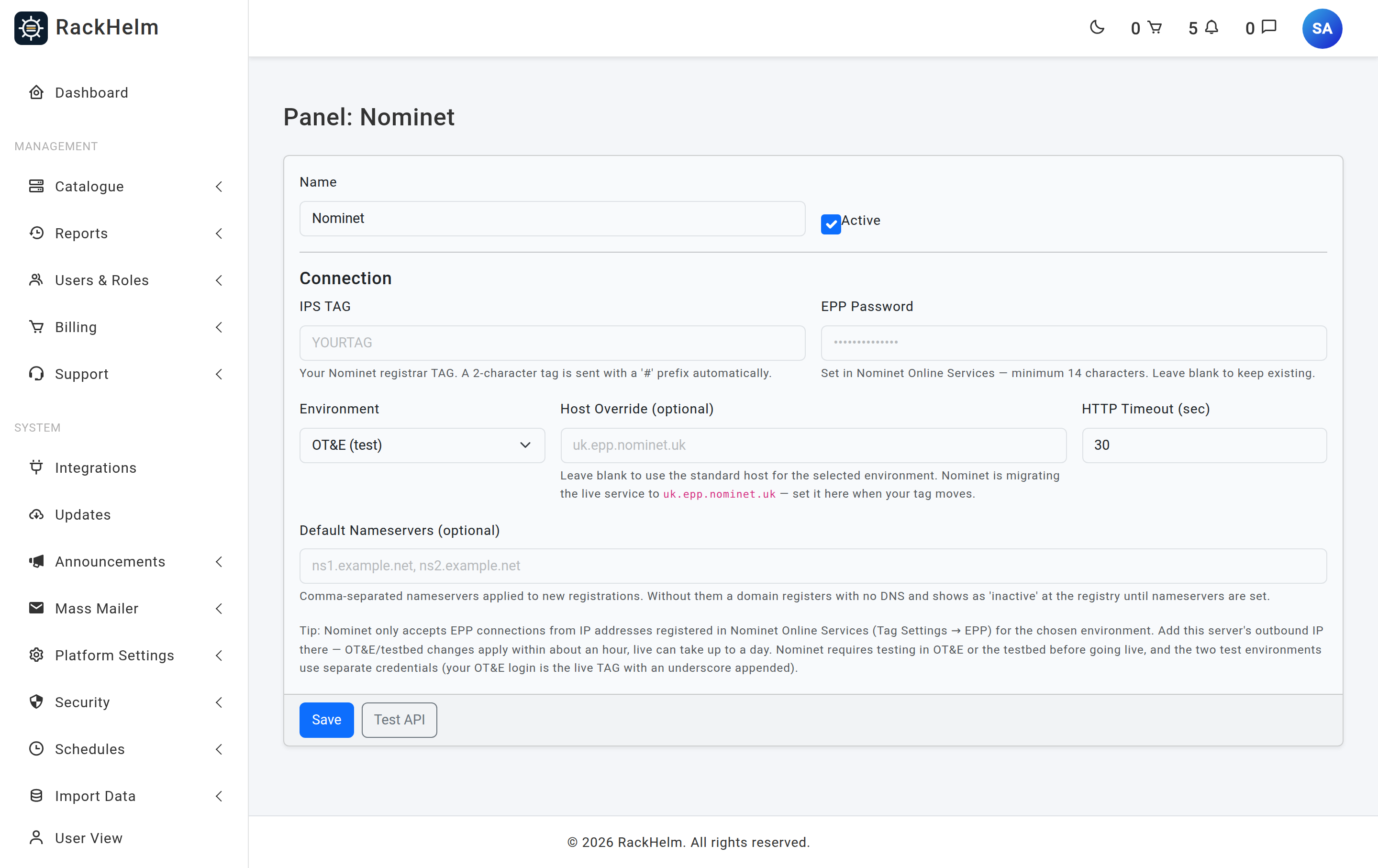
- Open Integrations → Nominet (
/admin/panels/nominet). - Start on OT&E (test) with your OT&E credentials.
- Press Test API. RackHelm connects, reads the EPP greeting, logs in and logs out again. Success reports the host it reached and the tag it authenticated as.
- Press Save. Switch Environment to Live only once you have completed Nominet’s own testing requirements.
Field reference #
| Field | What it does |
|---|---|
| Name | Display label. Defaults to Nominet. Up to 120 characters. |
| Active | Master switch for the panel. |
| IPS TAG | Required, up to 16 characters. Your Nominet registrar tag. A two-character tag is sent with a # prefix automatically; comparisons ignore case and any leading #. |
| EPP Password | Set in Nominet Online Services, minimum 14 characters. Never rendered back into the page — leave blank to keep the stored value. |
| Environment | OT&E (test), Testbed (test) or Live. Anything unrecognised falls back to ote, and a mode of test or live is stored alongside. |
| Host Override (optional) | Leave blank to use the standard host for the environment. Only for Nominet’s migration to uk.epp.nominet.uk. Stripped to hostname characters, so it cannot carry a port, path or credentials. |
| HTTP Timeout (sec) | Socket timeout. Field default 30, minimum 5; the client enforces a floor of 5 seconds whatever is stored. |
| Default Nameservers (optional) | Comma-separated, applied to new registrations only. Unknown hosts are created as EPP host objects first. |
The hosts each environment uses #
| Environment | Host | Port |
|---|---|---|
| Live | epp.nominet.org.uk |
700 |
| OT&E | ote-epp.nominet.org.uk |
700 |
| Testbed | testbed-epp.nominet.org.uk |
700 |
Warning: Leave Default Nameservers blank and a domain registers with no DNS at all. Nominet marks it inactive — out of the zone — until nameservers are set, so the name will not resolve even though it is registered.
What is different about .uk #
Transfers use IPS TAG pushes, not auth codes #
There are no EPP auth codes on .uk. A transfer happens when the losing registrar changes the domain’s IPS TAG to yours, after which it simply appears in your account. RackHelm models this honestly:
- A transfer order first asks the registry who currently holds the domain. If it is already on your tag, the transfer is recorded as complete and the registry expiry is captured immediately.
- If it is not, the item is flagged as a pending transfer with a note telling you the tag the current registrar must push it to.
- Any EPP code the customer typed is ignored, and only the fact — never the value — is logged.
- A customer opening the EPP Code tab is told .uk does not use auth codes and to raise a ticket with the gaining registrar’s TAG.
One contact, with a legal type #
.uk has a single registrant contact — no separate admin, tech or billing roles. RackHelm creates it from the order’s address and sends Nominet’s registrant-type extension. The type comes from the customer’s UK Legal Type field (IND, FIND, LTD, PLC, PTNR, LLP, STRA, RCHAR, FCORP, OTHER), defaulting to IND, with the Companies House number sent alongside where the address record has one. LTD, PLC, LLP and IP types require that number — the type is sent as given and Nominet’s own validation message surfaces any mismatch.
WHOIS privacy is free and automatic #
Post-GDPR .uk WHOIS hides registrant name and address by default, and RackHelm never sends a disclosure opt-in. If a customer orders privacy, the request is logged and nothing is purchased — there is nothing to buy.
Renewal reads the expiry first #
Nominet’s renew command requires the registry’s current expiry date as a race-condition guard, so every renewal is preceded by a domain info lookup. If the two disagree, the mismatch surfaces as an error rather than being papered over.
Put .uk on sale #
Create products named .uk and .co.uk under Catalogue → Catalogue & Groups and set Integration Type to Nominet on each product’s Provisioning tab. Multi-label TLDs are handled correctly — the driver takes the whole product name after the leading dot, so .co.uk is not mistaken for .uk.
Note: Nominet applies an acceptable-use limit of roughly 1,000 create attempts per 24 hours across a tag. Registering names that turn out to be taken burns that budget, which is why RackHelm treats a transfer order with no auth code as a transfer rather than retrying it as a registration.
Troubleshooting #
| Symptom | Cause and fix |
|---|---|
| Test fails mentioning 2200 or 2201 | Nominet rejected the credentials. Check the IPS TAG and the EPP password (minimum 14 characters), and that you are using the credentials issued for the selected environment rather than the live ones. |
| Test fails on connect, greeting, TLS or handshake | This server’s outbound IP is not allowlisted under Tag Settings → EPP for that environment, or port 700 is blocked outbound. Live changes can take up to a day to apply. |
| “Nominet connection is missing the IPS TAG or EPP password.” | One of the two is not stored. Re-enter the password — it is never echoed back into the form. |
| Registered domain does not resolve | No nameservers were sent. Set Default Nameservers on the panel, then set them on the affected domain from its management page. |
| Transfer sits pending indefinitely | The losing registrar has not pushed the tag. The item’s metadata carries the tag to quote; chase the customer’s current registrar, then let the Domain Updater schedule reconcile it. |
| Renewal fails on a date mismatch | Our view of the expiry is stale. Refresh the domain’s details and retry; the error is surfaced deliberately rather than forced through. |
| Contact creation rejected with a V-code | Nominet’s registrant validation. Most often a company type without a Companies House number — fix the customer’s address record and retry. |
| Customer asks for an EPP code | There is none. Transfers out are done by changing the IPS TAG; ask them for the gaining registrar’s tag and action it in Nominet Online Services. |


