OpenSRS (Tucows) is a full-featured registrar integration: registration, transfer, renewal, nameservers, registrar lock, WHOIS privacy, direct auth-code retrieval and bulk availability. It authenticates with a signed XML envelope rather than a bearer key, which changes what can go wrong. This article is for operators; for how domain orders flow through the platform in general, read How domain registration works in RackHelm first.
Warning: The OpenSRS driver has not been verified against a live OpenSRS account. It was written to the published XCP API. Test it thoroughly in Horizon and place one real order before selling through it.
Before you start #
- An OpenSRS reseller account and its username.
- An API key generated in the OpenSRS control panel. Test and production keys are separate and not interchangeable.
- For production: this server’s outbound IP added under Account Settings → IP Access Rules. Without it every call fails authentication. The Horizon test environment needs no allowlisting.
- The
edit_integrationspermission.
Configure the panel #
- Open Integrations → OpenSRS (
/admin/panels/opensrs). - Enter the reseller username and API key, and leave the Horizon switch on while you test.
- Press Test API. RackHelm issues a
GET_BALANCEand reports your balance and hold balance on success. - Press Save.
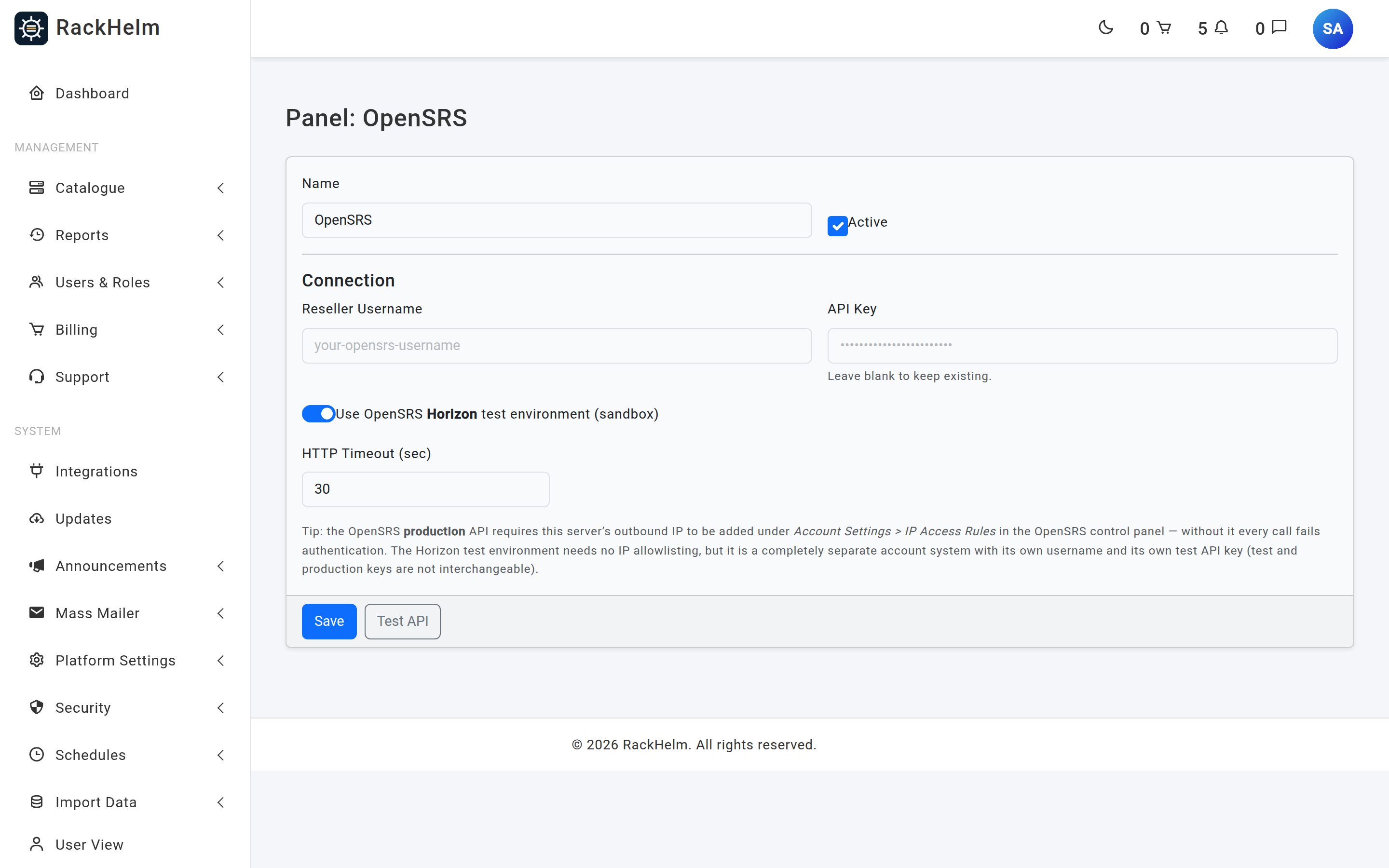
Field reference #
| Field | What it does |
|---|---|
| Name | Display label. Defaults to OpenSRS. Up to 120 characters. |
| Active | Master switch for the panel. |
| Reseller Username | Required. Sent as the X-Username header on every call. |
| API Key | Used to sign the request body. Never rendered back — leave blank to keep the stored value. |
| Use OpenSRS Horizon test environment (sandbox) | Switches between horizon.opensrs.net:55443 and rr-n1-tor.opensrs.net:55443, and stores a mode of test or live. |
| HTTP Timeout (sec) | Seconds to wait. Field default 30, minimum 5; a cleared value falls back to the driver’s 60. |
Note: Horizon is a completely separate account system with its own username and its own test API key. A production key will not authenticate against Horizon, or the reverse. Both endpoints are on port 55443, so check outbound access to that port from your server.
How authentication works #
OpenSRS does not send the key. RackHelm builds the XML envelope, computes a signature over the exact bytes that go on the wire, and sends it in an X-Signature header alongside X-Username. Any difference between the signed string and the posted body fails authentication — which is why a proxy that rewrites request bodies will break this integration in a way that looks like a bad key.
What OpenSRS supports #
| Capability | Behaviour |
|---|---|
| Registration | SW_REGISTER with reg_type=new. One contact block fills all four roles (owner, admin, billing, tech). The domain is registered locked, with reseller default nameservers. |
| Asynchronous registration | OpenSRS may accept a registration for later submission (trademark claims, GDPR processing). RackHelm treats that as success and records it as asynchronous in the item’s metadata. |
| Transfer | SW_REGISTER with reg_type=transfer. An EPP code is required and travels as auth_info. |
| Renewal | Extends by the billing cycle’s whole years. |
| Nameservers | Supported from the customer’s domain page. |
| Registrar lock | Read and toggle. |
| WHOIS privacy | f_whois_privacy at registration, from the DomainPrivacy order variable; whois_privacy_state to enable it afterwards. OpenSRS’s “no change needed” response counts as success. |
| EPP code | Retrieved directly. RackHelm unlocks the domain first, reads the auth info, and if none is returned asks OpenSRS to email the code to the admin contact. |
| Availability | Bulk, up to 30 names per batch. |
| Domain listing | 40 per page, capped at 250 pages, for the domain importer. |
| Suspend / unsuspend | Not implemented; domains have no suspend concept. |
Note: Registrations and transfers are sent with
auto_renew=0. Renewal is driven by RackHelm billing, so do not also enable auto-renew at OpenSRS.
Per-domain registrant credentials #
OpenSRS issues each domain a management username and password for its own registrant portal. RackHelm generates these per domain and sends them with the registration; they are never logged, because the envelope carries the registrant’s full contact details alongside them.
Put TLDs on sale #
There is no bulk price importer for OpenSRS. Create each TLD product under Catalogue → Catalogue & Groups, named after the extension with its leading dot, and set Integration Type to OpenSRS on the product’s Provisioning tab.
Troubleshooting #
| Symptom | Cause and fix |
|---|---|
| Test fails and mentions IP Access Rules | The production API requires this server’s IP under Account Settings → IP Access Rules. The hint is appended to every OpenSRS connection error because it is by far the most common cause. |
| Test fails immediately in production but works in Horizon | You are using the Horizon key against production. Generate a production key; the two are not interchangeable. |
| Test API shows “No saved API key; please enter it.” | The field was blank and nothing is stored. Enter the key once and test again. |
| “Connected, but no balance data returned.” | OpenSRS answered without a balance attribute — usually a permissions problem on the reseller account. |
| Connection times out | Both endpoints use port 55443. Confirm outbound access to that port, then raise the timeout if the link is slow. |
| Transfer fails with “EPP Code is required for transfer.” | No code on the order. Make the EppCode variable required on transfer products. |
| Registration reported as accepted but the domain is not live yet | OpenSRS returned the asynchronous acceptance code. The registry will complete it; the transfer sync job reconciles the expiry once it does. |
| EPP code shows “OpenSRS has emailed the EPP code to the admin contact.” | OpenSRS declined to return the code inline. Have the customer check the admin contact’s mailbox. |
| Privacy request appears to fail | Messages containing “already” or “enabled” are treated as success. Anything else is logged — some TLDs prohibit privacy outright. |


