When you rename a page slug or a group prefix, the address the page used to live at stops resolving. RackHelm remembers those addresses and sends visitors — and search engines — to the new one. This article is for operators.
Before you start #
Note: Redirects are managed on the page-groups screen and need the
manage_pagespermission.
What gets recorded #
A redirect row is written automatically whenever a public path is vacated:
- You change a page’s URL Slug.
- You move a page to a different group, so its prefix changes.
- You change a group’s URL prefix. That records the group index itself plus one row per page in the group.
You never create these by hand, and there is no editor for them — the only controls are the switch that turns the whole mechanism on or off and a button that forgets everything recorded so far.
The Old URLs card #
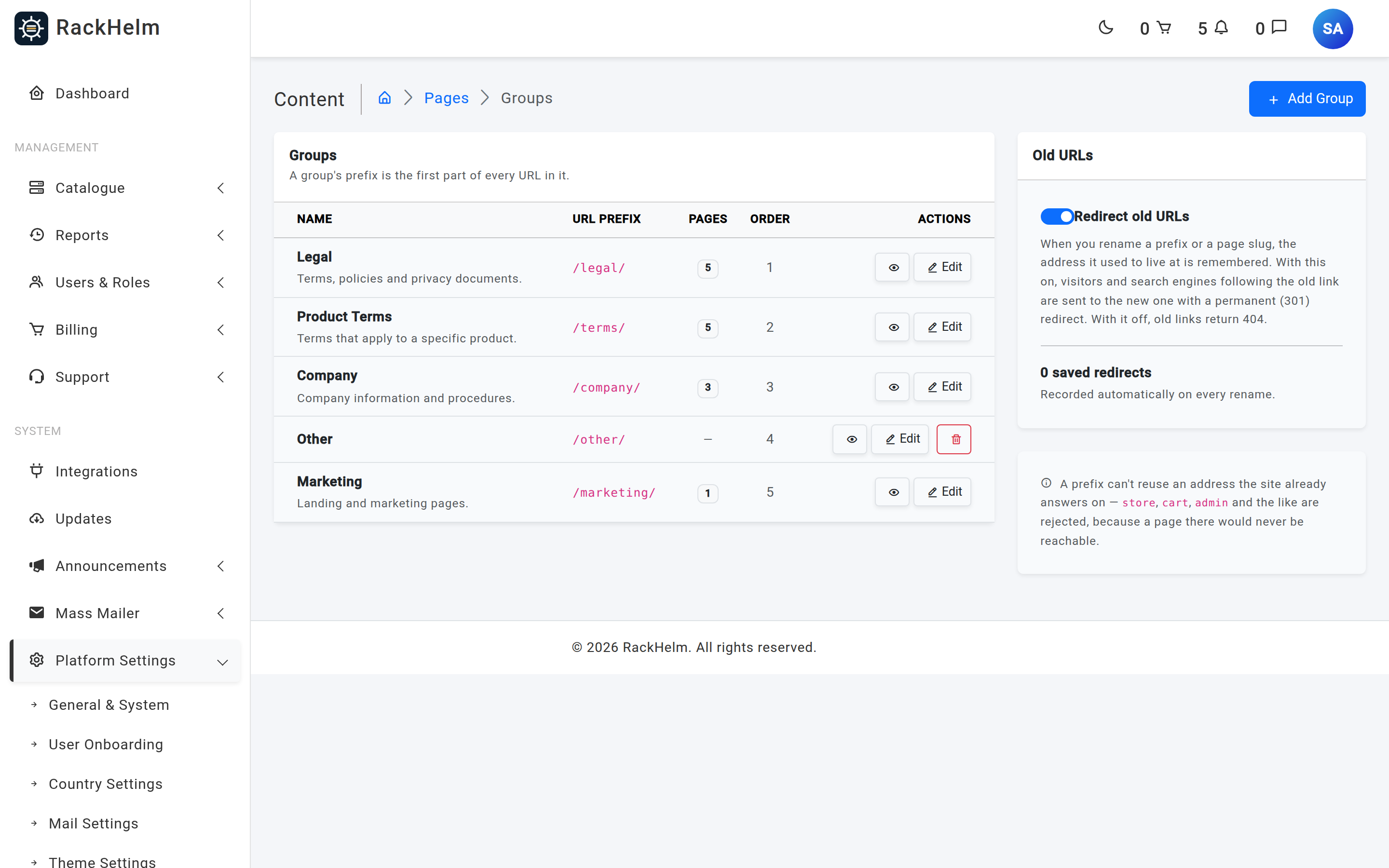
Open Platform Settings → Pages → Manage Groups. The Old URLs card on the right shows:
| Control | What it does |
|---|---|
| Redirect old URLs | On (the default) means an old address sends the visitor to the new one with a permanent 301 redirect. Off means old addresses return 404. |
| Saved redirects count | How many vacated paths are currently remembered. |
| Clear | Forgets every recorded redirect. From then on those addresses return 404. |
How a redirect is applied #
The redirect table is only consulted on the miss path: a request that has already failed to match a live page. Normal page views never touch it, so it costs nothing on the pages people actually read.
When a request misses, RackHelm tries three things in order:
- A recorded redirect for that exact path — if there is one, the visitor is sent on with a 301.
- If the prefix is a real group but holds no page with that slug, and exactly one other group has a published page with the same slug, the visitor is sent there with a 301. That covers a page moved between groups before any redirect was recorded.
- Otherwise, a 404.
A stale row that would point a path at itself — the result of renaming a slug and then renaming it back — is ignored rather than followed, so redirects cannot loop.
Redirects are a safety net, not a linking strategy #
Redirects keep other people’s links alive. For links inside your own content, use the permalink instead: /page-link/{slug} always resolves to the page wherever it has moved to, without a redirect hop and without depending on this table at all. See Content Pages.
Tip: Leave Redirect old URLs on unless you have a specific reason not to. It costs nothing on the happy path and it is the only thing keeping externally published links working after a rename.
Troubleshooting #
| Symptom | Cause and fix |
|---|---|
| An old URL 404s instead of redirecting | Redirect old URLs is off, or the redirects were cleared. Turn the switch back on — but note that clearing is permanent; a cleared path can only be restored by renaming back and forth. |
| The saved redirect count is 0 after a rename | The new path is the same as the old one, so there was nothing to record — for example, you renamed a prefix and then renamed it back. |
| A redirect points at the wrong page | Two pages in different groups share a slug and the page was moved without a recorded redirect. Recreate the intended path by renaming, or clear the table and rebuild. |
| Search results still show the old address | A 301 is being served, but search engines re-crawl on their own schedule. Update your sitemap and any external links you control. |
| Deleted a page and now the old link 404s | Redirects follow pages, not deletions — a deleted page has nowhere to send visitors. Recreate the page or accept the 404. |


