RackHelm has built-in Google Analytics 4 tracking: a client-side ecommerce funnel from browsing to purchase, a configurable cookie consent banner that gates it, and server-side purchase tracking for revenue that never touches a browser. Since 1.0.1.1 both the tag and the banner are also switched off automatically on any page that carries a typed-card form, which leaves a deliberate hole in the funnel. This article is for operators.
Before you start #
Note: Both screens in this article are part of company settings and need the
edit_company_settingspermission, which the built-in Administrator role does not hold. By default only a Super Admin can change them.
You need a GA4 property with a web data stream. The settings are split deliberately: the tracking IDs live under Integrations → Analytics, and the consent banner — which governs every cookie the site sets, not only Google’s — lives under Platform Settings → General & System.
Switching tracking on #
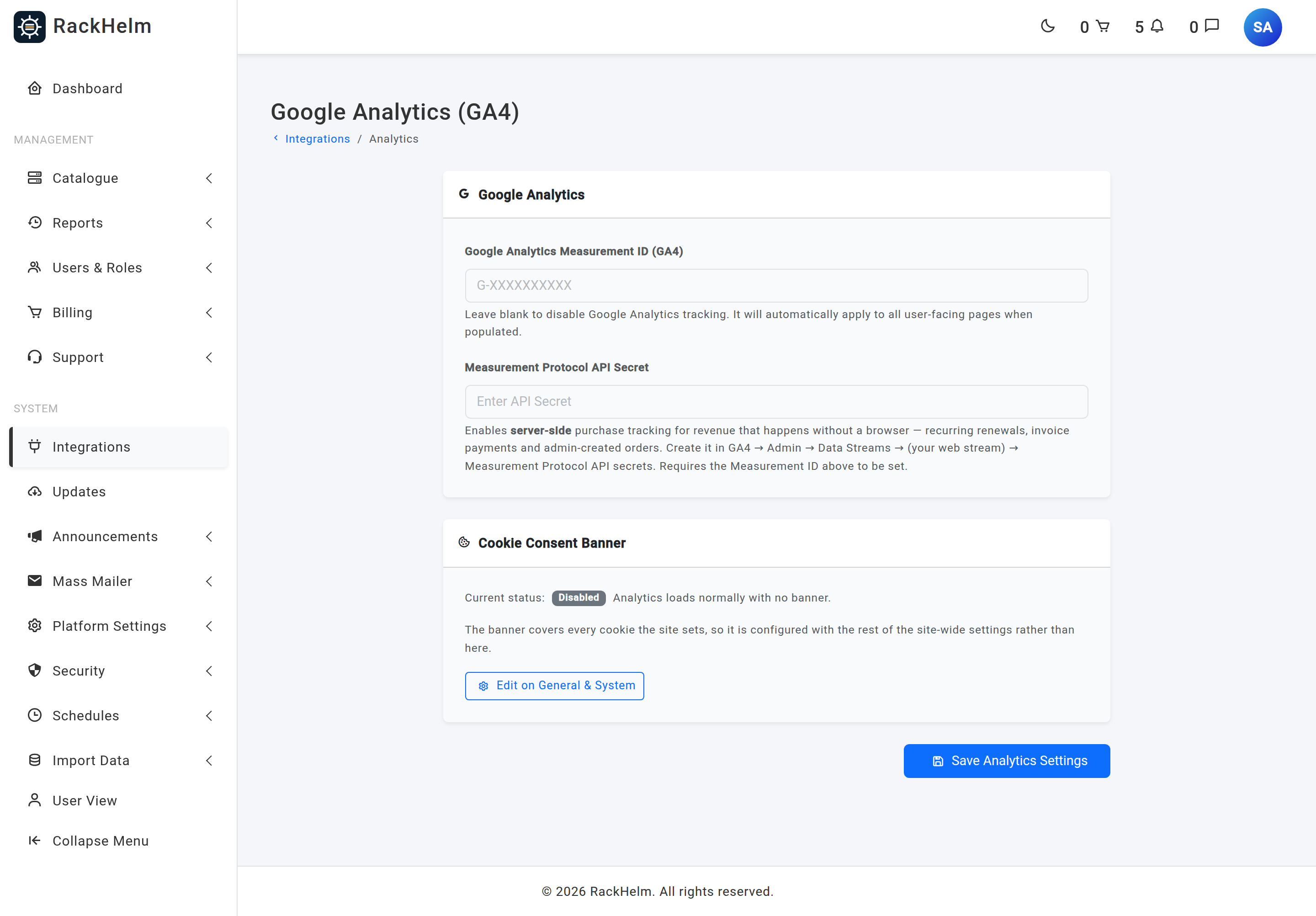
- Open Integrations → Analytics.
- Enter your Google Analytics Measurement ID (GA4) — it looks like
G-XXXXXXXXXX. - Save. Tracking applies to all customer-facing pages immediately. Leave the field blank to disable Analytics entirely.
What is tracked client-side #
With a Measurement ID set, these GA4 events fire from the customer’s browser:
| Event | Fired when |
|---|---|
sign_up |
A visitor completes registration. |
login |
A customer signs in. |
view_item_list |
A store product group page is viewed. |
view_item |
A product order page is viewed. |
view_cart, add_to_cart, remove_from_cart |
Basket activity. |
begin_checkout, add_payment_info |
The checkout is opened and payment details are supplied. |
purchase |
The thank-you page is reached after an interactive checkout. |
Note: Since multi-currency pricing arrived in 1.0.1.1,
begin_checkout,add_payment_infoandpurchasereport the currency the order was actually placed in, not the store’s base currency. Revenue in GA4 will therefore be split across currencies wherever customers shop in their own.
Pages with a card form load no Analytics at all #
Authorize.net’s card form is served by the portal itself: the card number, expiry and card code are real inputs in RackHelm’s own HTML, tokenised in the browser by Accept.js. PCI DSS 6.4.3 does not allow a remotely reconfigurable third-party script to run in a document that holds a typed card number, and gtag.js is exactly that — it is fetched from Google and its behaviour can be changed from outside this codebase at any time. So on those pages RackHelm loads no Google Analytics or Tag Manager tag and shows no cookie banner.
The suppression covers the whole page, and it applies to these four:
| Page | When it is suppressed |
|---|---|
| Checkout | Whenever the Authorize.net card pane is on the page — that is, whenever that gateway is being offered to this customer. |
| An invoice’s payment page | When the invoice can still be paid by card and the card gateway is Authorize.net. |
| Onboarding, step 2 of 2 (Payment Method) | When the Authorize.net tab is on the page. |
| Add a Credit Card (Authorize.net) | Always. The whole page exists to collect a card number. |
Warning: This is decided per page, not per payment method, so it also affects customers who never touch Authorize.net. If a checkout offers Authorize.net and the customer pays with Stripe instead, GA4 records the
purchaseon the thank-you page — which is a different page and keeps its tag — but nobegin_checkoutand noadd_payment_infobefore it. In GA4 that reads as a purchase with no checkout steps, and any funnel or checkout-abandonment report built on those steps will under-count. Nothing is broken and nothing needs fixing; it is the trade required by 6.4.3.
Note: Only Authorize.net triggers this. Stripe, PayPal and Square all collect the card in a cross-origin iframe, so the card number is never in RackHelm’s document and those pages keep the full funnel exactly as before. An install with no Authorize.net gateway sees no change at all.
Because there is no tag to consent to on those pages, the cookie banner is not rendered there either. A visitor who has not yet made a choice will be asked on the next ordinary page they open; an existing choice is untouched.

The same behaviour is documented in the portal itself, in the notes above the Authorize.net credentials under Billing → Payment Gateways.
The cookie consent banner #
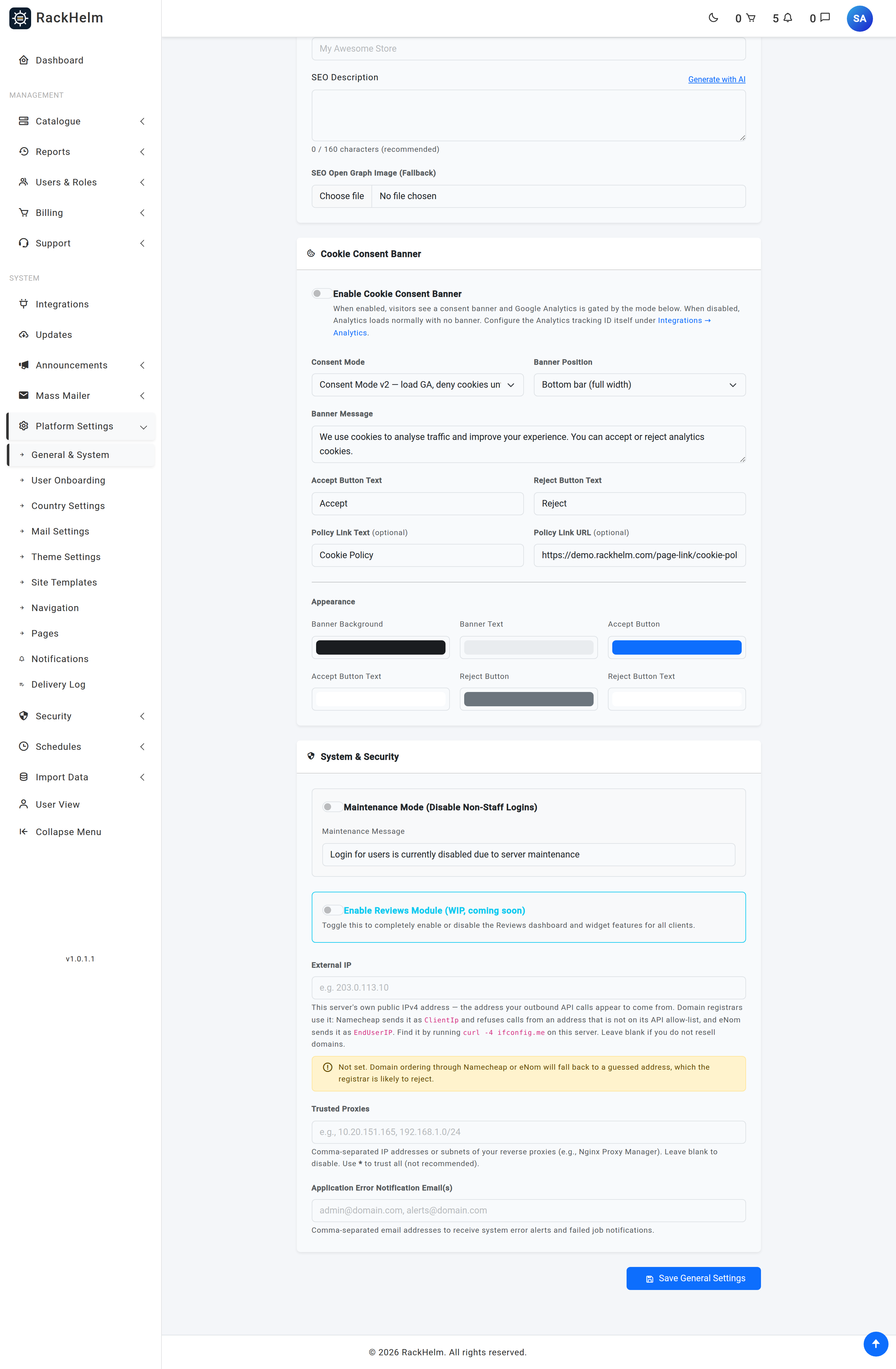
The banner is configured under Platform Settings → General & System → Cookie Consent Banner. It only appears when the banner is enabled and a Measurement ID is set — with no Measurement ID there is nothing to gate — and never on the card-form pages above.
The three modes #
| Mode | Behaviour |
|---|---|
| Consent Mode v2 (default, recommended) | Analytics loads immediately but with ad storage, ad user data, ad personalisation and analytics storage all set to denied. Accepting updates all four to granted. Rejecting keeps analytics storage denied. |
| Hard block | Analytics is not loaded at all until the visitor accepts. Rejecting loads nothing, so there is nothing to disable. |
| Opt-out | Analytics tracks by default; rejecting disables it for that visitor. The option is labelled in the interface as not EU/UK compliant. |
With the banner switched off entirely, Analytics loads and tracks with no banner shown.
Note: Consent Mode v2 gates cookie storage, not the tag:
gtag.jsis still fetched and still runs before anyone has clicked anything. That is why consent mode is not an answer to PCI DSS 6.4.3 and why the card-form pages suppress the tag outright rather than relying on the banner.
Banner options #
| Setting | Notes |
|---|---|
| Banner Position | Bottom bar (full width), bottom left box, or bottom right box. |
| Banner Message | Up to 500 characters. |
| Accept Button Text / Reject Button Text | Up to 50 characters each; default “Accept” and “Reject”. |
| Policy Link Text and Policy Link URL | Optional link shown after the message. Both must be filled in for the link to render; the URL is validated as an absolute URL. |
| Colour pickers | Banner background and text, plus background and text for each button. Defaults are a dark bar with a blue Accept and a grey Reject. |
Tip: Point the policy link at
/page-link/cookie-policyrather than a literal path — that permalink survives renaming your page groups. Installing the seeded legal pages sets this for you if it is empty.
A visitor’s choice is stored in the orbi_cookie_consent cookie as granted or denied, for 180 days, with SameSite=Lax and the Secure flag over HTTPS. While that cookie exists the banner stays hidden, so testing changes needs a fresh private window or the cookie deleted.
Server-side purchase tracking #
A recurring renewal, a gateway webhook settling an invoice, or an operator marking an invoice paid all produce revenue with no browser present, so no client-side purchase event can fire. RackHelm sends those to GA4 through the Measurement Protocol instead.
- Create an API secret in GA4: Admin → Data Streams → (your web stream) → Measurement Protocol API secrets.
- Paste it into Measurement Protocol API Secret on the Analytics screen and save. The field is write-only: it shows dots once set, and leaving it blank keeps the current value.
Both the Measurement ID and the API secret must be present — without the secret the feature simply stays off. Events are sent from a queued job with 3 attempts and a 30-second backoff, and a failure is logged rather than allowed to disturb the payment it belongs to. Look for [GA4 MP] lines in the application log; a successful send logs [GA4 MP] purchase event sent with the invoice number, transaction id, value and currency.
Server-side events are reported in the currency the invoice was settled in. Invoices raised before multi-currency carry no currency of their own and fall back to the store’s base currency.
What is deliberately not sent #
To keep revenue from being counted twice, a server-side purchase event is skipped when:
- the invoice was settled from account credit — that money was tracked when the credit was bought;
- nothing was actually charged, so the amount is zero or less;
- the invoice is purely a balance top-up, which is tracked at its own checkout.
Interactive checkouts are never double-sent either: the client-side event covers those, and the server-side job runs only for settlements that happen without a browser. Events carry the gateway transaction id where there is one, otherwise the invoice number, so GA4 de-duplicates if the same event ever arrives twice.
Troubleshooting #
| Symptom | Cause and fix |
|---|---|
| No data in GA4 at all | The Measurement ID is blank, or it belongs to a different property. It must be a GA4 ID beginning G-. |
| Traffic appears but no cookies are set | Consent Mode v2 is on and the visitor has not accepted. That is the intended behaviour. |
| Nothing at all is recorded for most visitors | Hard block mode: nothing loads until Accept is pressed. Consider Consent Mode v2 instead. |
begin_checkout and add_payment_info stopped arriving after 1.0.1.1 |
An Authorize.net gateway is being offered on that checkout, so the whole page carries no Analytics tag. Expected, and required by PCI DSS 6.4.3. purchase still arrives from the thank-you page. |
| The cookie banner does not show on checkout or on an invoice | Same cause: the page carries the Authorize.net card form. The visitor will be asked on the next ordinary page. |
| Checkout-abandonment or funnel reports look wrong | Build them on view_cart and purchase rather than on the checkout steps, or restrict the gateway so Authorize.net is not offered on the journeys you are measuring. |
| The banner never appears | Either it is disabled, there is no Measurement ID, you are on a card-form page, or you have already made a choice — clear the orbi_cookie_consent cookie. |
| The policy link is missing from the banner | Both the link text and the URL must be set, and the URL must be a full address. |
| Renewal revenue is missing from GA4 | No Measurement Protocol API secret is saved. Add one on the Analytics screen. |
| Revenue is split across several currencies | Expected on a multi-currency store: each event carries the currency the order or invoice was settled in. |
| Purchases are counted twice | Check for a second tracking snippet added through a theme customisation — RackHelm’s own client and server events do not overlap. |
| Credit top-ups do not appear as revenue on renewal | Intended: the top-up was counted when it was bought, so settling from credit is not counted again. |


