The reviews module lets your customers connect their own public review profiles and pull those reviews into the portal, so the feedback their business collects sits alongside their hosting. It is an optional module: you switch it on, seed the platform list, and provide the API credentials its connectors need.
Before you start #
Three things have to be in place before a customer can use it:
- Switch the module on. Under Platform Settings → General & System, tick Enable Reviews Module and save the form.
- Seed the platform list. The review platform table starts empty and is not populated by the standard install seeders. Run it once:
php artisan db:seed --class=ReviewPlatformsSeederThat creates the Google, Facebook and Trustpilot platform rows.
- Provide a Google Places API key. Google syncing reads the Places API, using
GOOGLE_PLACES_API_KEYfrom your.env.
Warning: Only the Google connector actually fetches reviews. The Facebook tab cannot be used at all — its button is disabled and reads Login with Facebook (Temporarily Disabled). A Trustpilot connection can be created and stored, but its sync handler is a placeholder in this build and brings nothing back.
Note: The Enable Reviews Module switch is off until the setting has been saved at least once, even though the description reads as though it defaults to on. Tick it and save the form to be sure.
What the customer sees #
With the module on, customers get two screens:
| Screen | What it does |
|---|---|
/reviews |
Every review pulled in across all of their connections. |
/reviews/connections |
Add a connection, sync them, or remove one. |
With the module off, both screens redirect to the dashboard with “The reviews module is currently disabled.”
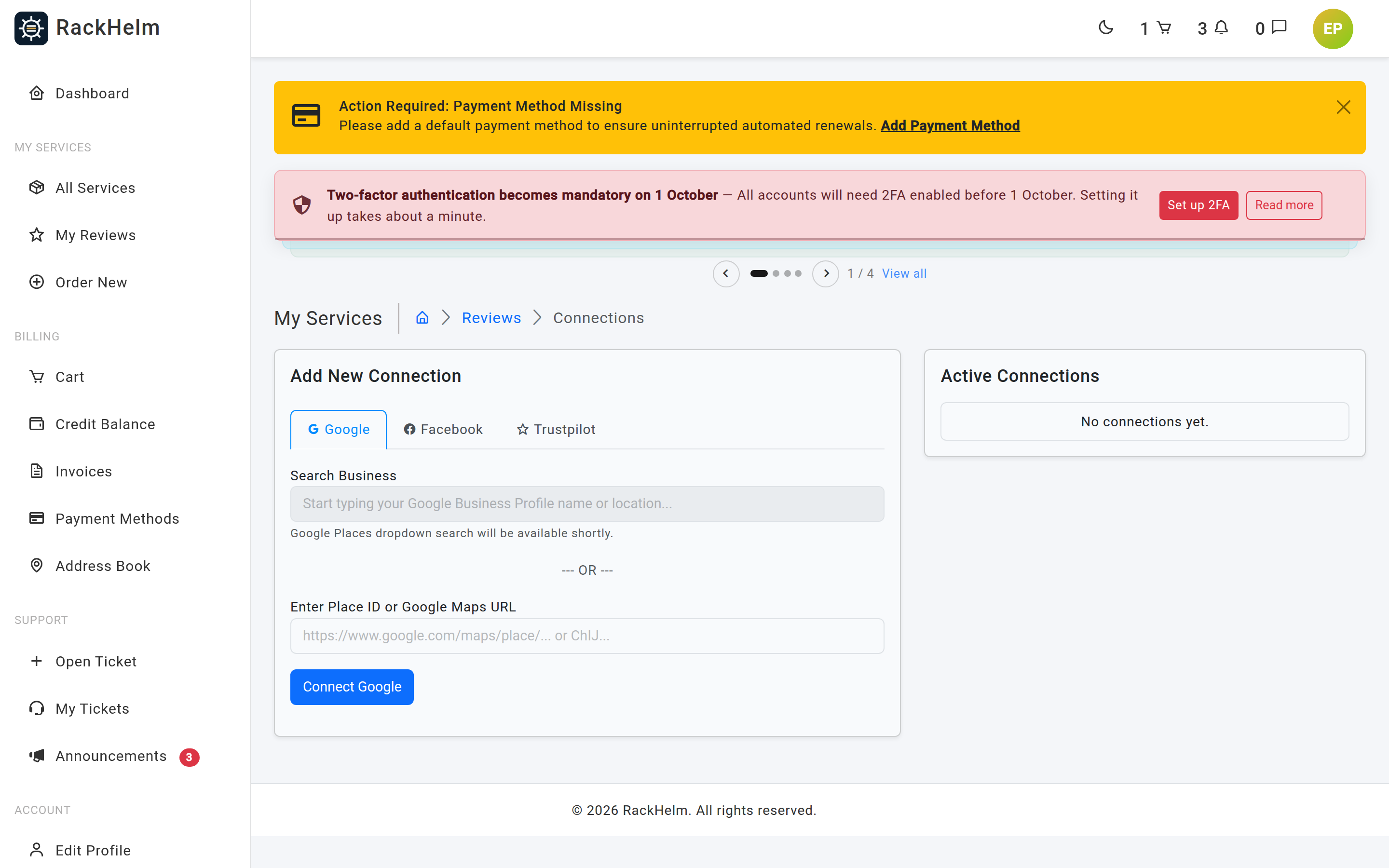
Adding a Google connection #
- Open Reviews → Connections and stay on the Google tab.
- Paste the Google Maps URL of the business profile into Enter Place ID or Google Maps URL.
- Select Connect Google.
Warning: Despite the field label, a bare Place ID is rejected. The value is validated as a URL, so it must start with
http://orhttps://— paste the full Maps address.
A Maps URL is resolved to a Place ID on the first sync — from a place_id query parameter if there is one, otherwise by looking the business name up through the Places API — and the resolved ID replaces the stored URL so it does not have to be worked out again.
Syncing #
Download Reviews, on the Active Connections card, queues one job per connection. Two limits apply:
- A manual sync is allowed once every 14 days per account. Attempting one sooner returns “You can only manually sync reviews once every 14 days.”
- Only one sync can run at a time per account; a second request gets “A sync is already in progress.”
Each run writes a sync log with a status of queued, processing, success or failed, and the failure message where there is one. Reviews are matched on their platform identifier, so re-syncing updates existing entries rather than duplicating them.
Removing a connection #
Deleting a connection also deletes every review that came in through it. A customer can only delete their own connections.
Putting reviews in the navigation #
The menu builder has a ready-made condition, Only if the reviews module is on, so you can add a Reviews link to the customer sidebar that hides itself when the module is switched off. See Navigation Menus.
Troubleshooting #
| Symptom | Cause and fix |
|---|---|
| Customers are redirected to the dashboard with “The reviews module is currently disabled” | The module is off. Tick Enable Reviews Module and save the General & System form. |
| The connections screen shows tabs but connecting fails validation | The platform rows do not exist. Run the ReviewPlatformsSeeder command above. |
| Sync fails with “Google Places API Key is not configured” | Set GOOGLE_PLACES_API_KEY in .env and clear the config cache. |
| “Could not extract a valid Google Place ID” | The URL supplied is not one the resolver can read. Ask the customer for the exact Place ID instead of a shortened map link. |
| A Trustpilot connection never returns reviews | Its connector is a placeholder in this build. Only Google is implemented, and Facebook cannot be connected at all. |
| “You can only manually sync reviews once every 14 days” | Working as designed. Wait out the window. |
| Only a handful of Google reviews arrive | The Places API returns a limited set of reviews per place; RackHelm stores whatever it is given. |


