My Reviews pulls the reviews customers have left about your business on public platforms into one list in the portal. You connect a profile once, the portal fetches the reviews, and they appear together on a single page. Open it from the sidebar under My Services → My Reviews, or go to /reviews.
Before you start #
The reviews module can be switched off by your provider. If it is, the My Reviews entry does not appear and going to the page returns you to your dashboard with “The reviews module is currently disabled.”
You need the public web address of the profile you want to connect. Nothing is posted on your behalf and no password for the review platform is asked for.
The reviews list #
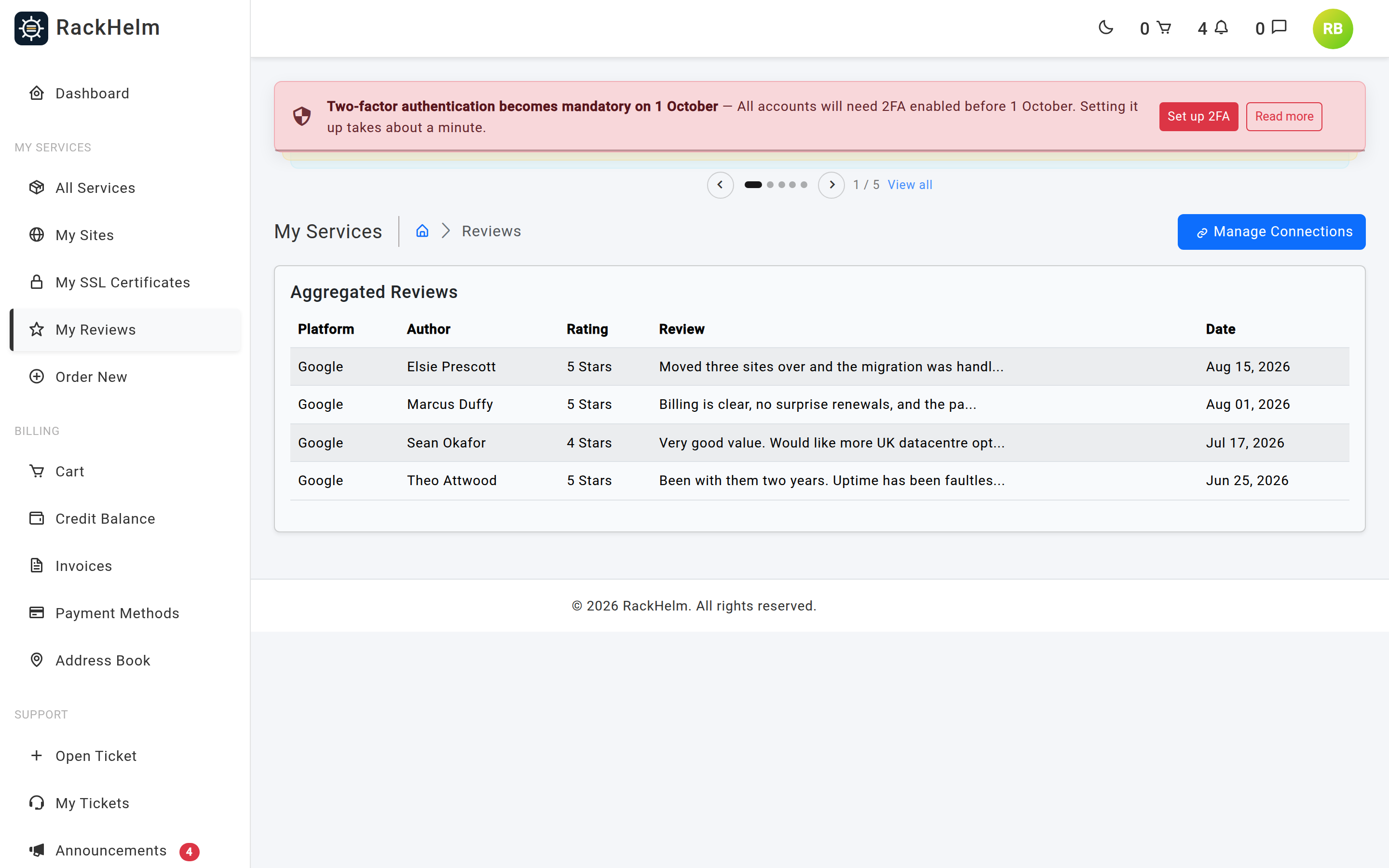
Aggregated Reviews lists what has been fetched, with five columns:
| Column | What it shows |
|---|---|
| Platform | Which connected profile the review came from. |
| Author | The reviewer’s name as published. |
| Rating | The star rating. |
| Review | The opening of the review text, truncated. |
| Date | When the review was left. |
When nothing has been fetched yet the table reads “No reviews found. Connect a platform to fetch reviews.”
Connecting a profile #
Select Manage Connections at the top right. Add New Connection has a tab per platform.
Google #
- Open the Google tab.
- Paste the address of your Google Business Profile into Enter Place ID or Google Maps URL — the full Google Maps URL for your listing.
- Select Connect Google.
The Search Business box above it is disabled: the page states that the Google Places dropdown search “will be available shortly”. Use the URL field.
Trustpilot #
- Open the Trustpilot tab.
- Enter your Trustpilot Profile URL, for example
https://www.trustpilot.com/review/yourdomain.com. - Select Connect Trustpilot.
Facebook #
The Facebook tab’s only control is a disabled Login with Facebook (Temporarily Disabled) button. Facebook cannot be connected in this release.
Managing connections #
Active Connections on the right of the page lists each connected profile with its platform name and the URL you supplied.
- Download Reviews at the top of the panel queues a fetch across every connection. It appears only once you have at least one.
- The bin icon on a row removes that connection. It asks you to confirm, because all reviews fetched from that profile are deleted with it.
Fetching reviews #
Select Download Reviews and you get “Sync has been queued for all your connections! It may take a few minutes to process.” The work runs in the background — reload the reviews page after a few minutes.
Note: A manual fetch is allowed once every 14 days. Asking again inside that window returns “You can only manually sync reviews once every 14 days. Please upgrade to unlock unlimited syncs.”
Troubleshooting #
| Symptom | Cause / fix |
|---|---|
| “The reviews module is currently disabled.” | Your provider has switched the module off. Ask them whether it is available on your plan. |
| Connecting Google is rejected as an invalid URL. | The field accepts a full web address. A bare Place ID such as ChIJ… is not accepted despite the label — paste the Google Maps URL for the listing instead. |
| Connecting fails with a validation error about the platform. | Your provider has not enabled that platform. Only platforms they have activated can be connected. |
| “You do not have any connections to sync.” | Add a connection before selecting Download Reviews. |
| “A sync is already in progress.” | A fetch is already running — usually a double click. Wait and reload. |
| “You can only manually sync reviews once every 14 days.” | The manual fetch limit. Wait out the window, or ask your provider about a package with unlimited syncs. |
| The sync was queued but no reviews appeared. | The fetch runs in the background and can take a few minutes. If the list is still empty afterwards, check the URL on the connection points at the correct public profile, and that the profile actually has published reviews. |
| Reviews vanished after removing a connection. | Expected — deleting a connection deletes the reviews fetched through it. Reconnect and fetch again. |


