Automatic provisioning is the pipeline that turns a paid order line into a real service on a control panel, a game panel or a registrar. It is a scheduled scanner plus a queued worker, not something that happens during checkout, so knowing which of the two is stuck is most of the diagnosis. This article is for operators.
Before you start #
Four things must all be true before a package will provision on its own:
- The Provision Orders schedule is enabled under Schedules, and the server cron that drives Laravel’s scheduler is running.
- A queue worker is running. Nothing in the pipeline happens synchronously.
- The product has an active integration bound to it under Catalogue → Catalogue & Groups → the product → Provisioning.
- The order has at least one invoice with status paid.
Warning: The Provision Orders schedule ships disabled. On a fresh install nothing provisions until you switch it on.
The pipeline, step by step #
- The item is created. Checkout and the admin order builder both write
provisioning_status = pending. Two exceptions: products in the System group are written straight toprovisioned, and SSL products are written toawaiting_configurationso they wait for the customer’s CSR. - The scanner runs.
ScanPendingProvisioningexecutes on the schedule you set, guarded so two runs can never overlap. It logs its candidate counts at each stage when file logging is on. - Candidates are claimed. Each candidate is claimed with a single atomic update to
queued, which also stampsprovisioning_started_atandprovisioning_last_attempt_atand incrementsprovisioning_attempts. If another worker got there first, the item is skipped. - A worker picks the item up.
ProvisionOrderItemre-claims it fromqueuedorpendingtoprocessing, then resolves the product’s integration and builds the driver for it. - Variables are merged. The values from every child addon are merged into the parent’s variable bag, so the driver sees the memory, CPU or disk an addon granted as if it had been ordered on the package itself.
- The driver runs. For registrars, RackHelm decides between a registration and a transfer first: an
EppCodeorAuthCodein the variables, or aDomainActionoftransfer, means a transfer. A transfer additionally splits the item onto its own new order and syncs the order’s due date and the item’sexpires_atto the registry expiry where the registrar returned one. - The item is marked provisioned, its child addons are resolved, and the customer is sent the “service provisioned” notification.
How child addons are resolved #
Once a parent finishes, each addon is handled on its own terms:
- Addon needs provisioning and has its own integration — it is queued as a separate provisioning job.
- Addon needs provisioning and is flagged for manual provisioning — it is left at
processing, which is what puts it on the Pending Provisioning screen for a human. - Anything else, including an addon that is not flagged as needing provisioning at all — marked
provisionedimmediately.
What the scanner will and will not pick up #
The scanner only claims an item when all three of these hold:
| Condition | Detail |
|---|---|
| Provisioning status | Empty or pending. Nothing else qualifies — not failed, not processing, not manual. |
| A paid invoice | The item’s order must have an invoice with status paid attached to it directly. |
| An active integration | The item’s product must have an active integration row. Addons carry no product, so the scanner never claims an addon directly — addons are only reached through their parent. |
Note: A failed item is never re-claimed automatically. Getting it moving again always means an explicit human action — Retry on the Pending Provisioning screen, or Force Provision on the package.
Retries and attempt counts #
The provisioning job is configured for a single attempt. It does not back off and retry: one pass, then either provisioned or failed. provisioning_attempts counts how many times an item has been claimed, not how many times a driver call was retried.
SSL certificates are the exception, because issuance is a waiting game rather than a single call. Each scan tick submits the order to the certificate authority or polls it for issuance, then re-arms the item to pending so the next tick picks it up again — resetting the attempt counter each time, so a long validation wait does not inflate the count. Only issuance, a terminal failure, or the customer being sent back to the configure wizard ends the loop.
Domain renewals at the registrar are also separate: that job allows four attempts with a 1, 5 and 15 minute backoff, and re-reads the registry expiry before every attempt after the first so a timed-out renewal is never bought twice.
When provisioning fails #
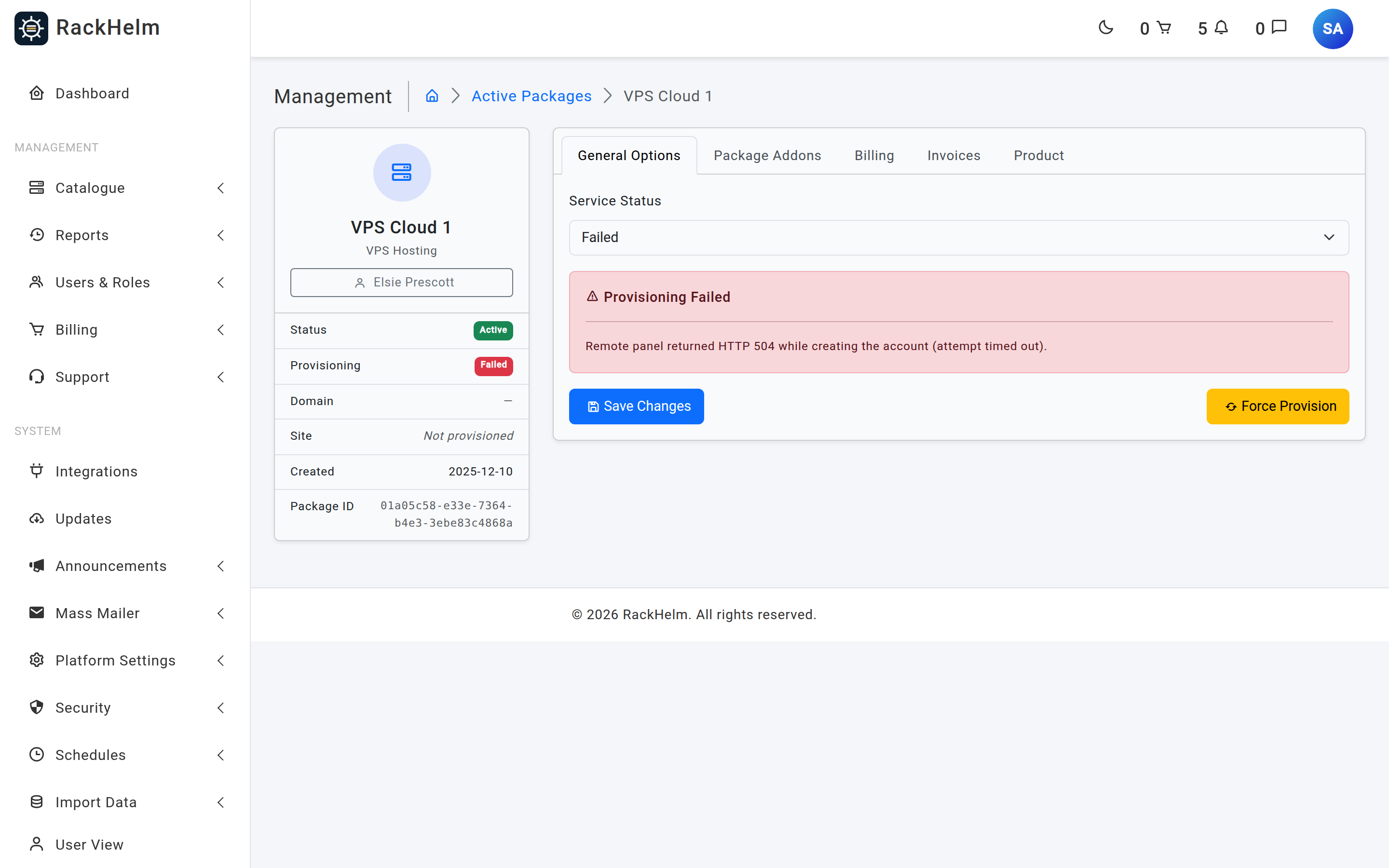
On any exception the worker:
- Sets
provisioning_status = failedand stores the message inprovisioning_error, truncated to 2,000 characters. - Raises an admin notification on the
provisioning.failedevent, carrying the order item ID, the product name and the error, with a link to the Pending Provisioning screen. It is de-duplicated per item, so one failure does not become a flood. - Fails the queued job, so it also appears in the Queue Monitor’s failed list.
One failure is not really an error at all but a configuration message: if a product has no integration bound, the item is failed with a message naming the fix — bind one on the product’s Provisioning tab, then retry. This only happens when somebody presses Force Provision on such a product, because the scanner would never have claimed it.
Turning the scanner on #
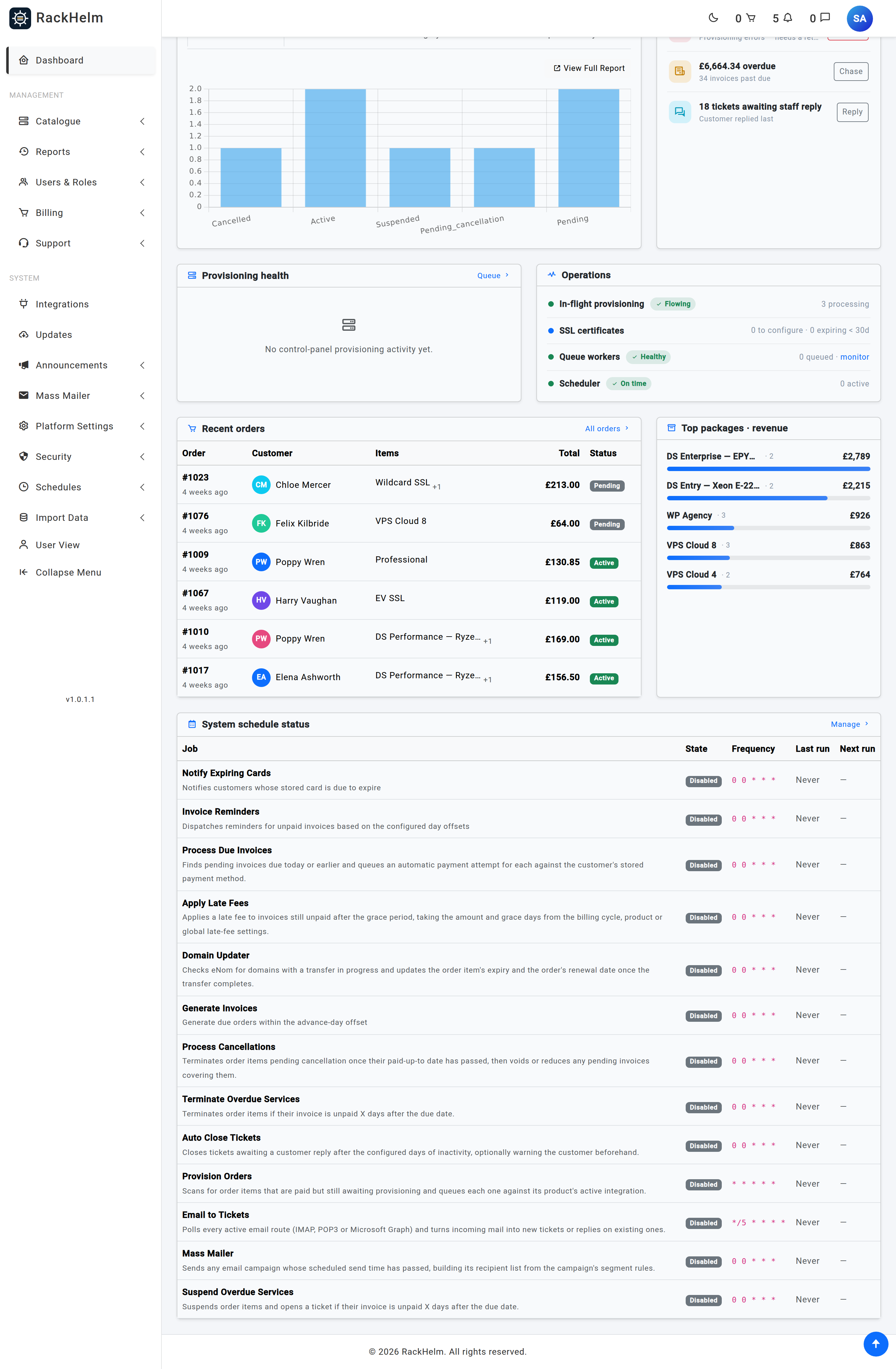
- Open Schedules → Provision Orders.
- Tick Enabled.
- Leave the cron timing at every minute (
*in all five fields) unless you have a reason to slow it down. The timezone isUTCby default. - Turn on Enable File Logging while you are commissioning it — the scanner logs its candidate counts and a sample of the rows it considered, which is the fastest way to see why nothing is being claimed. Turn it back off afterwards; it is verbose.
- Save.
The schedule is only registered with Laravel’s scheduler when it is enabled and its job class is on RackHelm’s internal allowlist, so a malformed cron expression is skipped with a warning rather than breaking every other schedule.
Running a scan by hand #
Two console commands dispatch the same scanner immediately. Both are useful when you want a scan now without waiting for the next tick:
php artisan app:provision-pending
php artisan app:scan-pending-provisioning
They queue the job rather than running it inline, so a worker still has to be up.
Troubleshooting #
| Symptom | Cause and fix |
|---|---|
| Nothing ever provisions | Check in order: is the Provision Orders schedule enabled; is the server cron calling Laravel’s scheduler; is a queue worker running. Any one of the three stops the whole pipeline silently. |
An item sits at pending with a paid order |
Almost always no active integration on the product. Turn on file logging for the schedule and compare its stage-1 count (status only) with its stage-2 count (status plus integration) — a gap between them is exactly this. |
An item sits at pending and the customer has paid |
The scanner needs an invoice attached to that order with status paid. A merged invoice — one covering several orders — carries no order link, so it does not satisfy the check. Use Force Provision on the package. |
An item is stuck at processing |
Either a manual-provisioning addon waiting for a human (clear it on the Pending Provisioning screen), or a worker that died mid-job. For the latter, set Service Status to Pending on the package and save, then let the scanner take it again. |
An item is stuck at queued |
It was claimed but never processed — the queue is not being worked. Check the Queue Monitor’s supervisors and pending counts. |
| The customer sees “We’re setting up your service…” forever | That message covers pending, queued and processing. Look up the package and resolve whichever of the three it is holding. |
| A domain was registered when it should have been transferred | Transfer detection needs an EppCode/AuthCode variable or DomainAction=transfer. Without either, the driver registers. Check the package’s configured variables before retrying. |
An SSL package never leaves awaiting_configuration |
That state is waiting on the customer to supply a CSR and pick a validation method in the SSL configure wizard. It is not a queue problem. |


