This article is for whoever looks after the server RackHelm runs on: where the logs are, how the background workers are supervised, how to inspect and retry jobs, which caches are safe to clear, and how to apply a database migration on a live install without breaking it.
Where the logs live #
Everything is under storage/logs/ in the application directory (/var/www/rackhelm on a default install).
| File | What it holds |
|---|---|
storage/logs/laravel.log |
The application log: errors, integration failures, and any schedule with Enable File Logging turned on. |
storage/logs/horizon.log |
Queue worker output, captured by the supervisor process. |
storage/logs/import_clientexec.log |
The most recent ClientExec import run. Reset each time an import starts. |
tail -f /var/www/rackhelm/storage/logs/laravel.log
grep -i "provision" /var/www/rackhelm/storage/logs/laravel.log | tail -50
The log channel and verbosity are set in .env. LOG_CHANNEL=stack with LOG_STACK=single writes one growing file; switching the stack to daily rotates it and keeps 14 days by default (LOG_DAILY_DAYS). LOG_LEVEL controls how much is written — debug during setup, error or warning once you are live.
Warning: With a single log file and
LOG_LEVEL=debug,laravel.loggrows without limit and will eventually fill the disk. Either switch to the daily channel or add a logrotate rule.
Queue workers #
Anything slow happens in the background: provisioning, payment attempts, invoice PDFs, notifications, campaign sends. Those jobs are executed by Horizon, which the installer runs under supervisor as rackhelm-horizon.
sudo supervisorctl status rackhelm-horizon
sudo supervisorctl restart rackhelm-horizon
The worker set covers six queues: default, payments, provisioning, invoices, bulk-email and notifications, auto-balanced across up to ten processes in production. Each job gets one attempt and a 60-second timeout by default.
After deploying code changes, tell the workers to finish their current job and exit; supervisor restarts them with the new code:
cd /var/www/rackhelm && php artisan horizon:terminateWarning: Workers hold the application in memory. Until they are restarted, they keep running the old code — including old configuration. Any change that affects queued work needs a
horizon:terminateto take effect.
The queue monitor #
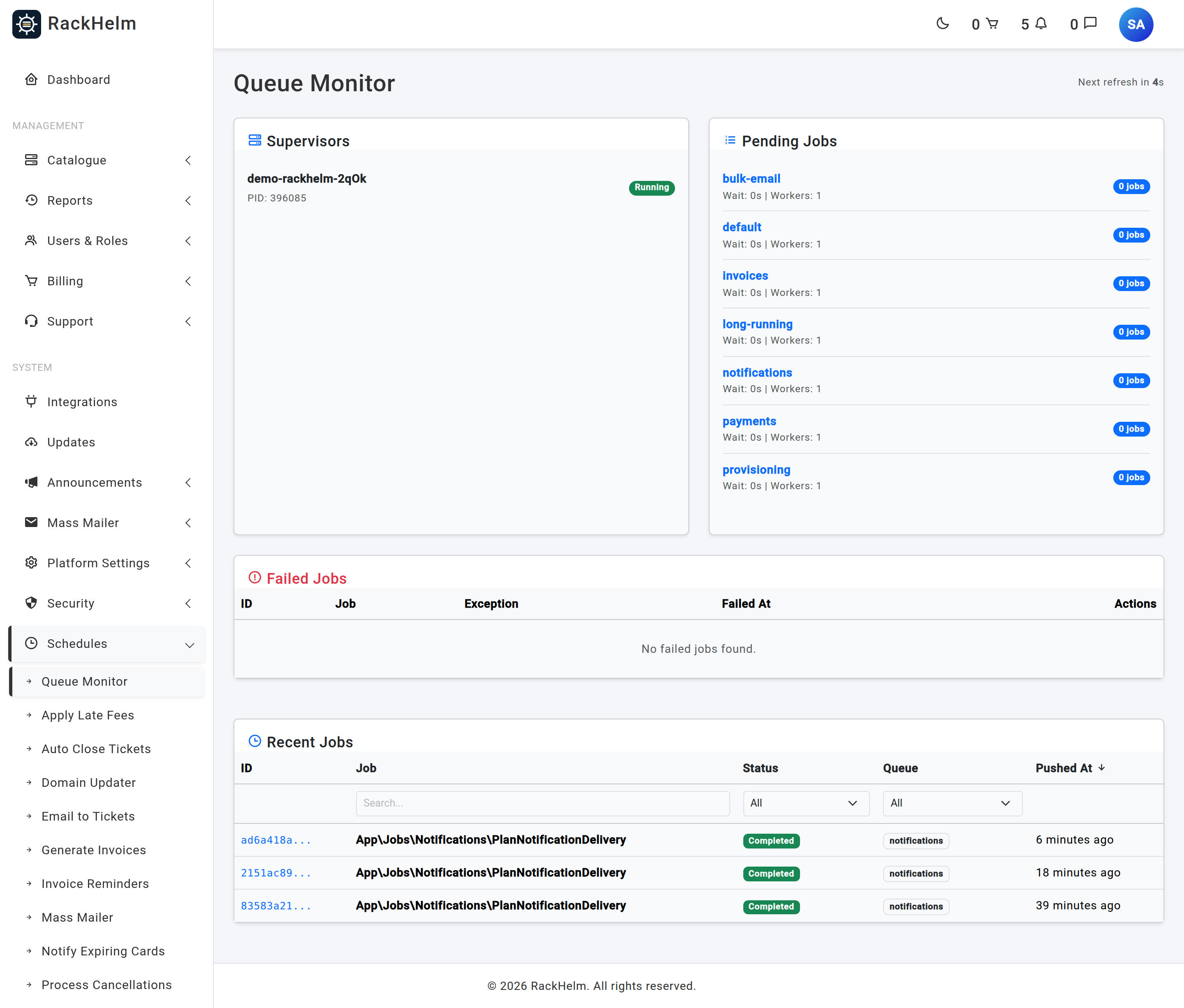
Schedules → Queue Monitor (/admin/queue-monitor) shows the same information from inside the admin area:
- Supervisors — each worker supervisor with its status and process id. An empty list means nothing is running.
- Pending Jobs — the current backlog per queue. Clicking a queue lists up to 100 waiting jobs.
- Failed Jobs — the 20 most recent failures with their exception and a Retry button.
- Recent Jobs — the last 20 jobs, filterable by name, status and queue.
Note: The route is registered behind
view_horizon, but the screen additionally requiresmanage_roles, so in practice that is the permission you need. Horizon’s own dashboard at/horizonis separate and requires a staff account holdingview_horizon.
Failed job data is retained for a week; recent, pending and completed job data for an hour.
Clearing caches #
Run these from the application directory as the web user.
| Command | When to use it |
|---|---|
php artisan cache:clear |
A setting or permission appears stale. Safe — settings and permissions are simply re-read from the database. |
php artisan view:clear |
After a template change, if the old page persists. |
php artisan view:cache |
Rebuilds compiled templates. Safe, and worth doing after an upgrade. |
php artisan config:clear |
After editing .env, if configuration was previously cached. |
php artisan storage:link |
Uploaded logos or invoice PDFs are not loading. |
Warning: Do not run
php artisan optimize,route:cacheorconfig:cacheon a licensed RackHelm build. Route caching serialises closure-based routes, which fails on an encoded build with “Call to a member function bindTo() on null”, and configuration caching would freeze an empty licence key. Onlyview:cacheis safe. The installer deliberately runs neither of the other two.
Running migrations safely #
Warning: Never run a bare
php artisan migrateon a live install. Any migration sitting pending — including ones added by an upgrade you have not finished reviewing, or by a feature you deliberately have not switched on — will run too.php artisan migrate:status | taildoes not save you, because it truncates exactly the rows you need to see.
Apply migrations one at a time by path:
cd /var/www/rackhelm

# 1. See everything that is pending — the whole list, not the tail.
php artisan migrate:status | grep -i pending

# 2. Back up first.
mysqldump -u USER -p DATABASE > ~/rackhelm-$(date +%F).sql

# 3. Apply exactly the migration you intend to.
php artisan migrate --path=database/migrations/2026_08_19_000001_create_notification_tables.php --force
--force is required because the environment is production; it suppresses the confirmation prompt, nothing else.
Health checks #
| Check | How |
|---|---|
| Is the application up? | curl -sf https://portal.example.com/up — a lightweight endpoint suitable for an uptime monitor. |
| Are workers running? | sudo supervisorctl status rackhelm-horizon, or the Operations panel on the dashboard. |
| Is the scheduler firing? | The dashboard’s System schedule status table — every enabled row should show a recent last run. |
| Can alerts actually be delivered? | php artisan notifications:doctor, which checks queue consumption, the cache store, transports, routing and retention. |
| Which version is installed? | Shown at the foot of the admin sidebar. |
Taking the portal offline #
RackHelm’s own Maintenance Mode — on General & System — blocks non-staff logins while leaving the site up and staff able to work. That is usually what you want.
The framework’s php artisan down takes the whole site offline including the admin area and stops queued work from being processed. Reserve it for upgrades, and remember to run php artisan up afterwards.
Troubleshooting #
| Symptom | Cause and fix |
|---|---|
| Nothing provisions; orders sit pending | Check workers are running, then check the queue monitor’s failed jobs. Also confirm the Provision Orders schedule is enabled. |
| Jobs pile up in Pending Jobs and never move | No worker is consuming that queue, or the workers are stuck. Restart with supervisorctl restart rackhelm-horizon. |
| A code or configuration change has no effect on background work | Workers are still running the old code. Run php artisan horizon:terminate. |
| 500 error after an upgrade | Read storage/logs/laravel.log. If you ran route:cache or config:cache, clear them and do not re-run them. |
| Disk full | Check storage/logs/laravel.log first, then stored invoice PDFs and ticket attachments under storage/. |
| Uploads or PDFs 404 | The public/storage symlink is missing. Run php artisan storage:link. |
| Permission-denied errors writing to storage | The web user must own storage and bootstrap/cache. Re-apply ownership and chmod -R u=rwX,g=rX,o= to both. |
| A migration ran that you did not intend | Restore from the backup you took in step 2. This is why the bare migrate command is off limits here. |


