Every purchase in RackHelm is stored as an order that holds one or more order items — the things the admin area calls packages. Understanding the lifecycle matters because RackHelm tracks state in three separate columns, not one, and a screen that looks wrong is usually two of those columns disagreeing. This article is for operators and staff.
The three status columns #
An order and its items each carry their own state, and the item carries a second, independent state for the machine work behind it:
| Column | Lives on | Answers |
|---|---|---|
orders.status |
The order (the billing container) | Is this order live, finished, or cancelled? |
order_items.status |
Each package and each addon | Is the customer entitled to this service right now? |
order_items.provisioning_status |
Each package and each addon | Has the service actually been built on the remote system? |
Note: An order has no total column. Its value is always recalculated as
(unit_price + setup_fee) × quantityacross its items, lessdiscount_amount. What the customer was actually charged lives on the invoice, not the order.
Order statuses #
| Status | What it means and what sets it |
|---|---|
pending |
Written the instant a cart is converted into an order at checkout. It is transient: the same checkout transaction immediately moves the order to active when the invoice is raised. You will normally only see it on imported records. |
active |
The normal live state. Set at checkout once invoices are generated, and the starting state for an order you create from Create Order in the admin area. |
completed |
A finished order that will not recur. Set when a Credit Deposit order settles (the money becomes account balance), and used by the legacy client importer for packages it imports as active, suspended or terminated. |
pending_cancellation |
Set automatically when every item on the order is pending cancellation. |
cancelled |
Set automatically when every item on the order is cancelled. |
The last two are never set by hand: Order::syncStatusWithItems() derives them from the items, and it runs after a customer cancellation, after a termination job succeeds, and whenever the cancellation sweeper processes an item.
Paying an invoice does not change the order’s status. It advances orders.due_date by the billing cycle length, anchored on the invoice’s due date rather than today, so paying early never shortens the term the customer bought.
Package (order item) statuses #
| Status | What it means and what sets it |
|---|---|
active |
The database default, so every item created at checkout starts here. The customer is entitled to the service. |
pending |
Items created through Create Order in the admin area start here rather than at active. It is not one of the model’s four named constants, but it is what the admin creation path writes. |
suspended |
Service withheld, usually for non-payment. Set by the overdue-suspension sweeper, or by an operator on the package screen. |
pending_cancellation |
Cancellation requested; the service keeps running until expires_at, which is set to the order’s due date at the moment of the request. |
cancelling |
Teardown is in flight — a termination job has been dispatched and has not yet reported back. |
cancelled |
Teardown finished. Written by the termination job when the remote provider confirms. |
terminated |
Only produced by the legacy client importer, for packages that were already terminated in the source system. |
Only items at active are billable — the model’s billable scope filters on exactly that — so a suspended or cancelling package is not picked up when invoices are generated.
Provisioning statuses #
| Status | What it means |
|---|---|
pending |
The column default. Waiting to be picked up by the provisioning scanner. |
queued |
Claimed by the scanner and handed to a worker. provisioning_attempts is incremented at this point. |
processing |
A worker has the item and is talking to the remote system. Also the resting state for an addon flagged for manual provisioning. |
provisioned |
Built successfully. This is what the Active Packages list renders as Active. |
failed |
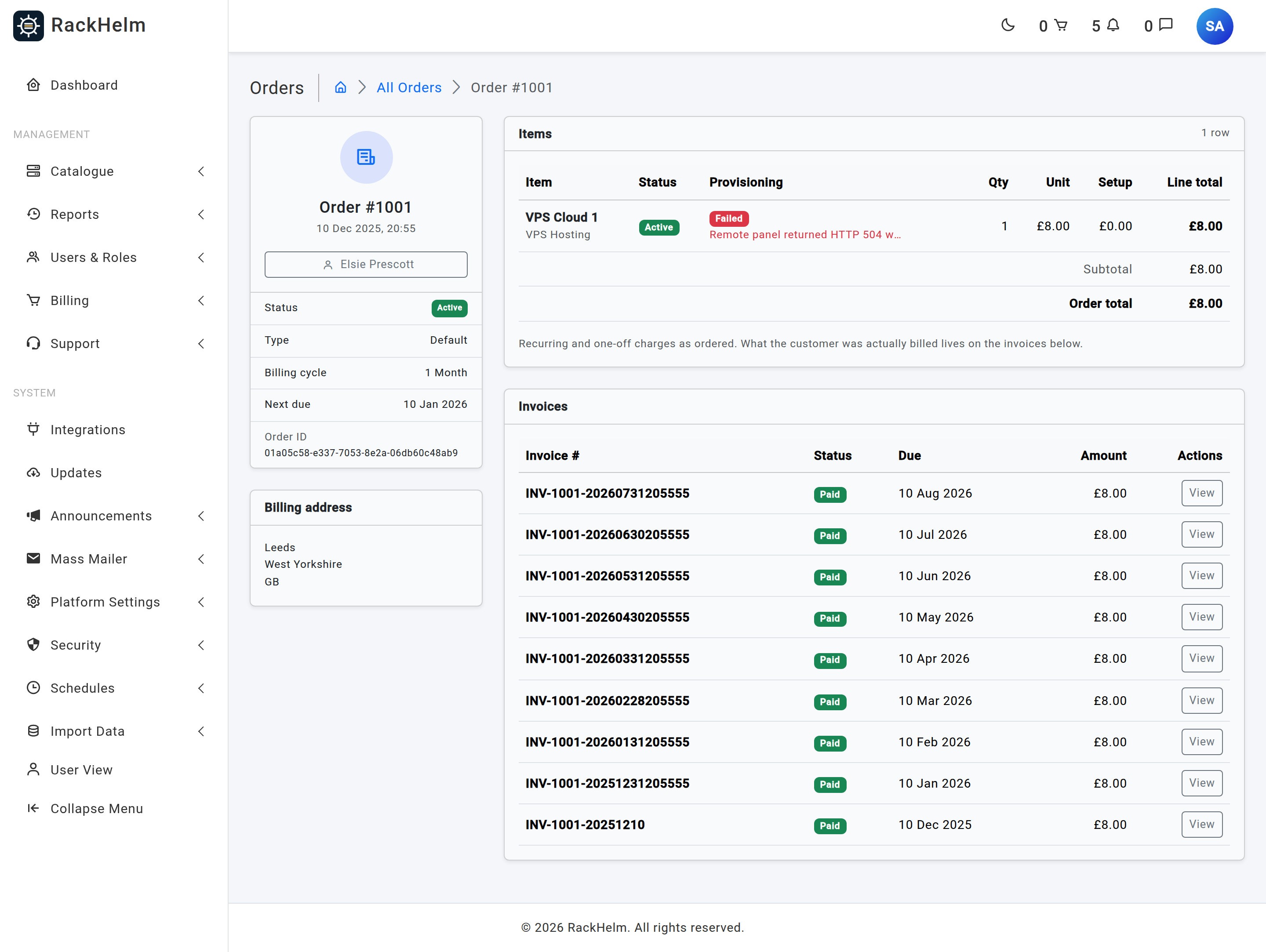
The provisioner threw, or the remote system refused. The reason is stored in provisioning_error (truncated to 2,000 characters) and shown on the package screen. |
awaiting_configuration |
SSL certificates only. The certificate is bought but the customer has not yet supplied a CSR and chosen a validation method. |
manual |
An addon bought at checkout whose definition is marked for manual provisioning. |
active |
An addon bought at checkout whose definition does not need provisioning at all. |
suspended |
Written by the suspend job once the remote provider confirms the service is off. |
terminated |
Written by the terminate job once the remote provider confirms the service is gone. |
Warning: Neither
manualnoractiveis picked up by the provisioning scanner, and neither appears on the Pending Provisioning screen. Amanualaddon only becomes visible there once its parent package finishes provisioning, at which point the pipeline moves it toprocessing.
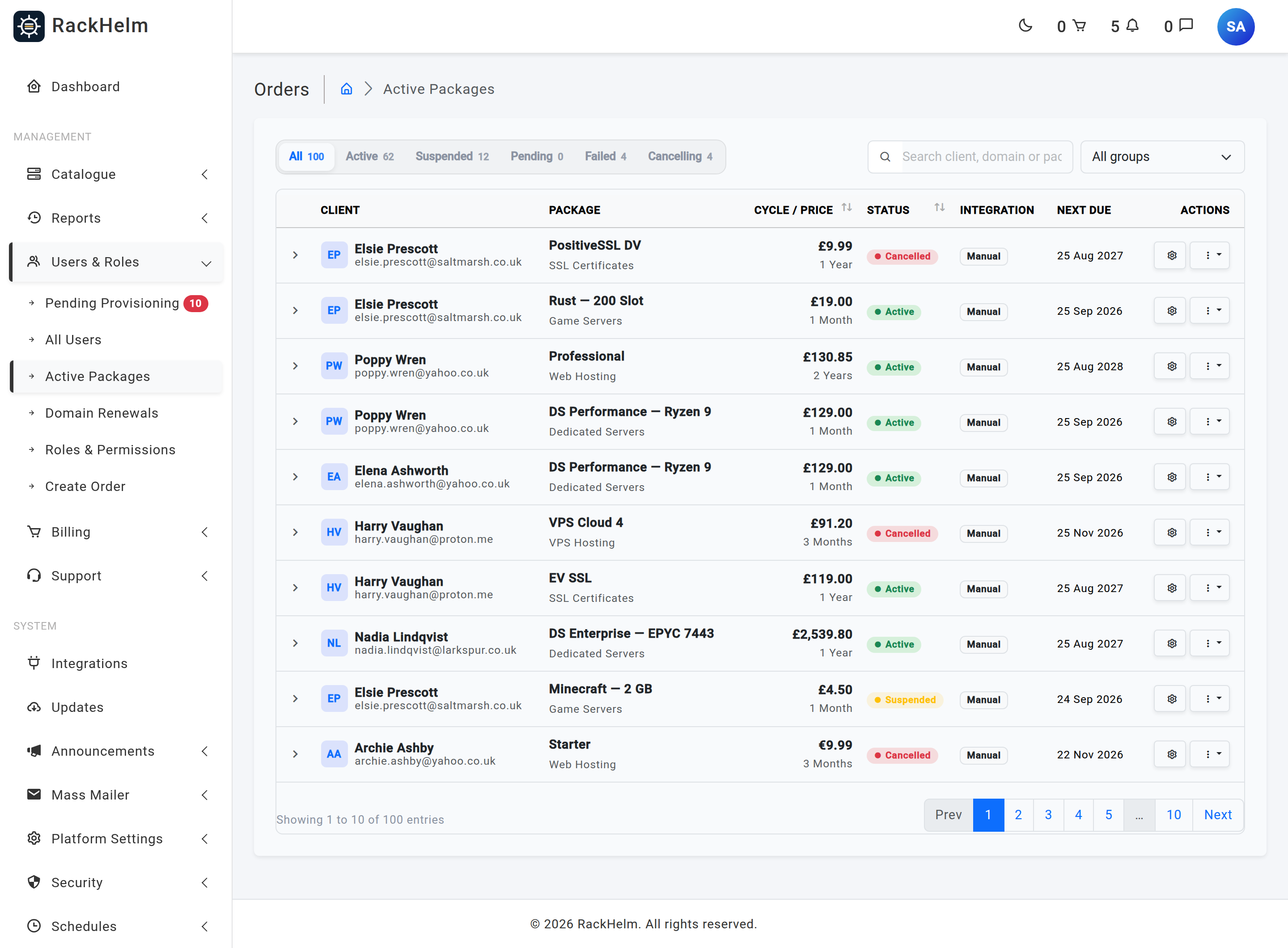
How the two item columns are combined on screen #
The Active Packages list does not show the raw columns. It derives one badge:
- It starts from
provisioning_status—provisionedis relabelled Active, andpending,queuedandprocessingall collapse into Provisioning. - The package’s own status then overrides it:
suspendedshows Suspended,pending_cancellationshows Pending Cancel, andcancelledshows Cancelled.
The order detail screen is the opposite: it shows both columns side by side, in separate Status and Provisioning columns, so it is the place to go when you need to see exactly what each column holds.
Deleting is a soft delete #
Both orders and order items are soft-deleted. Deleting a package from a client’s package list removes it from every active listing and reconciles its outstanding invoices, but the row is retained for audit and reporting. Once an order has no remaining items it is soft-deleted too.
Two consequences worth knowing:
- Order numbers are never reused. The next number is calculated including deleted orders, so a deleted order’s number cannot collide with a future invoice number.
- The termination job deliberately loads items including deleted ones, so choosing “also terminate the live remote service” during a delete still tears the service down even though the row is already gone from normal queries.
Troubleshooting #
| Symptom | Cause and fix |
|---|---|
| A package shows Active but the customer has nothing | provisioning_status is provisioned while nothing was actually built — most often an item marked provisioned by hand. Check provisioned_external_id on the package: if it is empty, no remote object was created. |
An order sits at pending long after checkout |
The order was created but the invoice generation step did not complete. Check the queue monitor for a failed GenerateInvoiceJob. |
| A cancelled package still bills | The order’s status only follows the items when all of them are cancelled. Check the remaining items on the order. |
| Status changed but the customer’s dashboard is unchanged | The customer view keys off provisioning_status, not the package status — pending, queued and processing all render as “Setting up”. Change the provisioning state, not just the package state. |


