Every content page belongs to a group, and the group’s slug is the first part of that page’s public URL. Group your terms under /legal/, product-specific terms under /terms/ and company documents under /company/ — then change your mind later and move a whole set of pages at once. This article is for operators.
Before you start #
Note: Groups sit behind the same
manage_pagespermission as the pages themselves, because a group’s slug is a public URL.
What a group does #
A group supplies three things:
- The URL prefix. A page with the slug
privacy-policyin a group with the sluglegalis published at/legal/privacy-policy. - A group index. Visiting
/legallists every published page in that group. - A standardised picker. The page editor’s Group dropdown is filled from this table, so page URLs stay tidy instead of being free text.
A fresh install seeds four groups: Legal (/legal/), Product Terms (/terms/), Company (/company/) and Other (/other/). A fifth, Marketing (/marketing/), is created when the homepage is converted into an editable page.
Managing groups #
Open Platform Settings → Pages and select Manage Groups, or go straight to /admin/page-groups. The table shows each group’s name, prefix, page count and sort order, with a preview button that opens the public group index.
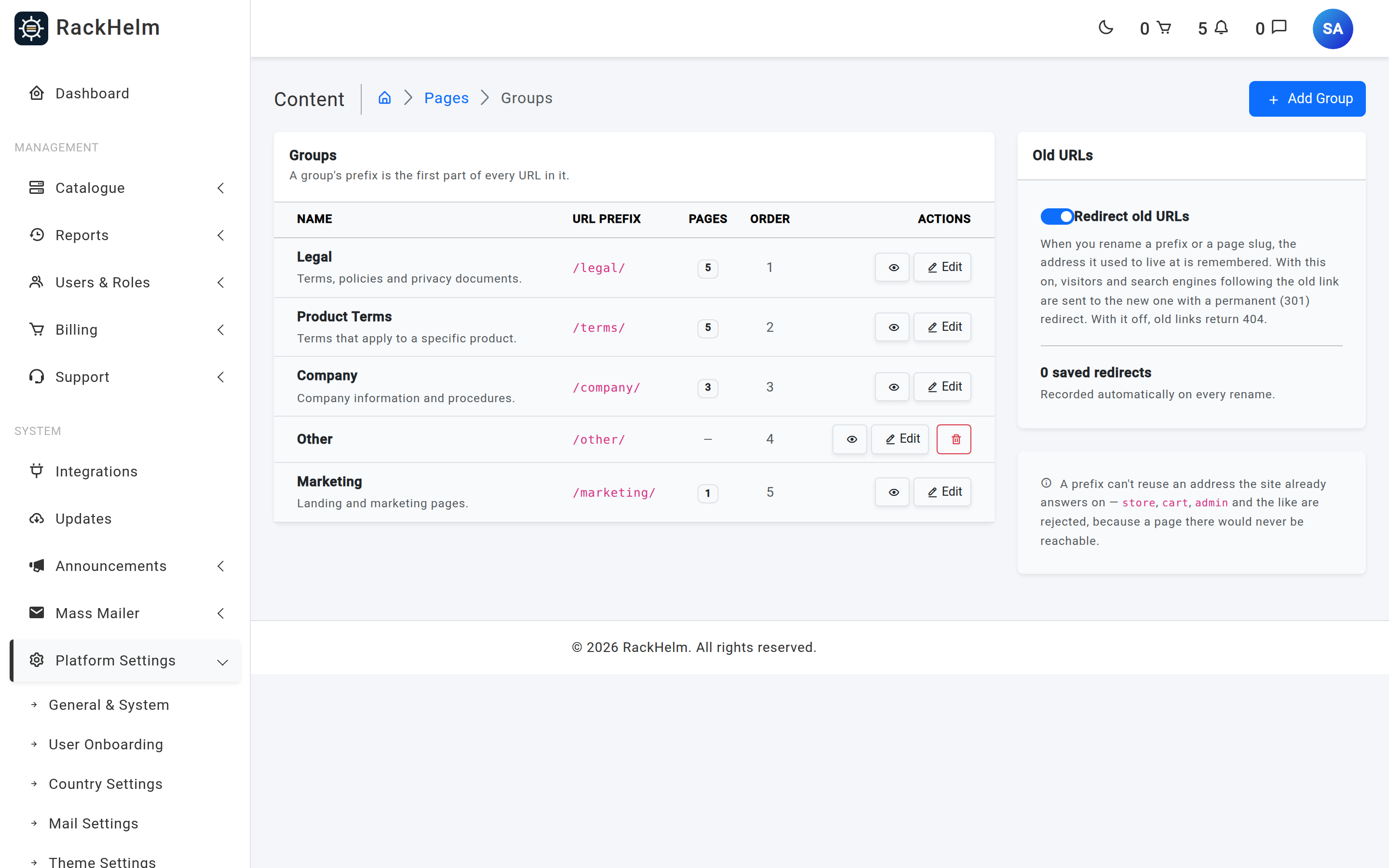
Adding or editing a group #
- Select Add Group, or Edit on an existing row.
- Enter a Name — this is the label shown in the page editor and on the group index.
- Optionally set the URL prefix. Leave it blank to derive one from the name.
- Optionally add a Description and a Sort Order.
- Save. If you changed the prefix, the confirmation tells you how many pages moved.
| Field | What it does |
|---|---|
| Name | Required, up to 100 characters. |
| URL prefix | Letters, numbers, dashes and underscores, up to 100 characters, unique across groups. Blank means “generate it from the name”. |
| Description | Optional, up to 255 characters. Shown on the groups list and the public group index. |
| Sort Order | Whole number, 0 or higher. Controls the order groups appear in. Defaults to one more than the current highest. |
Tip: You can also create a group without leaving the page editor — the Add group link beside the Group dropdown opens a small form and selects the new group for you.
Prefixes the site already uses are rejected #
Content-page URLs are a catch-all: RackHelm registers them after every other route so that a real part of the application always wins. That is what stops a page group breaking your store or your admin area — but it also means a group prefix that collides with a real route would simply never be reachable.
Rather than let you create a dead prefix, the form rejects it with:
Warning: “That URL prefix is already used by another part of the site. Pick a different one.”
The reserved list is built from the router itself, so every first path segment the application answers on is covered — store, cart, checkout, dashboard, login and so on, including routes added by later updates. On top of that, these are always reserved: admin, api, assets, build, css, js, img, images, fonts, storage, vendor, webhooks, livewire, up, page-link, sanctum, broadcasting, telescope, horizon, robots.txt and sitemap.xml.
If you type a prefix that is taken and let RackHelm generate one instead, it appends a number — store becomes store-2.
Renaming a prefix moves every page in the group #
Changing a group’s slug from legal to policies moves /legal/privacy-policy to /policies/privacy-policy, and does the same for every other page in that group, in one save. The old addresses are recorded so they can keep working — see Redirects for Renamed Pages.
Warning: Anything outside RackHelm that links to the old path — a marketing site, an email footer, a registrar’s whois record — still points at the old URL. Redirects cover you, but update the important links as well.
Deleting a group #
A group can only be deleted when it holds no pages, including pages you have deleted but which are still in the recycle bin. Move its pages to another group first. RackHelm also refuses to delete your last remaining group, because a page with no group has no stable public path.
The lowest-sorted group doubles as the fallback for any page that somehow ends up without one, which is why the seeded Legal group sits at sort order 1 and Marketing was placed after Other.
Troubleshooting #
| Symptom | Cause and fix |
|---|---|
| “That URL prefix is already used by another part of the site” | The prefix collides with a real route. Pick a different word. |
| “This group still contains pages. Move them to another group first” | Deletion is blocked while pages reference the group — including soft-deleted pages. Reassign them in the page editor. |
| “You need at least one page group” | You are trying to delete the last group. Create a replacement first. |
| The prefix I typed came back with a number on the end | It was reserved or already in use, so a unique variant was generated. |
| A page shows an amber “Ungrouped” badge | Its group has gone. It falls back to the lowest-sorted group’s prefix; open the page and pick a real group. |
| Old links 404 after a rename | Redirects are switched off. Turn Redirect old URLs back on in the Old URLs card. |


