Namecheap’s reseller API covers registration, transfer, renewal, nameservers, registrar lock, WhoisGuard privacy, bulk availability and a full domain listing. Its two awkward corners are strict IP allowlisting on an IPv4-only parameter, and the absence of any API command to fetch an EPP code. This article is for operators; for how domain orders flow through the platform in general, read How domain registration works in RackHelm first.
Warning: The Namecheap driver has not been verified against a live Namecheap account. It was written to the published API. Run it in the sandbox and place one real order before selling through it.
Before you start #
- API access enabled on the Namecheap account under Profile → Tools → Business & Dev Tools → Namecheap API Access. Namecheap grants production API access only to accounts meeting one of: 20 or more domains, a balance of $50 or more, or $50 or more spent in the last two years.
- An API key from that same screen.
- This server’s public IPv4 address added to Whitelisted IPs there. Every call fails without it, and Namecheap does not accept IPv6.
- The
edit_integrationspermission.
Configure the panel #
- Open Integrations → Namecheap (
/admin/panels/namecheap). - Fill the fields below.
- Press Test API. RackHelm calls
namecheap.users.getBalancesand reports the available balance and currency on success. - Press Save.
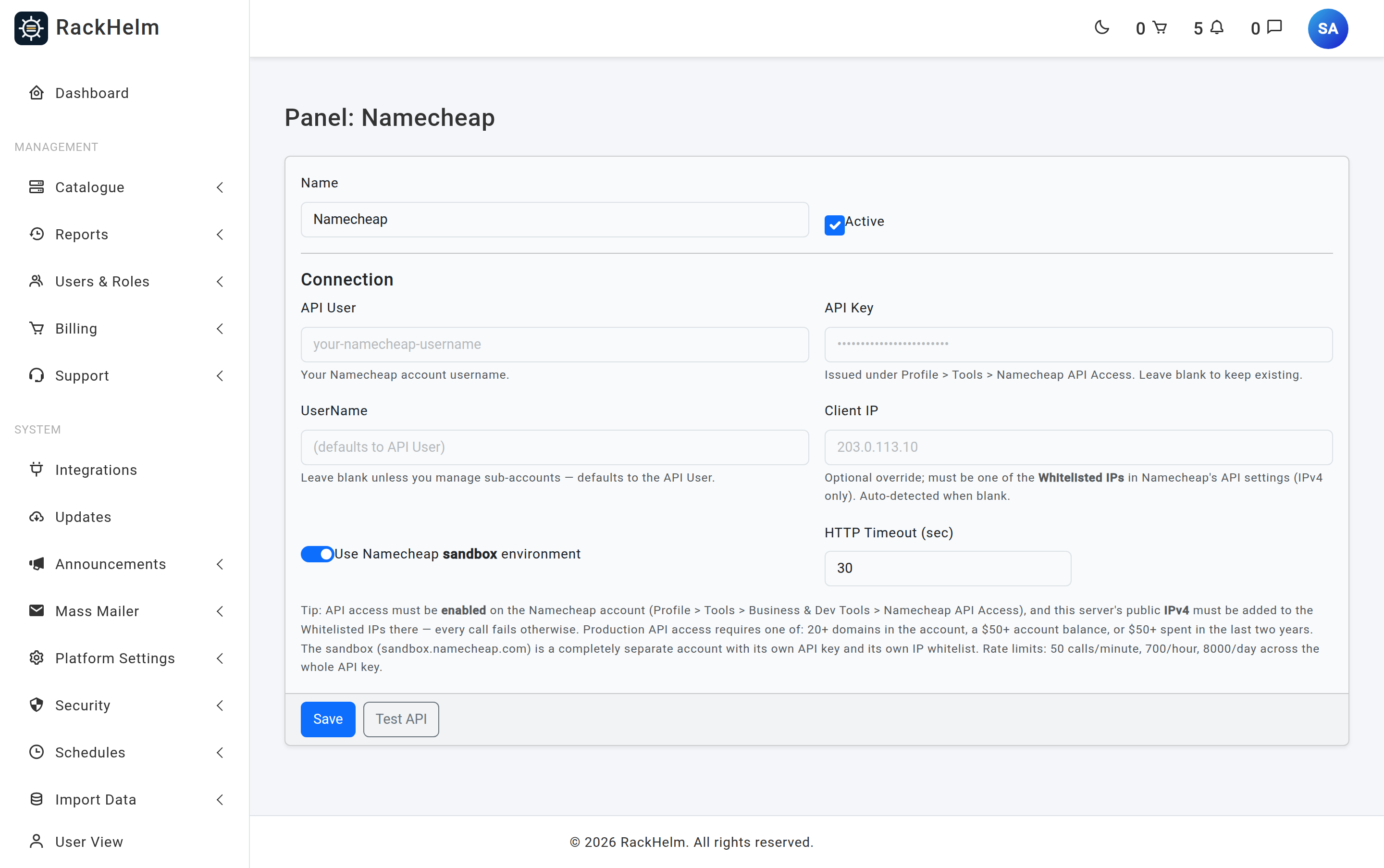
Field reference #
| Field | What it does |
|---|---|
| Name | Display label. Defaults to Namecheap. Up to 120 characters. |
| Active | Master switch for the panel. |
| API User | Required. Your Namecheap account username. |
| API Key | Issued under Profile → Tools → Namecheap API Access. Never rendered back — leave blank to keep the stored value. |
| UserName | Optional. Only needed if you manage sub-accounts; defaults to the API User at call time. |
| Client IP | Optional IPv4 override of the auto-detected server address. Validated as IPv4 — an IPv6 address is rejected by the form. |
| Use Namecheap sandbox environment | Switches between api.sandbox.namecheap.com and api.namecheap.com, and stores a mode of test or live. |
| HTTP Timeout (sec) | Seconds to wait. Field default 30, minimum 5. A blank value is not stored at all, so the driver’s own 60-second fallback applies. |
How Client IP is resolved #
Namecheap’s ClientIp must be the address the API call originates from — the server’s, never the visiting customer’s. RackHelm resolves it in this order:
- The panel’s Client IP field, if it is a valid IPv4 address.
- Platform Settings → General & System → External IP, if that is valid IPv4.
- The resolved server hostname.
127.0.0.1, which Namecheap will reject.
Note: The sandbox at
sandbox.namecheap.comis a completely separate account with its own API key and its own IP whitelist. Sandbox credentials never work against production.
Rate limits #
Namecheap enforces 50 calls per minute, 700 per hour and 8,000 per day across the whole API key. RackHelm is built around that: availability checks are batched up to 30 names per call, a group search sends one bulk call per registrar panel rather than one per TLD, and check results are cached for 3 minutes. Availability calls also use a tighter 8-second timeout with a 3-second connect timeout, so a slow registrar cannot stall a customer’s search.
What Namecheap supports #
| Capability | Behaviour |
|---|---|
| Registration | namecheap.domains.create, sent as a POST because the contact set runs to roughly 60 parameters. One contact block is reused for Registrant, Tech, Admin and AuxBilling. |
| Transfer | namecheap.domains.transfer.create. An EPP code is required; codes containing anything other than letters and digits are base64-wrapped automatically. The term is always sent as 1 year, per Namecheap’s contract, regardless of the billing cycle. |
| Renewal | Extends by the billing cycle’s whole years. |
| Nameservers | Supported from the customer’s domain page. |
| Registrar lock | Read and toggle. |
| WHOIS privacy | WhoisGuard. It can only be enabled when a privacy subscription is already attached to the domain — RackHelm reads the WhoisGuard ID and forwards masked WHOIS mail to the registrant email from the order. “Already enabled” counts as success. |
| Availability | Bulk, up to 30 names per call (the API’s own hard limit is 50). |
| Domain listing | 100 per page, capped at 200 pages — about 20,000 names — for the domain importer. |
| EPP code | Not available. Namecheap exposes no auth-code command. RackHelm unlocks the domain and returns instructions instead. |
| Suspend / unsuspend | Not implemented; domains have no suspend concept. |
The EPP code gap #
When a customer opens the EPP Code tab on a Namecheap domain, they do not get a code. They get the domain unlocked (best effort) and a message pointing at Domain List → Manage → Sharing & Transfer → Transfer Out in the Namecheap panel, where the code is emailed to the registrant contact. Plan a support process around that if you sell Namecheap TLDs to customers who transfer away often.
.uk domains #
For .uk names the driver sends the registrant’s legal type from the customer’s address record, defaulting to IND when it is not set.
Troubleshooting #
| Symptom | Cause and fix |
|---|---|
| Error mentions 1011102 or 1010102 | The API key was rejected, or API access is not enabled on the account. Check both under Profile → Tools → Namecheap API Access. |
| Error mentions 1011150, 1017150 or 1017105 | The calling IP is not whitelisted (or is disabled). Add this server’s IPv4 under Edit Whitelisted IPs, and set the panel’s Client IP if auto-detection is picking the wrong address. |
| Test API shows “Connected, but no balance data returned.” | Namecheap answered without a balance block. Usually a permissions problem on the API key. |
| Form rejects the Client IP | Only IPv4 is accepted, because that is all Namecheap accepts. |
| Transfer order fails with “EPP Code is required for transfer.” | No code on the order. Make the EppCode variable required on transfer products. |
| “Namecheap did not accept the transfer of …” | Namecheap returned success at the envelope level but Transfer="false". Check the domain is unlocked at the losing registrar, is outside its 60-day lock, and that the code is current. |
| Multi-year transfer only bought one year | Expected. Namecheap requires transfers to be one year; renew afterwards for the remaining term. |
| Privacy could not be enabled | There is no WhoisGuard subscription on the domain, or no registrant email is available. Both are logged; add the subscription in the Namecheap panel. |
| Sporadic failures under load | You are hitting the 50-per-minute cap. Reduce how many Namecheap TLDs appear in a searchable group. |


