The staff area lives at /admin and everything in it hangs off one sidebar. This article walks that sidebar top to bottom, says what each entry is for, and names the permission that reveals it. Use it as a map when you know what you want to do but not where it lives.
Before you start #
To see anything under /admin at all you must hold at least one role with the Staff role switch on. That is a property of the role, not a permission, and it is checked before every admin request alongside two-factor enforcement and password confirmation.
What you see inside the sidebar then depends on your permissions. Two staff members with different roles see genuinely different menus.
Note: The Super Admin role bypasses every permission check by design, so it always sees the complete menu. If you are testing what a role can do, test it as a user holding only that role — never as Super Admin. See Roles & Permissions.
Dashboard #
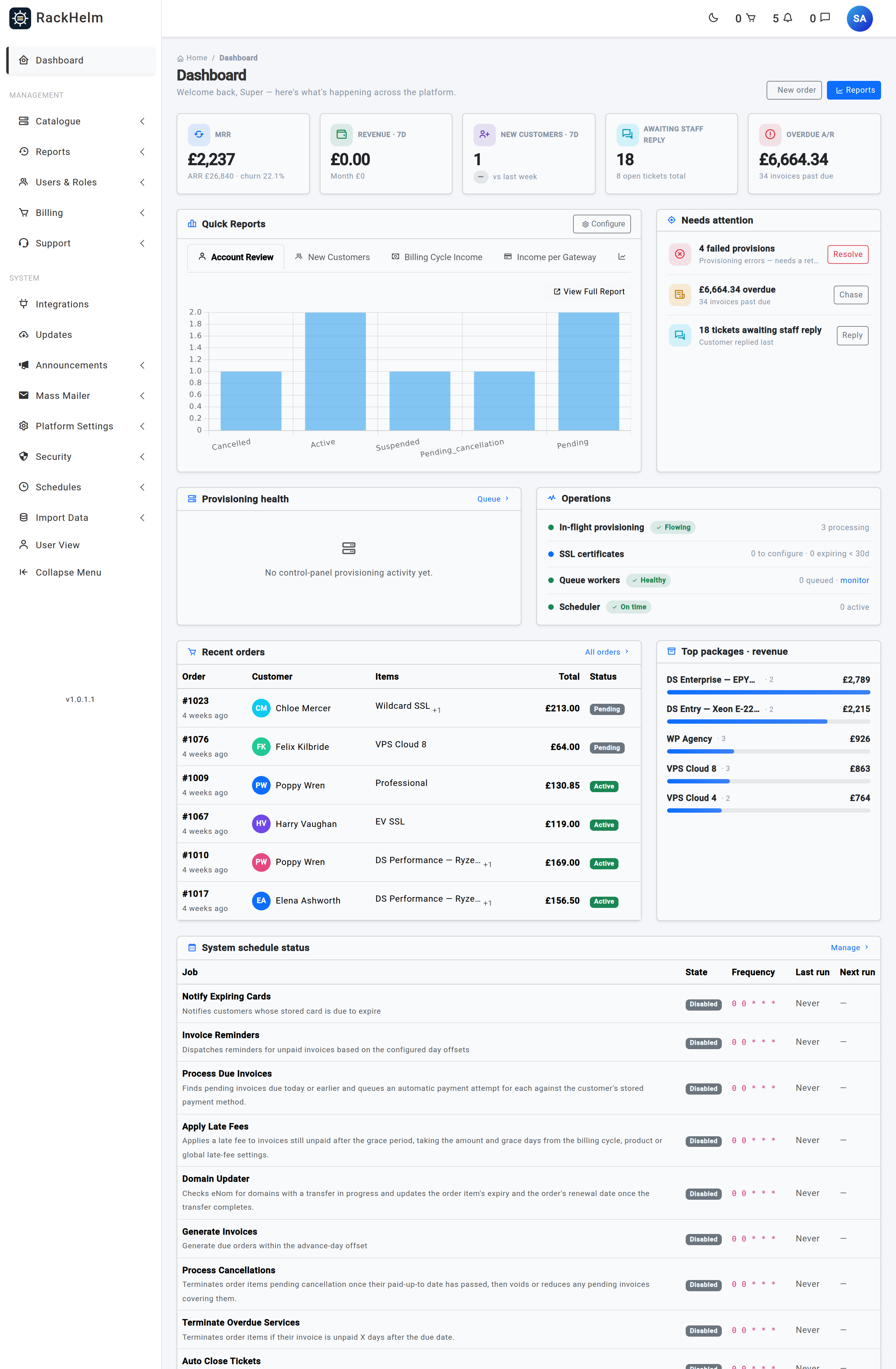
The landing screen. A KPI strip across the top gives MRR, ARR and churn; below it a Needs attention panel lists the things that actually require a decision today — failed provisions, items stuck in flight, overdue money, tickets awaiting a staff reply, SSL certificates waiting to be configured, renewals due within seven days and failed queue jobs. Underneath are provisioning health, recent orders and a configurable strip of quick reports.
Individual dashboard widgets are gated on their own permissions (view_widget_income, view_widget_tickets, view_widget_invoices, view_widget_provisioning), so a Support Agent would see the ticket panel and none of the revenue figures. In a default install that rarely comes up: the dashboard controller itself requires staff_panel, which is not a seeded permission, so only Super Admin reaches the screen at all. See the warning at the end of this article.
Management #
Catalogue #
Everything you sell.
- Catalogue & Groups — the main product screen. Groups are listed with their products nested inside; New Group and New Product sit in the header. The product editor is a five-tab workspace: General, Pricing, Provisioning, Options and Store & SEO. Viewing needs
view_products; creating and editing neededit_products. - Custom Fields — reusable inputs collected at order time. Needs
manage_custom_fields. - Billing Cycles — the shared list of recurring periods. Needs
edit_productsto use. - Product Addons — optional extras and their per-cycle pricing. Needs
manage_addons.
Reports #
The Report Dashboard plus SEO Reports and any database-defined reports you have enabled, which appear as their own menu entries in sort order. Needs view_reports; SEO reports additionally need view_seo_reports. Individual reports have their own permissions, for example view_report_income_growth.
Users & Roles #
Despite the name, this is where the operational order screens live as well.
- Pending Provisioning — appears only when at least one order item is pending, processing, queued or failed, with a red count badge. This is the first place to look when a customer says nothing arrived. It offers per-item Retry and Mark Provisioned, plus bulk actions.
- All Users — the customer and staff directory, with per-user tabs for packages, billing, invoices, tickets, addresses, authentication logs and sub-accounts. Needs
view_clients. - Active Packages — every order item across all customers, filterable by status. Needs
view_orders. - Roles & Permissions — the permission matrix.
- Create Order — the staff order builder, for placing an order on a customer’s behalf. Needs
edit_orders.
Billing #
- Invoices — the invoice list and individual invoice screens. Needs
view_invoices. - Create Invoices — raise an ad-hoc invoice. Needs
edit_invoices. - Payment Gateways — configure Stripe, PayPal, Square or Bank Transfer.
- Coupons — discount codes. Needs
manage_coupons. - Settings — billing preferences, invoice customisation, global late-fee defaults and global affiliate settings. Needs
edit_company_settings.
Support #
- All Tickets — the helpdesk queue and the individual ticket view. Needs
view_tickets. - Email Routing — the mailboxes RackHelm polls to turn incoming mail into tickets. Needs
manage_email_routes. - Spam Filter — blocked senders. Needs
edit_company_settings. - Canned Replies — reusable answers. Needs
manage_canned_replies. - Ticket Settings — numbering, uploads, signatures and response-time goals. Needs
edit_support_settings. - Departments — routing targets, with staff and role assignment. Needs
manage_departments.
System #
Integrations #
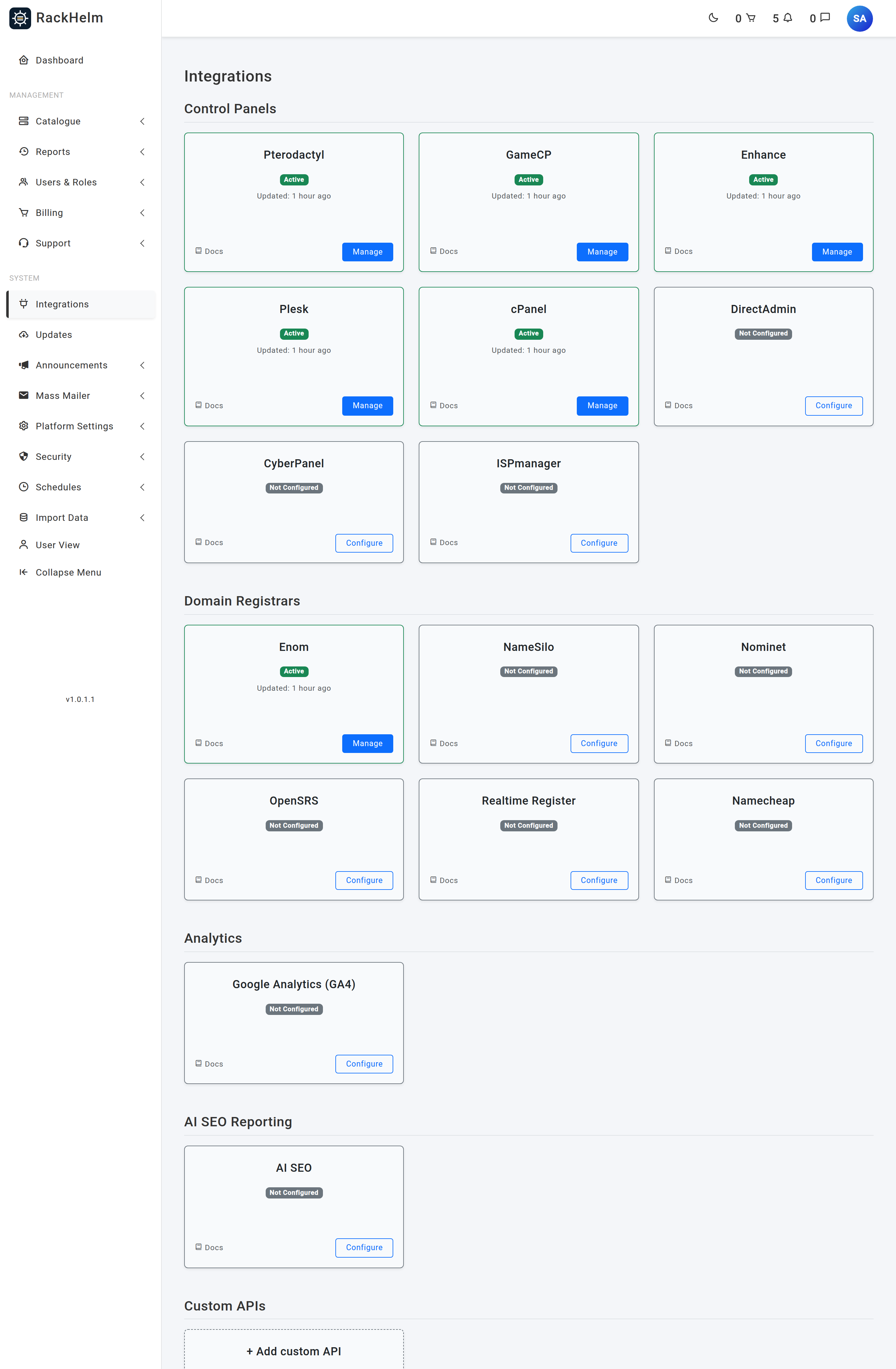
A single screen listing every external system RackHelm can talk to, grouped into Control Panels, Domain Registrars, Analytics and AI SEO Reporting, with your own Custom APIs listed as a separate group beneath. Control panels cover Pterodactyl, GameCP, Enhance, Plesk, cPanel, DirectAdmin, CyberPanel and ISPmanager; registrars cover Enom, NameSilo, Nominet, OpenSRS, Realtime Register and Namecheap.
Each panel card opens a credentials editor with Test buttons. Analytics and AI SEO hold keys rather than a connection, so they open their own settings screens and are hidden from anyone without edit_company_settings. SSL certificate issuers deliberately have no card of their own: they reuse the underlying registrar’s credentials and are configured on the product.
The menu entry appears for anyone holding edit_integrations or manage_custom_apis. Custom APIs have a deliberately higher bar: creating one means choosing an outbound URL and a payload template, so manage_custom_apis is withheld from Administrator by default.
Announcements and Mass Mailer #
Announcements publishes notices to customers. Mass Mailer is the campaign manager — All Campaigns, Create Campaign and reusable Templates, with recipient lists built from segment rules and sent by a scheduled job.
Platform Settings #
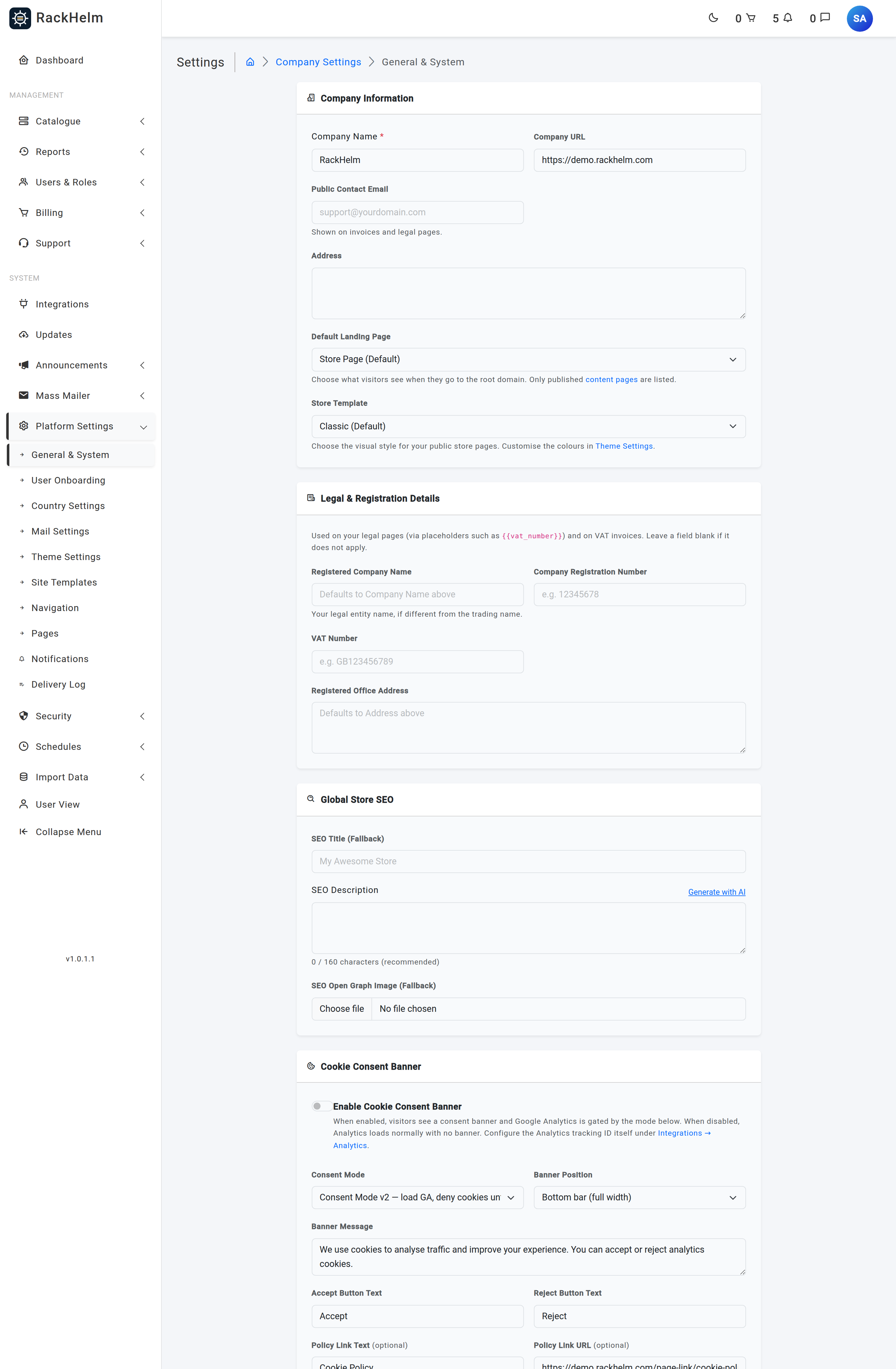
The configuration hub. It holds ten entries:
| Entry | What it configures |
|---|---|
| General & System | Company information, legal and registration details, global store SEO, the cookie-consent banner, maintenance mode, trusted proxies and the error-notification address. |
| User Onboarding | Whether new customers are walked through an address and payment-method wizard, and whether they may skip it. |
| Country Settings | Which countries appear in address forms. |
| Mail Settings | SMTP or sendmail delivery, the from address and name, and a test-send button. |
| Theme Settings | Favicon, navigation logo, minimised logo, dark-mode options, footer text, the light and dark colour palettes and custom CSS. |
| Site Templates | Templates used by the site builder. |
| Navigation | The menu builder for all five navigation locations, with preview, revisions and reset. Needs manage_navigation. |
| Pages | Content pages, the visual builder, page groups and redirects. Needs manage_pages. |
| Notifications | Which staff or destinations get told about which platform events. Needs manage_notifications, which is Super Admin only by default. |
| Delivery Log | The notification delivery ledger. Needs view_notification_logs. |
Security #
Six screens: Fraud Protection, Captcha Protection, MFA, Password Policy, Audit Logs and Email Logs. The two log screens need view_audit_logs; the four policy screens need edit_company_settings.
Schedules #
Queue Monitor plus one entry per system schedule, listed alphabetically. Opening a schedule lets you enable it, set its cron expression and timezone, give it a summary e-mail address and adjust its job-specific options. Schedule editing needs manage_schedules. The Queue Monitor route needs view_horizon, but its controller additionally requires manage_roles — which is not a seeded permission — so in a default install it is Super Admin only.
Import Data #
Bulk loaders for a migration: ClientExec Data Import, TLD Importer (registrar price lists), Registrar Domains Importer and Enhance Importer.
The bottom of the sidebar #
- User View — jumps to the customer dashboard so you can see the portal as a customer sees it.
- Collapse Menu — narrows the sidebar to icons, using the minimised logo if you uploaded one.
- Below the menu, the running build version. It is shown to staff only; hover for the release date.
A note on menu visibility #
Warning: Several menu entries and routes are gated on ability names that are not seeded permissions —
manage_settings,manage_products,manage_orders,manage_integrations,manage_rolesandmanage_campaigns. An ability that does not exist cannot be granted to a role, so in a default install only Super Admin sees those entries. Some of the screens behind them are still reachable with a real permission (Billing Cycles withedit_products, Create Order withedit_orders, Ticket Settings withedit_support_settings), but a handful of controllers additionally requirestaff_panel— likewise not a seeded permission — which makes them Super Admin only in practice. That group includes the staff dashboard, Payment Gateways, Theme Settings, the Captcha, MFA, Password Policy and Fraud screens, and the product-group and product-variable editors.
Troubleshooting #
| Symptom | Cause and fix |
|---|---|
| An Administrator signs in and gets “Unauthorized access to the staff panel”. | Their role does not have the Staff role switch on. Only a Super Admin can turn it on, under Users & Roles → Roles & Permissions. |
A staff member reaches /admin but gets 403 on the dashboard. |
The dashboard requires staff_panel, which is not a seeded permission — see the warning above. Send them straight to the screen they need, for example /admin/tickets. |
| A permission has been granted but the menu entry still does not appear. | Check you granted the exact key the menu uses. Several entries use names that are not real permissions; those cannot be granted at all. |
| Pending Provisioning has vanished from the menu. | That is correct. It only renders while at least one order item is pending, processing, queued or failed. Nothing to do means nothing to show. |
| The Integrations entry is missing for a staff member who manages panels. | It requires edit_integrations or manage_custom_apis. view_integrations on its own is not enough to reveal it. |
| A report you created does not appear under Reports. | Only reports flagged active are listed, and they are ordered by their sort order. |


