RackHelm is served by nginx by default, with a Let’s Encrypt certificate issued during installation. This article covers the server block the installer writes, how certificates are obtained and renewed, what to do when TLS is terminated by Cloudflare or another proxy, and why a portal without a certificate cannot be logged into at all.
HTTPS is not optional #
RackHelm’s session cookie is marked Secure, which means the browser will only store and return it over HTTPS. Over plain HTTP the cookie is discarded, so the CSRF token in the login form never matches the session and every sign-in attempt fails with 419 Page Expired. Session data is encrypted as well, and generated links are forced to HTTPS whenever APP_URL begins with https://.
Warning: If certificate issuance fails during installation, the installer prints an explicit warning that the site is serving plain HTTP and that logins will fail with 419 until a certificate is in place. Treat that warning as a blocking error, not a note.
The nginx site the installer writes #
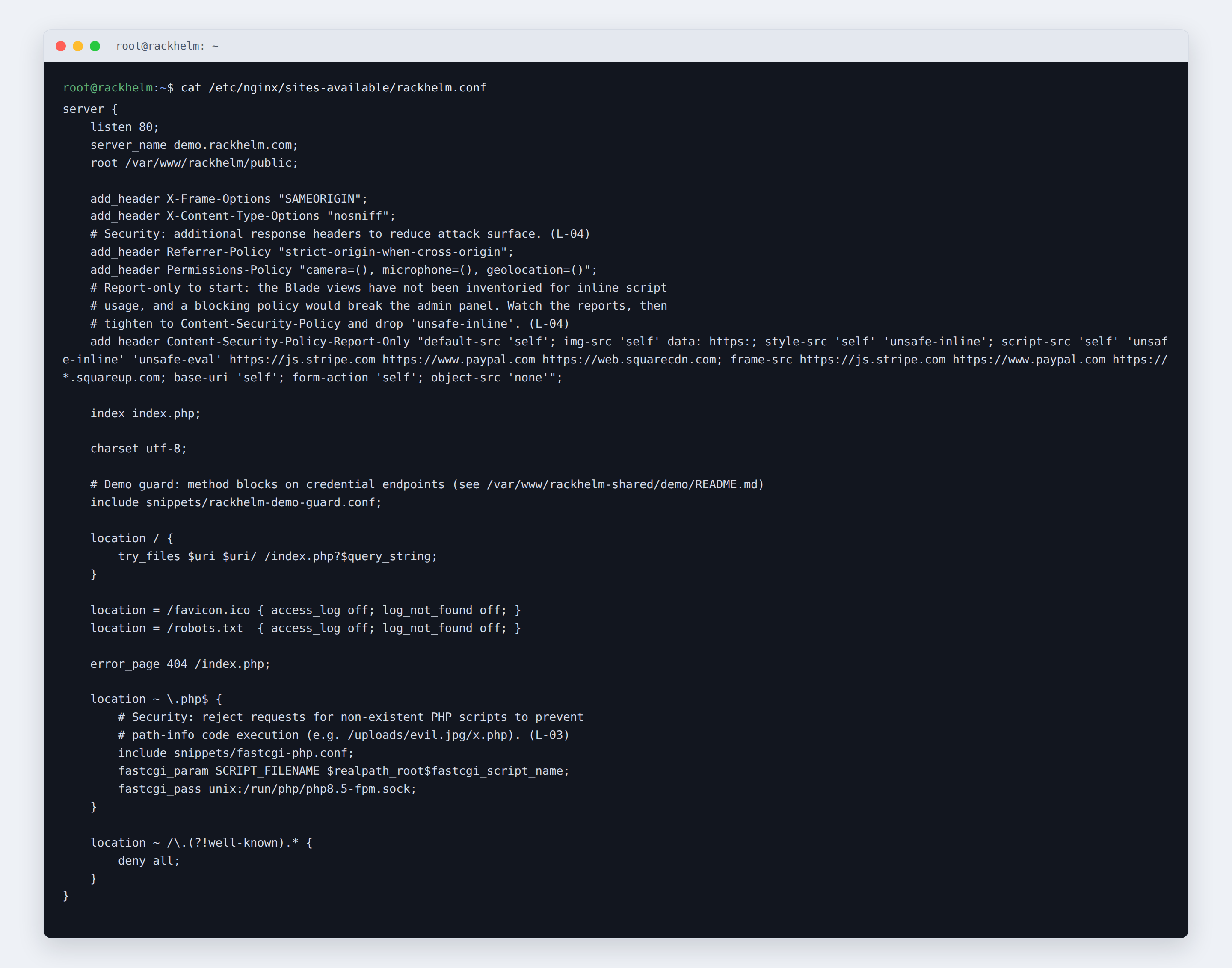
The configuration is written to /etc/nginx/sites-available/rackhelm.conf on Debian and Ubuntu (symlinked into sites-enabled) or /etc/nginx/conf.d/rackhelm.conf on RHEL. In outline:
server {
    listen 80;
    server_name portal.example.com;
    root /var/www/rackhelm/public;

    add_header X-Frame-Options "SAMEORIGIN";
    add_header X-Content-Type-Options "nosniff";
    add_header Referrer-Policy "strict-origin-when-cross-origin";
    add_header Permissions-Policy "camera=(), microphone=(), geolocation=()";

    index index.php;
    charset utf-8;

    location / {
        try_files $uri $uri/ /index.php?$query_string;
    }

    location = /favicon.ico { access_log off; log_not_found off; }
    location = /robots.txt  { access_log off; log_not_found off; }

    error_page 404 /index.php;

    location ~ .php$ {
        include snippets/fastcgi-php.conf;
        fastcgi_pass unix:/run/php/php8.5-fpm.sock;
    }

    location ~ /.(?!well-known).* {
        deny all;
    }
}
On RHEL the FastCGI socket is unix:/run/php-fpm/www.sock and the Debian-specific snippet is replaced by try_files $fastcgi_script_name =404; followed by include fastcgi_params; and an explicit SCRIPT_FILENAME. The installer also enables PHP-FPM as the nginx user rather than apache.
The generated file also carries a Content-Security-Policy-Report-Only header, which reports but never blocks. That is deliberate: the enforced policy is built per request in PHP (see the warning below), and a second enforcing header here would silently narrow it.
Two further pieces of hardening are applied outside the block above:
- A catch-all default server (Debian and Ubuntu). After removing nginx’s stock default site, the installer adds
/etc/nginx/sites-available/rackhelm-catchall.conf, which listens on port 80 as the default server for any otherserver_nameand returns444— closing the connection with no response. A request with a spoofedHosttherefore never reaches PHP. cgi.fix_pathinfo=0. Written to99-rackhelm-security.iniin the PHP configuration directory, so a request such as/storage/…/evil.jpg/x.phpcannot walk back to an uploaded image and execute it.
Let’s Encrypt #
When you answer Y to the certificate question, the installer runs:
certbot --nginx -d portal.example.com --non-interactive --agree-tos
  -m admin@portal.example.com --redirect
Certbot rewrites the server block to listen on 443, installs the certificate, and adds an HTTP-to-HTTPS redirect. Once a listen 443 directive is present, the installer inserts an HSTS header:
add_header Strict-Transport-Security "max-age=31536000; includeSubDomains" always;HSTS is added only after a certificate exists, because emitting it over plain HTTP is meaningless and would risk locking the site out if issuance later failed.
Certbot’s own systemd timer handles renewal. Verify it with:
certbot renew --dry-runIssuing a certificate later #
If issuance failed, or you installed without one, fix DNS and firewalling first, then run the command the installer printed:
certbot --nginx -d portal.example.com --redirectThen update .env so the application knows it is on HTTPS:
APP_URL=https://portal.example.com
ASSET_URL=https://portal.example.com
Behind Cloudflare or a reverse proxy #
When TLS is terminated in front of the server, answer n to the certificate question and y to Are you running behind a reverse proxy or Cloudflare using HTTPS?. The installer then writes APP_URL and ASSET_URL with an https:// scheme even though nginx itself only listens on port 80.
That is not the whole job. You must also tell RackHelm which proxies it may trust, or it will read the proxy’s IP address as the visitor’s — breaking login throttling, audit trails and fraud checks:
- Open Platform Settings → General & System.
- Fill in Trusted Proxies with a comma-separated list of IP addresses or CIDR ranges, for example
10.20.151.165, 192.168.1.0/24. - Save.
Once a proxy is trusted, RackHelm honours X-Forwarded-For, X-Forwarded-Host, X-Forwarded-Port, X-Forwarded-Proto and X-Forwarded-Prefix from it. The field is validated: only literal IP addresses and CIDR ranges with a prefix of /8 or narrower are accepted, and the keywords REMOTE_ADDR, PRIVATE_SUBNETS and private_ranges are rejected, because trusting everything would let any caller forge those headers. Leaving the field blank trusts no proxy at all.
Note: Trusted Proxies requires the
edit_company_settingspermission.
Running on Apache #
The installer only configures nginx, but RackHelm ships a complete public/.htaccess, so Apache works if you point a virtual host at /var/www/rackhelm/public, enable mod_rewrite and mod_headers, and allow overrides on that directory. The shipped file sets HSTS, X-Frame-Options, X-Content-Type-Options, Referrer-Policy and Permissions-Policy, disables directory indexes, forwards the Authorization and X-XSRF-Token headers, and routes everything that is not a real file to index.php.
Warning: Do not add a
Content-Security-Policyheader in your web-server configuration. RackHelm builds the policy per request in PHP, and some pages widen it at runtime — the Pterodactyl console has to open a websocket to whichever node a customer’s server lives on. Browsers intersect two CSP headers on one response, so a static copy silently cancels every runtime addition and breaks those pages. Use theCSP_*variables in.envinstead.
Troubleshooting #
| Symptom | Cause and fix |
|---|---|
Login always returns 419 Page Expired |
No TLS on the portal. The session cookie is Secure-only, so the browser never stores it. Install a certificate, or terminate HTTPS at a proxy and set APP_URL to the https:// address. |
| Certbot failed during installation | The hostname does not resolve to this server, or port 80 is not reachable from the internet. Fix both, then re-run the certbot --nginx command. |
400 Bad Request with nothing in laravel.log |
The request’s Host is not the host in APP_URL. This is rejected before the application logs anything. Check APP_URL and the Company URL setting. |
| Connections to the server’s IP or another hostname hang or return nothing | Expected on Debian and Ubuntu — the catch-all server returns 444. Browse by the portal’s own hostname. |
nginx configuration test or restart failed during install |
Another site already claims port 80 or the same server_name. Run nginx -t for the specific error and check /var/log/rackhelm_install_servers.log. |
| Visitor IP addresses all show as the proxy’s | Trusted Proxies is empty or the entry was rejected by validation. Use a literal IP or a CIDR of /8 or narrower. |
| Assets load but the game-server console or a third-party widget is blocked | A CSP directive is too narrow, or a second CSP header is being set by the web server. Remove any static CSP header and widen the policy with CSP_CONNECT_SRC and friends. |
| PHP files download instead of executing | The location ~ .php$ block or its fastcgi_pass socket path is wrong. Check the PHP-FPM socket matches the PHP version actually installed. |


