Your address book holds the billing addresses invoices are issued to, and the registrant details used when you register a domain. Keeping it accurate matters: an invoice takes a snapshot of the address at the moment it is raised, and registries reject domain orders whose registrant details are incomplete.
Viewing your addresses #
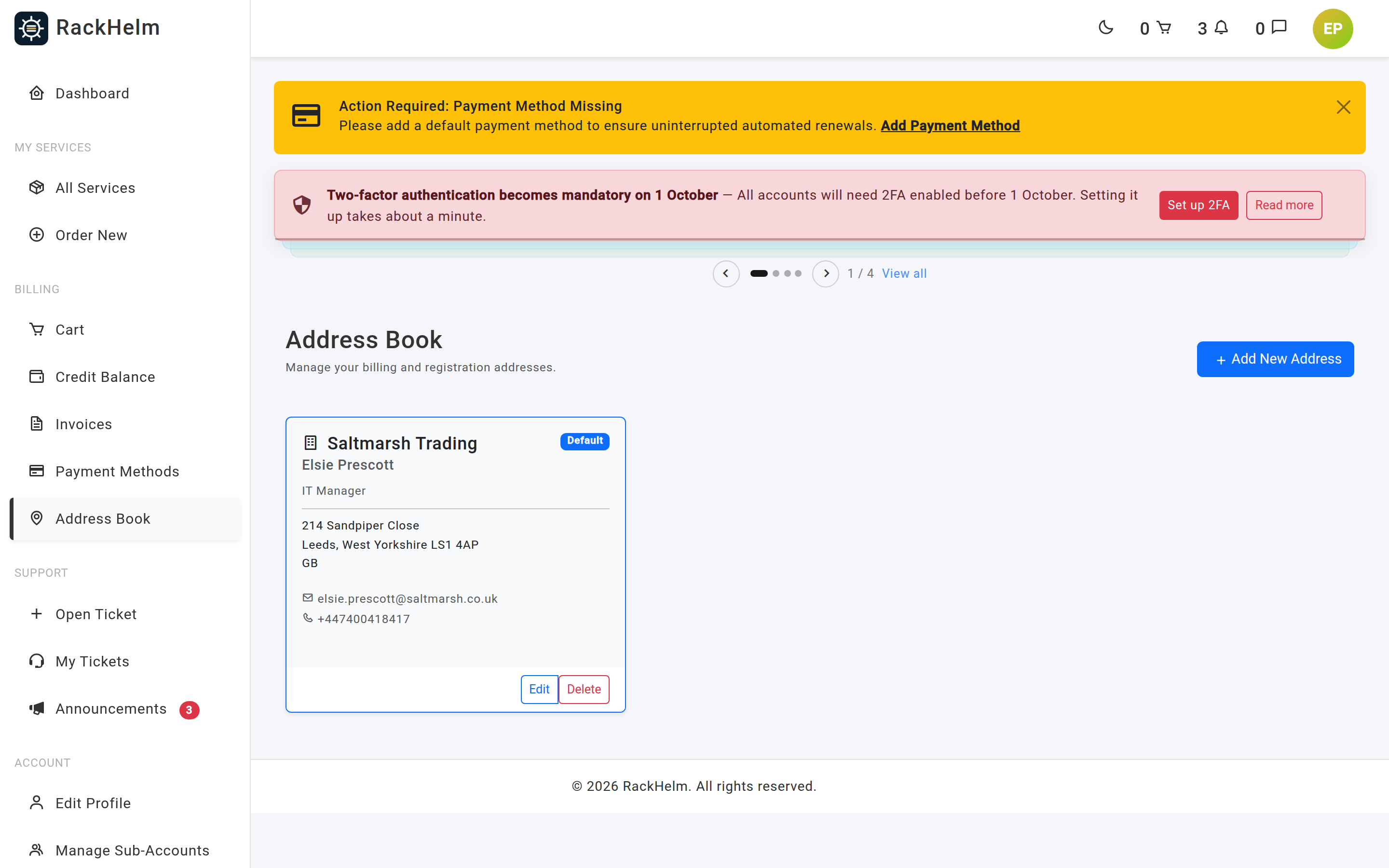
Open Address Book in the sidebar or go to /addresses. Each address is shown as a card, the default first, with buttons to Make Default, edit and Delete.
Adding or editing an address #
Select the button at the top of the page to open the Add New Address dialog, or edit an existing card. Fields marked with an asterisk are required.
| Field | What it is for |
|---|---|
| Organization | Company name. Optional, but include it if invoices must be addressed to a business. |
| Job Title / Role | Optional, for example CTO. |
| First Name * / Last Name * | The contact this address belongs to. |
| Country * | Chosen from your provider’s list of active countries. It also decides how the phone number is validated. |
| UK Legal Type | Required by Nominet for .uk registrations. See below. |
| Registrant Name | The company or full name a .uk domain is registered to. |
| Address Line 1 * / Address Line 2 | Street address. |
| City * | Town or city. |
| State / Province * | County, state or region. Required even in countries that do not normally use one — enter the county. |
| Zip / Postal Code * | Up to 20 characters. |
| Email Address * | Where invoices and registrar correspondence for this address are sent. It does not have to match your sign-in address. |
| Phone Number * | Validated against the selected country and stored in international format. |
Select Save Address when done.
UK Legal Type values #
Choose the one that describes the registrant:
- UK Individual (IND) and Non-UK Individual (FIND)
- UK Limited Company (LTD) and UK Public Limited Company (PLC)
- UK Partnership (PTNR) and UK Limited Liability Partnership (LLP)
- UK Sole Trader (STRA)
- UK Registered Charity (RCHAR)
- Non-UK Corporation (FCORP)
- Other (OTHER)
Leave both .uk fields blank if you are not registering .uk domains. See Registering or transferring a domain.
Setting the default #
Select Make Default on the card you want. Only one address is the default at a time — setting a new one clears the old. The default is pre-selected at checkout and used for new invoices.
Deleting an address #
Select Delete. You are asked to re-enter your account password first. The default address cannot be deleted — make another address the default, then delete the old one.
Note: Deleting an address does not change invoices that already exist. Each invoice keeps its own copy of the address it was issued to.
Using a different address on one order or invoice #
- At checkout — pick a saved address from Select Address, or enter a new one, which is then saved to your address book.
- On an unpaid invoice — open the invoice and use Change Billing Address to switch to another saved address. Paid invoices cannot be changed.
Troubleshooting #
| Symptom | Cause and fix |
|---|---|
| The phone number is rejected | It is validated against the selected country. Set Country first, then enter the number in that country’s normal format or in full international form. |
| “You cannot delete the default address.” | Make another address the default, then delete this one. |
| Your country is not listed | Providers publish only the countries they trade with. Raise a ticket to ask for it to be added. |
| A .uk domain order is rejected by the registry | UK Legal Type or Registrant Name is missing or wrong on the address used for the order. Correct the address, then raise a ticket so the order can be resubmitted. |
| An invoice shows an old address | Invoices snapshot the address at the time they are raised. Change it on the invoice while it is unpaid, or update the address book so future invoices are right. |
| You cannot see an address a colleague added | Addresses belong to the billing account. Sub-accounts share the owner’s address book — if it is not there, it was never saved. |


