Content pages are the editable pages of your public site — terms of service, privacy policy, company information, a landing page, anything that is prose or layout rather than catalogue. RackHelm ships thirteen starter legal templates and lets you add as many pages of your own as you need. This article is for operators; every screen below is in the staff area.
Before you start #
Note: Every screen in this article requires the
manage_pagespermission. The built-in Administrator role holds it out of the box; Support Agent and Billing Manager do not.
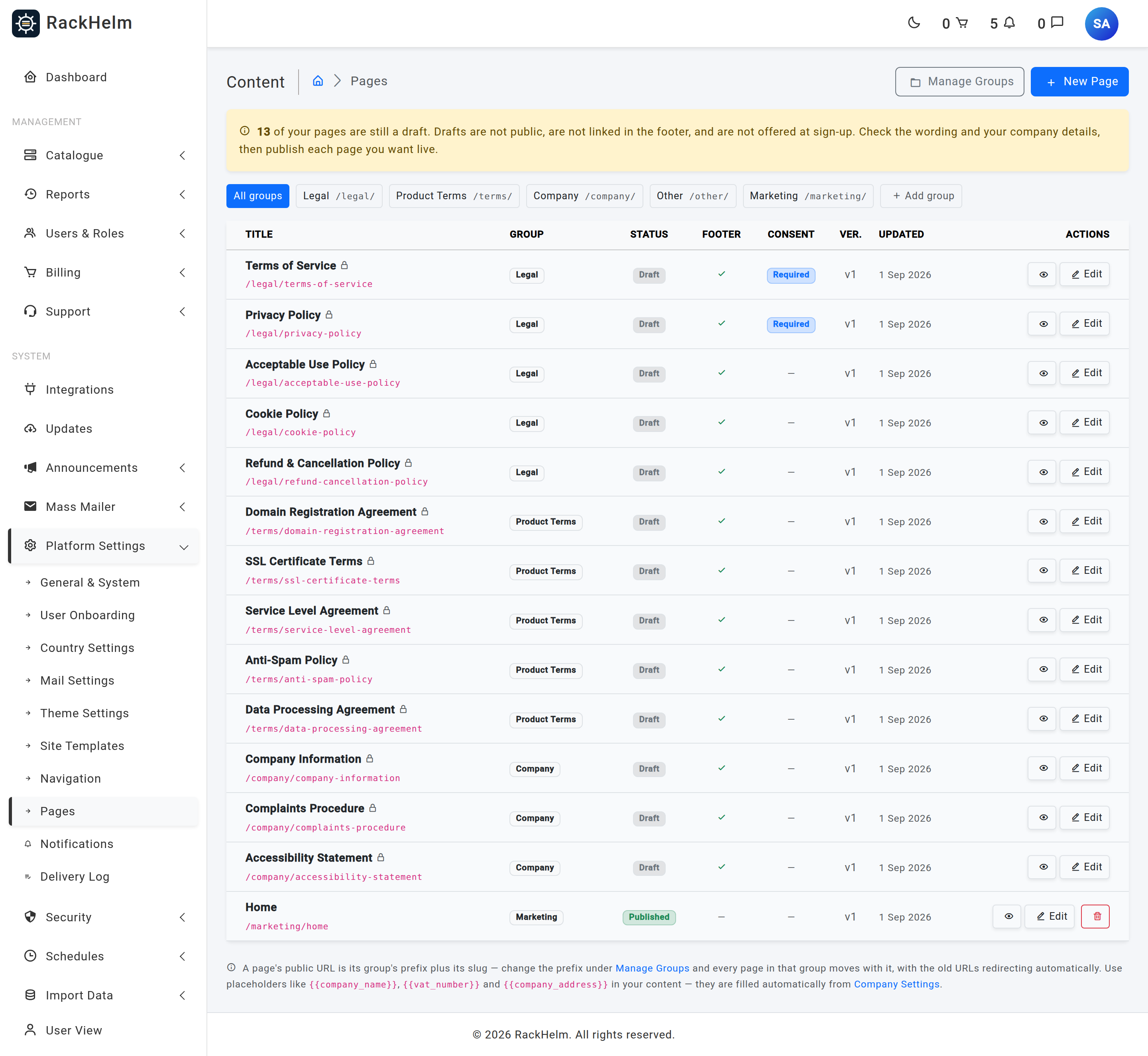
The seeded legal templates are created as drafts. A draft is not public, is not linked in the footer and is not offered at sign-up, so a fresh install ships with no live legal pages until you review the wording and publish each one deliberately. The Pages index shows a warning banner counting how many drafts you still have.
Warning: The seeded documents are starting templates, not legal advice. Have the wording — particularly Terms, Privacy and the Data Processing Agreement — reviewed by a suitably qualified person before you publish.
Where pages live #
Open Platform Settings → Pages. The index lists every page with its group, publication status, whether it appears in the footer, whether it requires consent, its version number and its full public path.
Creating a page #
- Select New Page.
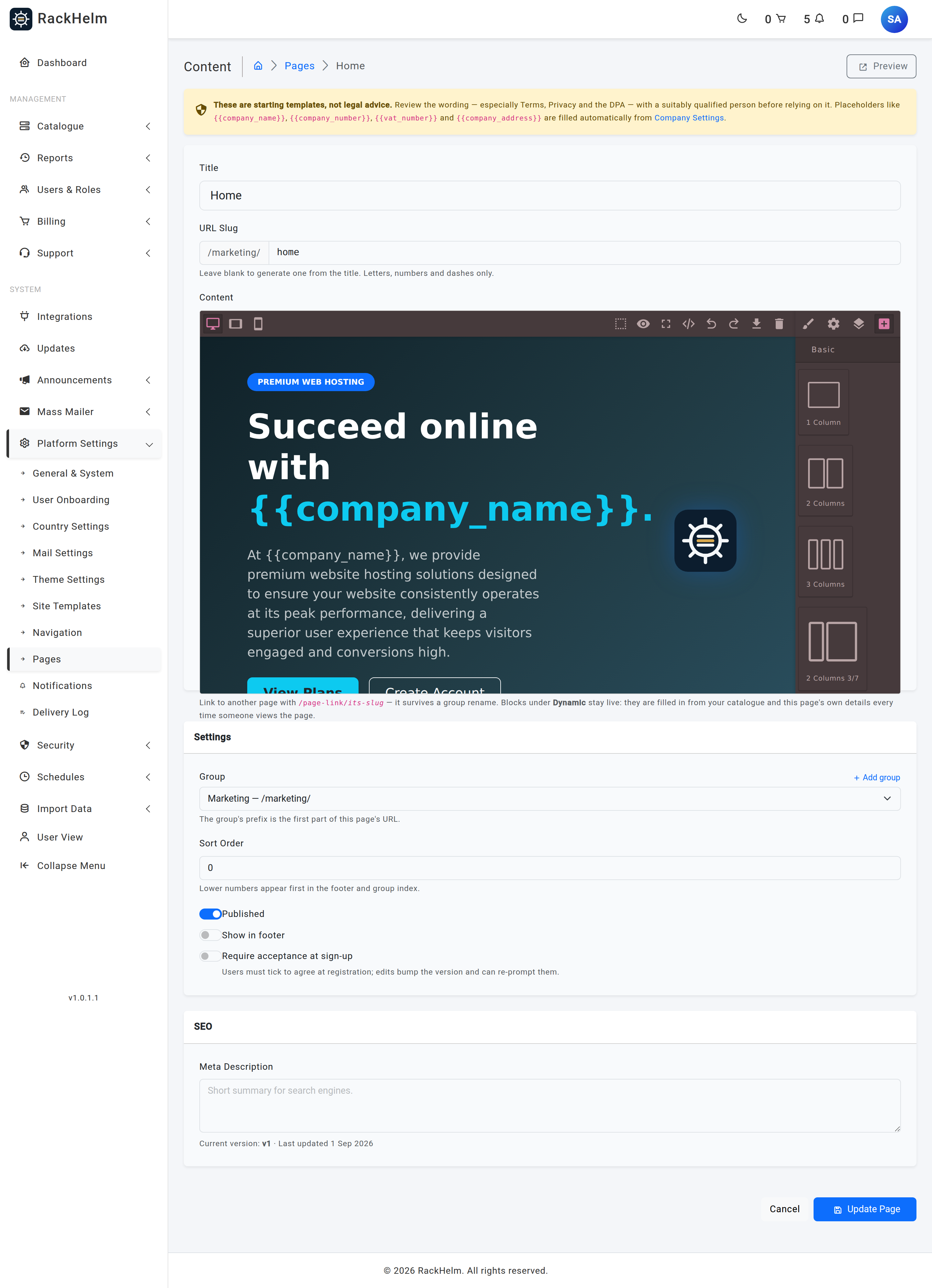
- Enter a Title. Leave URL Slug blank to have one generated from the title.
- Choose the editor: Rich text for prose, or Visual builder for a laid-out page (see The Visual Page Builder). New pages open in the visual builder by default.
- Pick a Group in the sidebar — the group’s prefix becomes the first part of the page’s URL. Use Add group to create one without leaving the form.
- Set the switches for Published, Show in footer and Require acceptance at sign-up.
- Select Create Page.
Field reference #
| Field | What it does |
|---|---|
| Title | Required, up to 255 characters. Shown as the page heading and in the browser title. |
| URL Slug | Letters, numbers, dashes and underscores only, up to 255 characters. Must be unique within the group, so /legal/overview and /company/overview can both exist. Leave blank to generate it from the title; a clash gets -2, -3 and so on appended. |
| Content | The page body, written in either the rich-text editor or the visual builder. Cleaned when saved and again when rendered. |
| Group | Required. Supplies the URL prefix and the group index the page is listed on. |
| Sort Order | Whole number. Lower numbers appear first in the footer and on the group index. |
| Published | Off means draft: invisible to the public, absent from the footer, not offered at sign-up. Staff holding manage_pages can still open the page’s URL to preview it, and see a “Draft preview” banner. |
| Show in footer | Adds the page to the footer link list once it is published. |
| Require acceptance at sign-up | New customers must tick to agree to this page when they register, and the acceptance is recorded against the page’s version number. |
| Meta Description | Up to 255 characters, used as the page’s search-engine description. |
Never hardcode a page URL #
A page’s public address is its group’s prefix plus its slug — and both halves are editable (see Page Groups and URL Prefixes). If you paste /legal/privacy-policy into another page, an email template or a setting, that link dies the moment you rename the group prefix.
Instead, link to the permalink /page-link/{slug}. That address always resolves to the page wherever it currently lives. In the rich-text editor, enter /page-link/privacy-policy as the link URL; in the visual builder, use the same value in the link component. When the page is rendered, RackHelm rewrites those links to the page’s real URL, so readers get a direct link rather than a redirect hop.
Tip: The permalink is also the right value for settings that point at a page, such as the cookie banner’s policy link. The seeder sets that to
/page-link/cookie-policyfor exactly this reason.
Placeholders that fill themselves in #
Page content can contain {{token}} placeholders that are replaced with your company details when the page is rendered. Both {{company_name}} and {{ company_name }} spacing work. Fill the values in under Platform Settings → General & System.
| Placeholder | Filled from |
|---|---|
{{company_name}} / {{site_name}} |
Company Name |
{{company_registered_name}} |
Registered Company Name, falling back to Company Name |
{{company_number}} |
Company Registration Number |
{{vat_number}} |
VAT Number |
{{company_address}} |
Address (line breaks preserved) |
{{company_registered_address}} |
Registered Office Address, falling back to Address |
{{company_email}} |
Public Contact Email |
{{company_url}} |
Company URL |
{{last_updated}} / {{effective_date}} |
The date this page was last saved |
A placeholder whose setting is empty renders as a visible red marker such as [Vat Number] rather than a broken token — that is your prompt to go and fill the field in.
Versions and proof of consent #
Every page carries a version number, starting at 1. Saving an edit that changes the body — or, on a built page, the stylesheet — increases it by one. Editing only the title, the sort order or the meta description does not.
When a page has Require acceptance at sign-up switched on, RackHelm records a consent row each time a customer agrees: which page, which version, when, from which IP address and with which browser user agent. Registration writes those rows automatically for every acceptance-required page.
There is also an optional re-consent flow: when a page’s version moves on, customers who accepted an earlier version are redirected to /terms/review and asked to accept again before they can carry on using the portal. It is governed by the terms_reacceptance_enabled setting and is off by default — this build has no admin screen for it, so it has to be enabled in the settings table. Staff and impersonation sessions are never interrupted, and the flow fails open, so a problem in it cannot lock a customer out.
System pages #
The thirteen seeded documents are marked as system pages. They show a padlock in the index, their slug is read-only so public links keep working, and they cannot be deleted — unpublish them instead if you want them hidden. You can still move a system page to a different group, edit its wording freely, and change any of its switches.
The seeded set is: Terms of Service, Privacy Policy, Acceptable Use Policy, Cookie Policy, Refund & Cancellation Policy, Domain Registration Agreement, SSL Certificate Terms, Service Level Agreement, Anti-Spam Policy, Data Processing Agreement, Company Information, Complaints Procedure and Accessibility Statement. Terms of Service and Privacy Policy arrive with Require acceptance at sign-up already on.
Troubleshooting #
| Symptom | Cause and fix |
|---|---|
| The page 404s for visitors but opens for you | It is still a draft. Staff with manage_pages can preview drafts; nobody else can. Switch Published on. |
| Placeholders show as red text in square brackets | That company setting is empty. Fill it in under Platform Settings → General & System. |
| “This is a system page and cannot be deleted” | Seeded legal pages are protected. Unpublish the page instead. |
| The slug field is greyed out | System pages keep a fixed slug so existing links keep resolving. You can still move the page to another group. |
| A link inside page content goes nowhere after a rename | The link hardcoded a path. Replace it with /page-link/{slug}. |
| The register page shows plain text instead of links to Terms and Privacy | Those two pages are still drafts. The sign-up form only links to published pages. |
| An edit does not appear in the footer | The footer link list is cached and refreshed whenever a page or group is saved. Save the page again if it looks stale, and confirm Show in footer and Published are both on. |


