Transactional email is everything RackHelm sends automatically in response to something happening: an invoice being raised, a payment failing, a ticket being answered, a service being provisioned. This article explains where those messages come from, what you can and cannot change about them, and how they are branded.
How transactional email is produced #
Each message is generated by a notification class in the application, not from an editable template row. There are around twenty of them, covering:
| Area | Messages |
|---|---|
| Billing | Invoice generated, invoice reminder, payment succeeded, payment failed, payment method expiring soon |
| Orders and services | Order created, service provisioned, manual provisioning required, SSL certificate issued |
| Support | New ticket, ticket replied, ticket assigned, ticket closed, ticket auto-close reminder, guest ticket verification |
| Accounts | Email verification |
| Staff alerts | New client registered, pending bank transfer, scheduled job failed, and the generic admin event message |
All but one of these are queued, so they are sent by a background worker rather than during the customer’s request. If your queue workers are stopped, transactional email stops with them — see Maintenance, Logs and Health.
Note: There is no admin screen for editing transactional email wording. RackHelm ships a
manage_email_templatespermission key, but no screen is bound to it, and no create/edit form for email templates exists in the admin area. If you need different wording, that is a change to the application, not a setting.
What you can change: branding #
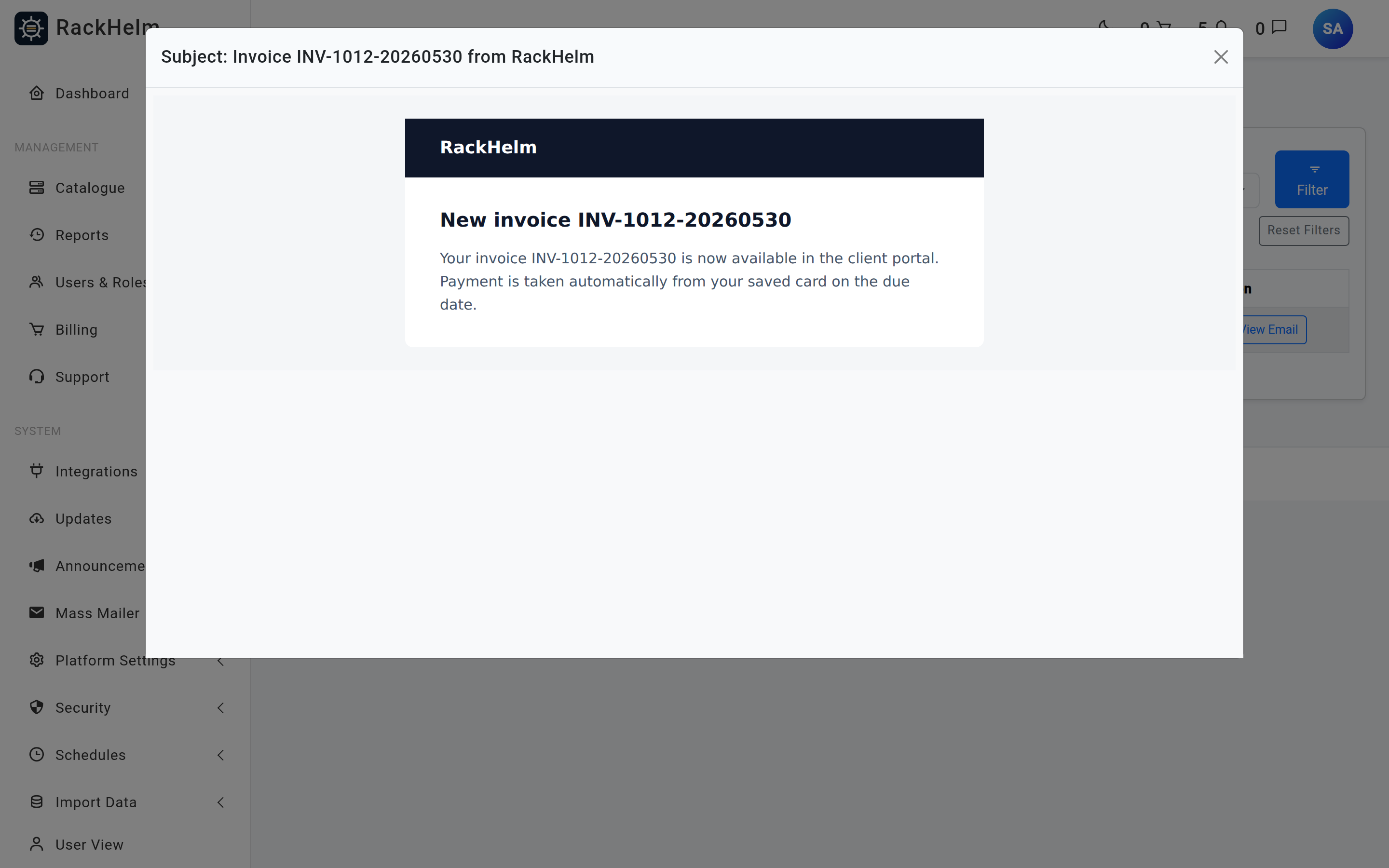
Every transactional message is rendered through one shared Markdown mail layout, and that layout is branded from your settings:
- The header shows your Navigation Bar Logo from Platform Settings → Theme Settings. With no logo uploaded, it falls back to your company name as text.
- The sender name is your Company Name and the sender address is Override From Address from the mail screen.
- Links in the message are built from Company URL, which is pinned deliberately rather than taken from the incoming request, so a spoofed host cannot mint a reset link pointing somewhere else.
Between them, those three settings are what makes the platform look like your business rather than ours. See Theme and Branding and Mail Settings and the Email Log.
Where editable email content does exist #
Three separate features do have editable content, and they are easy to confuse with transactional email:
| Feature | What it is |
|---|---|
| Mass Mailer campaigns and campaign templates | Marketing email you compose and send to a segment. Fully editable, under Mass Mailer in the sidebar. |
| Canned replies | Reusable ticket answers your agents insert while replying. Under Support → Canned Replies. |
| Admin notification actions | Staff-facing alerts. You choose which events go where, but not the wording. See Admin Notifications. |
Inbound-route autoresponders #
RackHelm has an email_templates table with a name, subject and body, and an inbound email route can reference one as an autoresponder: when mail arrives on that route and creates a ticket, the stored subject and body are sent back to the sender as a plain-text acknowledgement.
Warning: This is wired up in the background but not exposed in the admin area. There is no screen for creating an email template, and the route editor under Support → Email Routing does not currently offer an autoresponder picker. Unless a template row and a route reference are created directly in the database, no autoresponder is sent. Do not plan around this feature; use the ticket system’s own “new ticket” notification instead.
Confirming what was sent #
Every message handed to the mailer is recorded in Security → Email Logs with its recipient, subject and full rendered body. That is the place to check the exact wording a customer received, and to confirm a message was produced at all.
Troubleshooting #
| Symptom | Cause and fix |
|---|---|
| No transactional email at all, but the mail test works | The test sends inline; nearly everything else is queued. Start or restart the queue workers. |
| Messages show a plain text company name instead of a logo | No Navigation Bar Logo has been uploaded on the theme screen, or the public/storage symlink is missing so the image cannot be fetched. |
Buttons in emails link to localhost or the wrong domain |
Company URL is wrong. Fix it on General & System. |
| You need different wording in a customer email | Not configurable. Raise it with your RackHelm supplier — the text lives in the application’s notification classes. |
| An autoresponder never fires on an inbound mail route | Expected: there is no UI for configuring one. See the warning above. |
| Admin alerts arrive but customer email does not (or the reverse) | They are separate systems. Admin alerts run through the notification subsystem and its own delivery log; customer mail runs through the mailer and the email log. Check the matching log for each. |


