Account credit is a balance held against a customer’s account that can be spent on orders and renewals. Staff use it for goodwill gestures, refunds you do not want to push back to a card, and proration credits; customers can also top it up themselves if you allow deposits. Every movement is written to a ledger. This article covers both the staff side and the customer side, including how credit behaves on a multi-currency store.
Before you start #
- Seeing a customer’s balance and ledger requires
view_credit_balances. Adding credit requiresadd_client_credit; taking it away additionally requiresremove_client_credit. Changing an account’s currency and converting its balance requiresconvert_client_credit. - All of these are granted to the seeded Billing Manager role. See Roles & Permissions.
- Customer self-service deposits need Enable User Credit Deposits switched on under Billing → Settings, and a catalogue product named exactly
Credit Deposit(one is created by the initial database migration, in the hidden System product group).
Credit is denominated in the account’s currency #
On a multi-currency store this is the fact that governs everything else. The balance is held in the customer’s currency; each invoice and order carries its own frozen currency. Credit is only ever spent against a record in the same currency — it is never converted on the fly, because a silent 1:1 spend would give money away.
| Where | What happens when the currencies differ |
|---|---|
| Automatic renewal charges | Credit is left untouched and the full amount goes to the card. A line is written to the application log: “account credit is held in GBP but the invoice is in EUR; credit not applied.” |
| Checkout | The checkout is priced in the customer’s own currency, so the two always agree; should they ever diverge, credit is simply not applied. |
| A deposit invoice paid after the customer changed currency | The payment is converted through base at today’s table rates and credited in the new currency, and the ledger line says so: “Credit Deposit (Inv: INV-1234-20260924): £50.00 converted to EUR”. |
Adding or removing credit as staff #
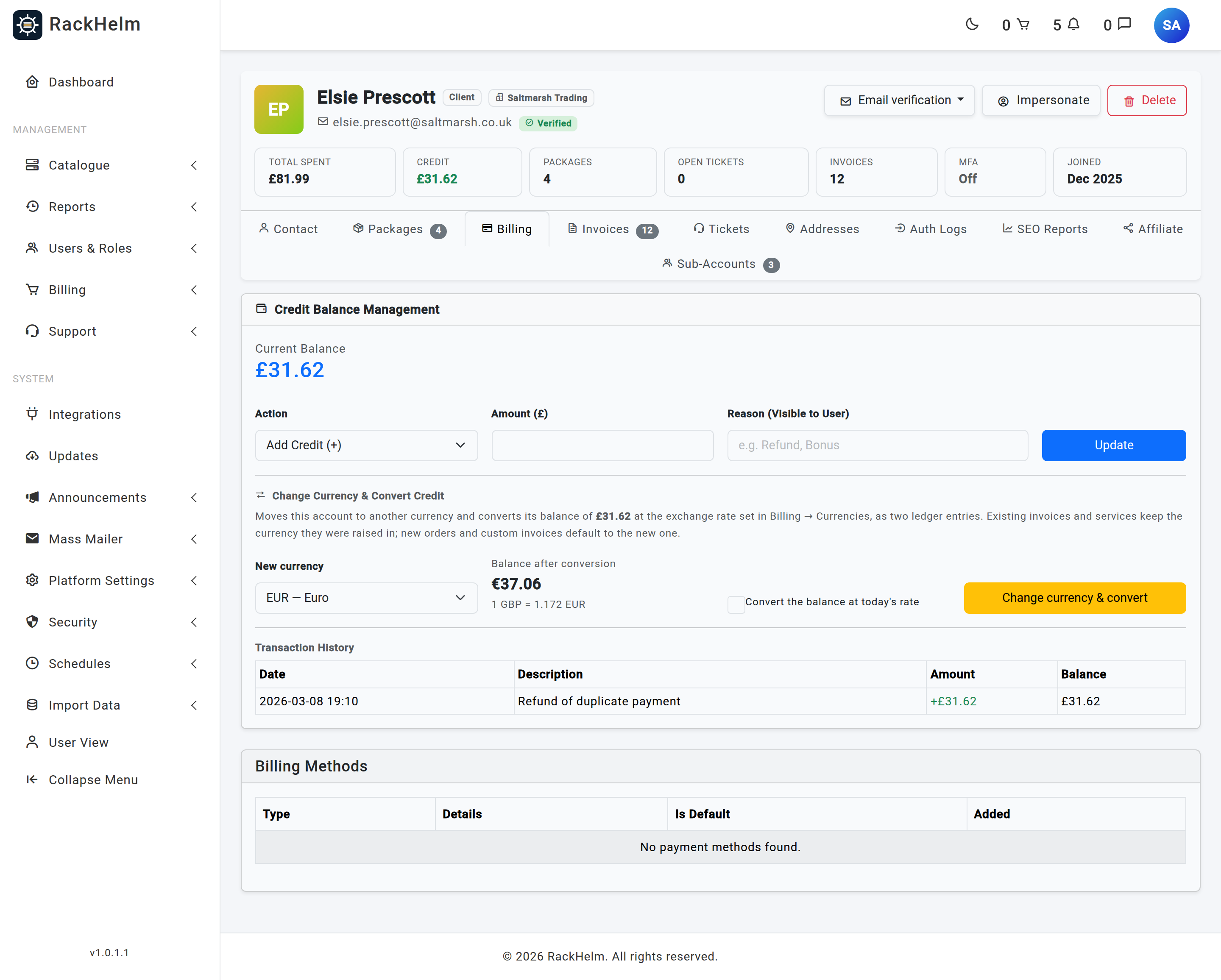
- Open Users & Roles → All Users and select the customer.
- Go to the Billing tab.
- Choose Action: Add Credit (+) or Remove Credit (-).
- Enter the Amount — the label carries the symbol of the customer’s own currency, and the figure is in that currency, not yours.
- Enter a Reason (Visible to User) — for example “Refund for ticket #1234” or “Goodwill — downtime 3 Aug”.
- Select Update.
| Field | Rules |
|---|---|
| Action | Required; Add or Remove. |
| Amount | Required; numeric; at least 0.01. Enter a positive figure for both actions — the direction comes from the Action selector. |
| Reason | Required; up to 255 characters. It appears verbatim in the customer’s own transaction history. |
Note: Removing credit is refused if the balance would go negative — you will see “Insufficient credit balance.” and nothing is changed. The check and the deduction happen in one database operation, so two staff members cannot both spend the same balance.
Changing a customer’s currency and converting the balance #
A customer’s currency is the default for their new orders and custom invoices; it is not a property of their history. Every existing order and invoice keeps the currency and rate it was raised in, and renewals follow the order, so changing the preference reprices nothing that already exists. The one figure that is not frozen is the credit balance — which is why a non-zero balance blocks the change until it is converted.
With convert_client_credit, the customer’s Billing tab carries a Change Currency & Convert Credit card. Pick a New currency, read the Balance after conversion preview and the rate line beneath it, tick Convert the balance at today’s rate, and select Change currency & convert.
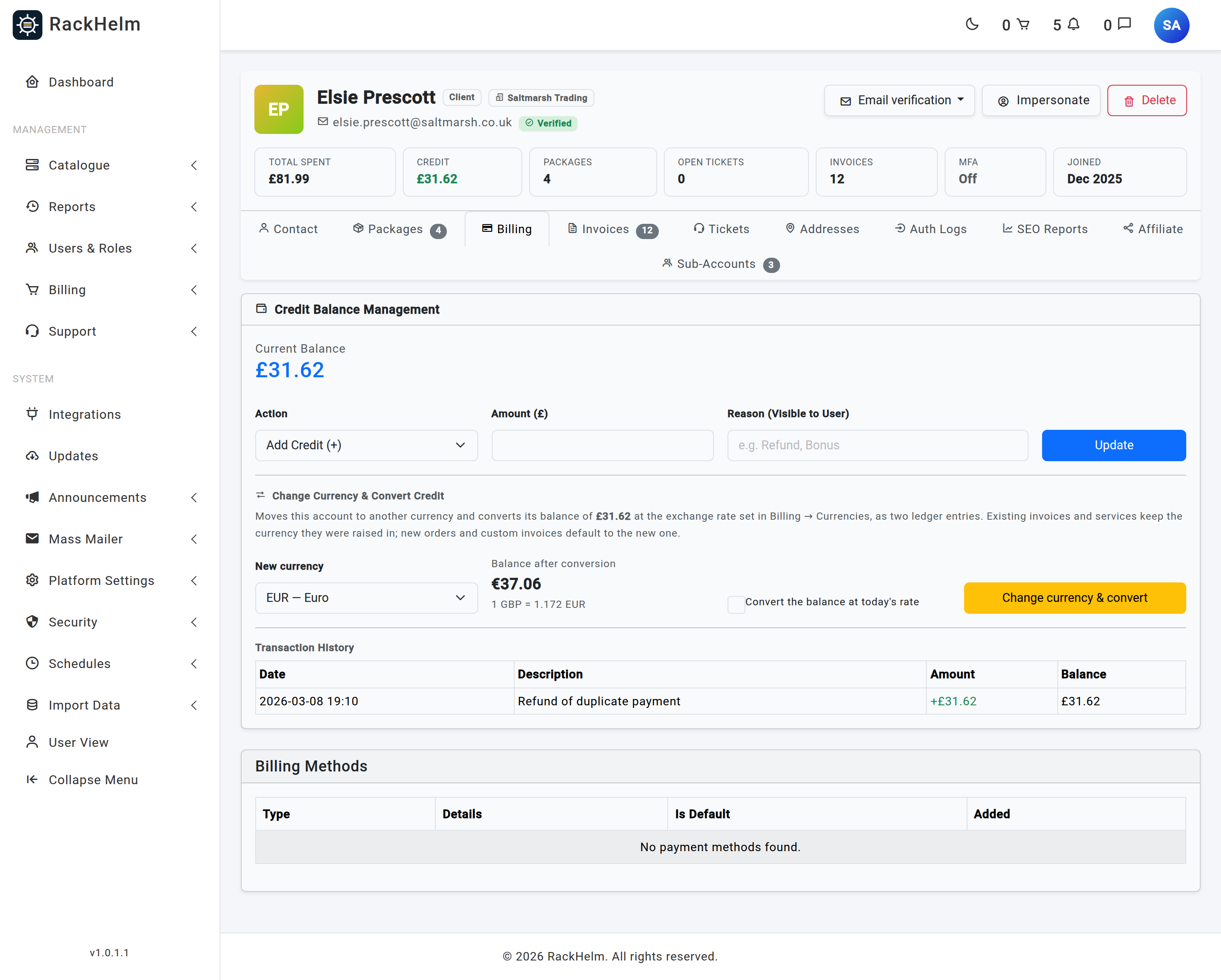
The conversion moves the whole balance through the base currency at the rates on the currencies table — never a live API call — and is written as two ledger rows inside one transaction: a removal stamped with the old code (“Currency change: GBP balance converted to EUR”) and an addition stamped with the new one (“Currency change: £70.94 converted at 1 GBP = 1.17 EUR”). Credit and preference can never be observed in different currencies. The success message repeats the figures.
| Refusal | Why |
|---|---|
| “Sub-accounts use the account owner’s currency.” | Only account owners hold a currency preference. |
| “This account holds £70.94 of credit in GBP. Convert the credit before changing the currency.” | The currency was changed without asking for a conversion — for example from the customer’s edit form rather than this card. |
| “This account has a negative credit balance (−£5.00). Adjust it to zero before changing the currency.” | A negative balance cannot be recreated in the new currency. Zero it first. |
| “EUR has no exchange rate set (it is still 1.0). Set a real rate in Billing → Currencies before converting credit.” | Converting through the 1.0 placeholder would hand over the same number of units in a different currency. |
Warning: Converting is one-way bookkeeping, not an exchange. The customer’s open invoices in the old currency can no longer be settled from the balance afterwards, because credit only spends where the currencies match. Convert when the account has no unpaid invoices left in the old currency, or expect to settle those by card.
Ledger rows written before 1.0.1.1 #
Older ledger rows were written without a currency code, and a base-currency account’s rows were written without one for longer still. Those rows now read as base, which is right in almost every case. To make them say so explicitly, run:
php artisan currency:pin-credit-ledger --dry-run
php artisan currency:pin-credit-ledger
It pins only rows where a missing code provably meant base — rows on an account owner. It lists, and leaves alone, affiliate commission rows, rows on sub-accounts (whose credit is held in the owner’s currency) and rows whose user no longer exists. The console output is the record; no activity-log entries are written.
How customers get credit #
| Source | Detail |
|---|---|
| A staff adjustment | As above. |
| A self-service deposit | The Add Funds form on the customer’s Credit page, if deposits are enabled. |
| Proration on a package or billing-cycle change | Unused time is applied to the difference invoice as a negative line; anything left over is added to the balance, described as prorated credit overflow against the invoice it came from. A cancellation does not mint credit — it voids or reduces the pending invoice instead. |
| Credit returned from a voided or cancelled invoice | Voiding an invoice, deleting a package or cancelling a service returns the account credit that had been applied to it, as a ledger row against that invoice. |
| A currency conversion | The two rows described above. They net to a change of unit, not a change of value. |
Warning: Affiliate commission is not paid into account credit in this build. The ledger carries an
affiliate_code_idcolumn and a commission listener exists, but the event it listens for is dispatched from only one controller action that no page links to, so on a normal install no affiliate is ever credited. The affiliate screen’s payout totals, which count ledger rows carrying an affiliate code, will therefore read zero. Do not promise commission-to-credit to affiliates until this is wired up.
Self-service deposits #
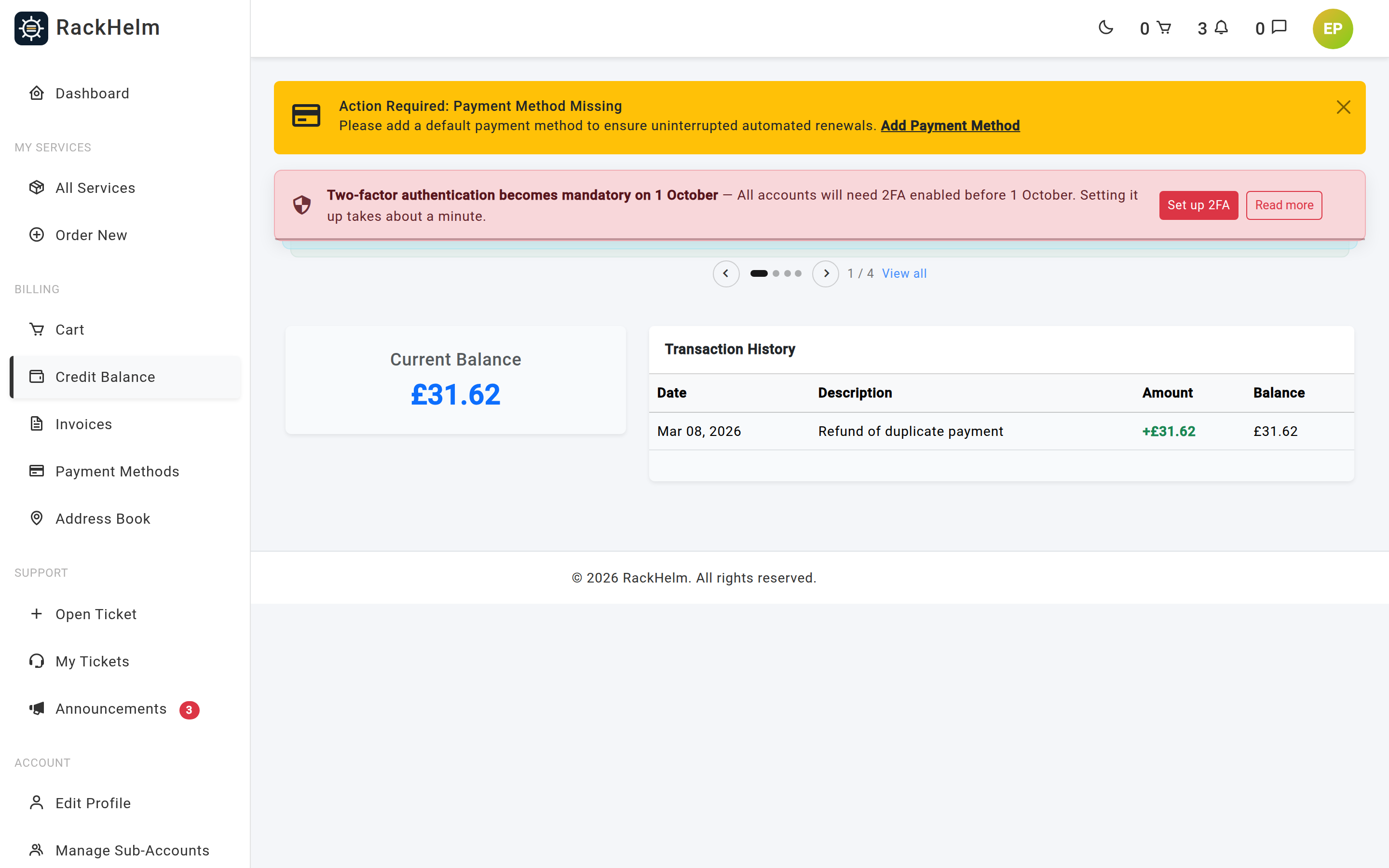
With deposits enabled, the customer’s Credit page shows their balance, an Add Funds box and their transaction history (ten rows per page). The amount box is labelled Amount with their own currency’s symbol.
The bounds are 5 and 1,000 in the base currency, converted into the customer’s currency at the table rate. For a base-currency customer that is a flat £5–£1,000; for anyone else it is the converted equivalent.
A deposit is not an instant top-up. Submitting the form puts a Credit Deposit line in the customer’s cart for the requested amount and sends them to the cart; the balance only rises once the resulting order’s invoice is paid. That is deliberate — the money has to arrive before the credit does.
Note: The Add Funds box’s own minimum is fixed at 5 and it pre-fills 10.00, neither of which is converted for the viewer’s currency. On a store whose base is GBP, a customer in EUR can type 5.00 and have it rejected by the server because the real minimum is the converted figure. The server’s bound is the one that counts.
Warning: Do not rename or delete the
Credit Depositproduct. The deposit flow looks it up by that exact name, and a rename makes deposits fail with “System error: Credit Deposit product not found.” Keeping it in the System product group is also what stops it appearing in the store and in the customer’s service lists.
How customers spend credit #
| Where | Behaviour |
|---|---|
| At checkout | A Use Account Credit toggle applies the lesser of the balance and the order total. If credit covers the whole order, no gateway is needed and none is asked for. |
| On renewals | Only if the customer has enabled Use Credit First under Billing Preferences on their Edit Profile page. The automatic charge run then applies credit first and charges the card for the remainder. |
When credit part-funds an invoice, the invoice’s amount is reduced by the credit applied and the screens show the difference as a Credit Applied line. Because a card charge below the network minimum cannot be processed, a split that would leave less than that on the card is adjusted so the card takes exactly the minimum and credit covers the rest. The minimum is per currency — 50p for GBP, USD and EUR, but 175 for HUF and 50 for JPY. See Tax, VAT and currency.
Tax, where it is enabled, is added before credit, so an order settled entirely from credit still carries its VAT on the invoice. Credit deposits themselves are never taxed.
Note: There is no “pay this invoice with my credit” button on the invoice page in this build. Credit is applied automatically at checkout and on renewals; to settle a specific open invoice from a balance, ask the customer to enable Use Credit First before the charge run reaches it, or settle the invoice another way and adjust the balance by hand with a clear reason.
Warning: A route for paying an invoice from credit does exist (
POST /invoices/{invoice}/pay-credit), but no page links to it and it still carries a known defect: it takes the credit from the balance without lowering the invoice’s amount, so the invoice records the full sum as paid and shows no Credit Applied line. Do not build links or integrations against it until that is fixed.
Note: A credit top-up cannot be paid with account credit — the automatic charge run skips it, and the invoice route refuses it with “A credit top-up cannot be paid with account credit.” A top-up that would otherwise be a zero-net loop is not a payment.
Troubleshooting #
| Symptom | Cause and fix |
|---|---|
| The Billing tab returns 403 | You lack view_credit_balances, or you are trying to manage an account at or above your own staff rank. |
| Remove Credit returns 403 | remove_client_credit is a separate permission from add_client_credit; the route only enforces the latter, so the removal check happens inside. |
| “Insufficient credit balance.” | The customer’s balance is lower than the amount you tried to remove. Check the ledger — something may have spent it since the page loaded. |
| No Change Currency & Convert Credit card | You lack convert_client_credit (seed it, above); the store has only one active currency; or the account is a sub-account. |
| The target currency is listed but greyed out, “(no rate set)” | Its exchange rate is still the 1.0 placeholder. Set a real rate under Billing → Currencies first. |
| A renewal charged the card in full although the customer held credit | Either Use Credit First is off, or the balance is in a different currency from the invoice. The application log names which. |
| Old ledger entries changed currency on screen after an account moved | Fixed in 1.0.1.1: each row now keeps the code it was written with. Rows written before that carry no code and read as base — run currency:pin-credit-ledger to stamp them. |
| The customer sees no Add Funds form | Enable User Credit Deposits is off under Billing → Settings. |
| “Credit deposits are disabled.” on submitting a deposit | The setting was turned off between the page loading and the submission. The server refuses the request regardless of what the page showed. |
| “System error: Credit Deposit product not found.” | The Credit Deposit product has been renamed or deleted. Recreate it with that exact name in the System product group, priced at 0.00 and excluded from the store. |
| A deposit was paid but the balance did not rise | The credit lands when the invoice is settled. Confirm the invoice is paid; if you settled it with Mark as Paid, the deposit is credited as part of that action. A deposit sitting on a merged invoice is not credited automatically — a warning is logged and the credit must be added by hand. |
| A deposit credited a different figure from the one paid | The customer changed currency between raising and paying it. The amount was converted at the table rate and the ledger description records the original figure. |
| Credit appeared without anyone adding it | Almost always prorated overflow from a package or billing-cycle change, or credit returned from a voided invoice or cancelled service. The ledger description says which. |


