Every charge on your account is represented by an invoice: the first payment for a service, each renewal, prorated differences when you change a package, and top-ups of account credit. This article explains the invoice list, what each status means, and the ways to pay.
Your invoice list #
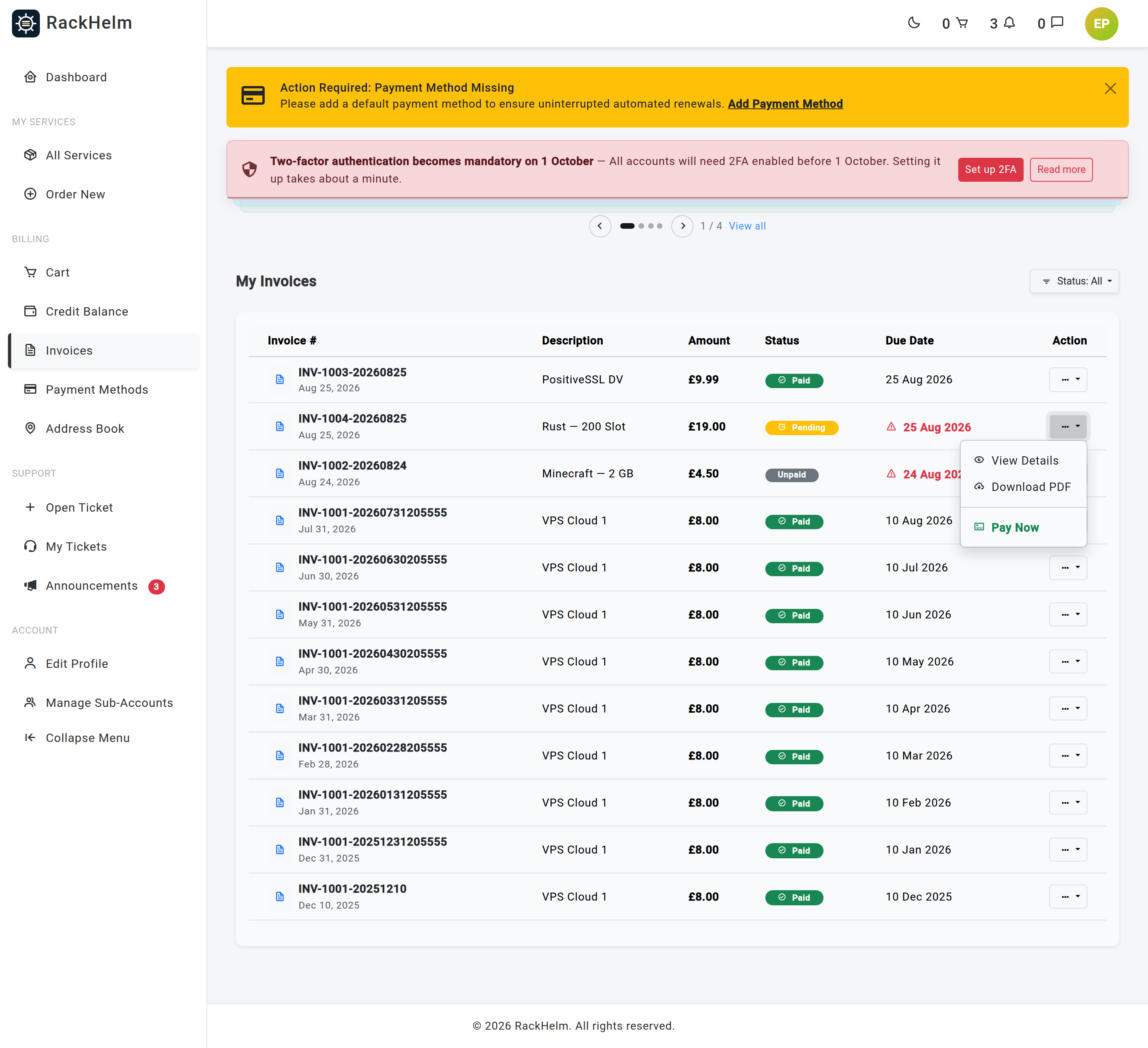
Open Invoices in the sidebar or go to /invoices. Invoices are listed newest first, twenty to a page.
| Column | What it shows |
|---|---|
| Invoice # | The invoice number, with the date it was raised underneath. |
| Description | The first item on the invoice, plus +n more when there are others. Domain lines show the full domain name. |
| Amount | The total due — the figure that is actually charged. |
| Status | See the table below. |
| Due Date | Shown in red with a warning icon once an unpaid invoice is past due. |
| Action | View Details, Download PDF and, while unpaid, Pay Now. |
The Status button above the table filters the list. Choose All, Paid, Open or Pending.
What the statuses mean #
| Status | Meaning |
|---|---|
| Pending | Raised and awaiting payment. This is the normal state of a new invoice. |
| Unpaid | An automatic renewal charge could not be taken automatically — most often because your default method is bank transfer. Pay it from the invoice page. |
| Paid | Settled. The invoice page shows the date it was paid. |
| Cancelled | Voided by your provider, usually because the service behind it was removed. Nothing to pay. |
The invoice page #
Selecting an invoice opens the full document. From the header you can go Back, download the file with PDF, and — while it is unpaid and not awaiting a bank transfer — Pay Now.
The body shows Order Items, a Summary with the subtotal, any discount, any credit already applied and the Total Due, then Customer Details and the Billing Address the invoice was issued to.
Changing the billing address on an invoice #
While the invoice is unpaid, select Change Billing Address beside the address panel, pick a different saved address and Save Changes. Once an invoice is paid the address is fixed — the page tells you so if you try.
Paying an invoice #
By card #
- Select Pay Now or Complete Payment.
- In Select Payment Method, choose a saved card or enter a new one.
- Select Pay £x. If your bank asks for confirmation, complete it in the box that appears.
Your card details go straight to the payment provider — RackHelm stores only the brand and last four digits.
With account credit #
Where your balance covers the full total, you can settle the invoice from your credit instead. See Paying with account credit.
By bank transfer #
If the invoice is flagged for bank transfer, the payment button is replaced by an Awaiting Bank Transfer panel showing your provider’s bank details and the reference to quote — always the invoice number. Payment is confirmed manually by your provider.
Downloading the PDF #
Use Download PDF from the row menu in the invoice list, or PDF in the header of the invoice page. The file is named Invoice-<number>.pdf and is served only to the account that owns it.
Troubleshooting #
| Symptom | Cause and fix |
|---|---|
| The Open filter shows nothing | Invoices in this portal are stored as pending, unpaid, paid or cancelled. Use Pending or All to find what you owe. |
| “Amount (£x) is too small to process via Stripe.” | Card payments have a 50p minimum. Pay with account credit, or let the amount roll into the next invoice. |
| “Could not initialize payment system. Please try again later.” | The card gateway did not respond. Try again shortly; if it persists your provider needs to check their gateway settings. |
| “Your payment was received but does not cover the full invoice total.” | The invoice total changed — usually a late fee added — after the payment was started. Your provider reconciles this manually; the balance stays outstanding until they do. |
| The total rose after the due date | Your provider can apply a late fee to overdue invoices. It appears as its own line on the invoice. |
| “Insufficient credit balance.” | Paying by credit requires the balance to cover the whole invoice. Top up first or pay by card. |
| “You cannot change the billing address on an invoice that has already been paid.” | Correct — paid invoices are fixed. Update the address in your address book so future invoices are right. |
| You get a permission error opening an invoice | The invoice belongs to a different account. Sub-accounts see the billing account’s invoices, not another customer’s. |
| The PDF will not download | The stored file is missing. Raise a ticket quoting the invoice number. |


